
How to Back Up a Crypto Wallet: Complete Step-by-Step Guide
Published November 5, 2026

Short answer: To back up a crypto wallet, write down the 12- or 24-word recovery (seed) phrase your wallet shows at setup, copy it by hand in the exact order, and store it offline, ideally on a metal plate, in at least two separate secure places. Then test a restore with a small amount before you trust the wallet with real funds. Never photograph the phrase, save it in the cloud or type it into a website.
Learning how to back up a crypto wallet takes about ten minutes, yet it decides whether your coins survive a lost phone, a broken hardware device or a stolen laptop. Unlike a bank, no company can reset your access if you lose your keys. This guide explains what a wallet backup really is, what you need to save, the best backup methods, and a clear seven-step routine to back up a crypto wallet safely, restore it when needed and avoid the mistakes that cost people their funds.
What Is a Crypto Wallet Backup?
A crypto wallet backup is the information you need to rebuild your wallet after the device that held it is lost, broken, stolen or reset. For almost every self-custody wallet, that information is the recovery phrase, also called the seed phrase or secret phrase: a list of 12 or 24 words generated when the wallet is created. If you set an optional passphrase, the backup also includes that extra word or string. Knowing exactly what you are protecting is the first step in learning how to back up a crypto wallet correctly.
It helps to remember what a wallet actually is. Your coins never sit inside the app or the device; they live on the blockchain. The wallet stores the private keys that prove you own them. The seed phrase is a human-readable master key from which those private keys are derived, so anyone holding the phrase can restore your wallet on any compatible device and move the funds. That is why the way you back up a crypto wallet matters as much as the wallet itself.
Modern wallets are hierarchical deterministic (HD) wallets, which means one seed phrase covers every address and account the wallet creates. You do not need a new backup for each new address. You only need a new one when you create a new wallet or add a passphrase.
Read more: How to Secure a Crypto Wallet: 10 Steps to Keep Your Crypto Safe
Secure your accounts with fast, reliable two-factor authentication. Download now and protect your login in seconds.Download Authenticator App
Why Is It Important to Back Up a Crypto Wallet?
Blockchain transactions are permanent, and there is no “forgot password” button. If the only copy of your keys disappears, the coins stay on the blockchain but nobody can ever spend them. A tested backup is the difference between an annoying afternoon and a permanent loss. Knowing how to back up a crypto wallet is the cheapest insurance in crypto.
Three everyday situations show why you should back up a crypto wallet before you deposit meaningful funds:
- Your phone is lost, stolen or damaged, and the wallet app lived on it.
- Your hardware wallet breaks, goes missing or is no longer supported by its maker.
- Your computer crashes, or you simply want to move to a new device.
The scale of the problem is large. Industry estimates suggest that between 2.3 and 3.7 million bitcoin, up to roughly a fifth of the supply, are permanently out of reach, mostly because owners lost their keys or seed phrases. Blockchain analytics firm TRM Labs also reported that private key and seed phrase compromises drove more than $2.1 billion in losses in the first half of 2025. Many of those cases came from weak storage habits rather than clever hacking, such as phrases kept in photos, cloud notes or emails.
Because a recovery phrase can provide access to the assets controlled by a compatible self-custody wallet, protecting it is just as important as recording it accurately. Read our guide on how to protect your seed phrase for detailed advice on offline storage, physical backups, phishing prevention, and what to do if your recovery words are exposed.
What Do You Need to Back Up in a Crypto Wallet?
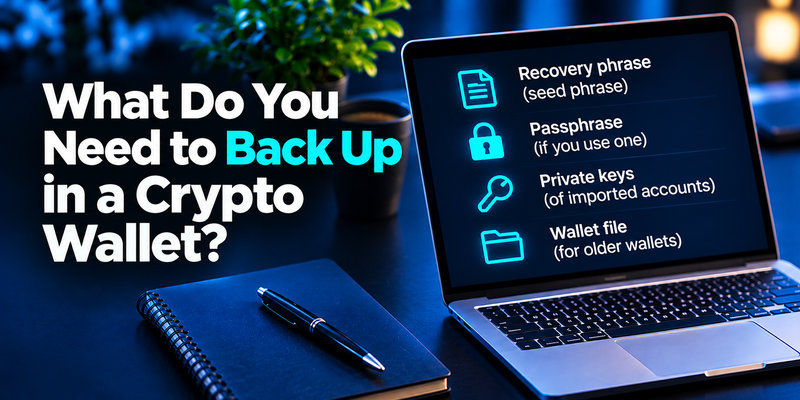
Before you back up a crypto wallet, know exactly which pieces make up a complete backup:
- The recovery phrase. Every word, in the correct order and spelled correctly.
- The passphrase, if you use one. This optional extra word creates a separate hidden wallet. Store it apart from the words, because losing it means losing access to that wallet for good.
- Private keys of imported accounts. An account you imported with a single private key is not derived from your seed phrase, so it needs its own backup.
- The wallet file, for older desktop wallets. Some legacy wallets save keys in a file instead of a phrase, and the file usually has its own password.
- A neutral note about the wallet type. Record which app or device created the phrase, but keep that note away from the words.
- Two-factor recovery codes for exchange accounts. An authenticator app protects your exchange login, not your self-custody keys. If your phone dies, you will need the backup codes or setup keys you saved when you turned on 2FA, so store them offline too.
You do not need to back up your PIN, your balances or your transaction history. The PIN is reset by restoring the wallet, and the balances and history live on the blockchain. With these pieces collected, you are ready to back up a crypto wallet using one of the methods below.
If you use cryptocurrency exchanges with app-based verification, a TOTP authenticator app may generate temporary login codes for those accounts. Keep the exchange’s recovery codes or other officially supported backup methods in a secure location. These authentication backups are separate from the seed phrase used to recover a self-custody wallet.
Read more: How to Set Up a Hardware Wallet: Complete Step-by-Step Guide
What Are the Best Ways to Back Up a Crypto Wallet?
There is no single best method, but some are clearly safer than others. This table compares the common ways to back up a crypto wallet.
| Method | How it works | Main strength | Main weakness | Best for |
|---|---|---|---|---|
| Handwritten paper | Words copied by hand onto acid-free paper | Free and fully offline | Burns, fades, tears and gets wet | Short-term or small balances |
| Metal backup plate | Words stamped or engraved on stainless steel or titanium | Survives fire, water and corrosion | Costs roughly $50 to $150 | Long-term holdings |
| Hardware wallet recovery sheet | Device generates the phrase offline and you copy it | Keys are created away from the internet | Still needs a safe physical copy | Larger balances |
| Seedless multi-card backup | Wallet is cloned onto extra cards, so no phrase exists | No words to transcribe | Cards must be kept in separate places | People who do not want to manage a phrase |
| Split or multi-share backup | The secret is divided into shares (for example Shamir backup or multisig) | One stolen copy is not enough | More complex to set up and restore | Advanced users with large holdings |
| Digital copy (photo, cloud, email, notes, password manager) | Phrase saved as a file or text | Convenient | Exposed to hacks, malware and account takeovers | Not recommended |
Some wallet apps offer an encrypted cloud backup as a convenience. Treat it as an extra at most, never as your only backup, because cloud accounts can be phished, breached or locked.
Whichever option you choose, the goal when you back up a crypto wallet is the same: an offline copy that survives fire, theft and your own mistakes.
How to Back Up a Crypto Wallet Step by Step
Follow these seven steps whenever you back up a crypto wallet for the first time, and repeat them each time you create a new wallet.

Step 1: Prepare a private, offline setting
Before you back up a crypto wallet, download the wallet app or set up the device only from the official source, and check the publisher name. Choose a quiet room with no cameras, no screen sharing and nobody looking over your shoulder. Have a pen and acid-free paper ready.
Step 2: Write the recovery phrase by hand
When the wallet displays the phrase, copy each word on paper, in order, and number them from 1 to 12 or 1 to 24. Spell every word fully. Do not type it into any device, and do not take a screenshot or photo; photos sync to cloud services, and a hijacked account can expose them without you noticing.
Step 3: Confirm the phrase inside the wallet
Most wallets ask you to re-enter or pick the words in order. Do this against your handwritten copy, not from memory. Then read the whole list again, word by word, to catch a transposed pair or an unclear letter.
Step 4: Move the phrase to durable metal
Paper is a poor long-term medium. For any serious amount, transfer the words to a stainless steel or titanium plate. Stamped characters usually withstand extreme heat better than engraved ones, and a good plate resists fire, flood and corrosion. Keep the paper until the metal copy is checked.
Step 5: Store at least two copies in separate places
A single copy in one home is a single point of failure. Keep one copy in a fireproof safe at home and another somewhere physically separate, such as a bank deposit box, a trusted relative’s house or a professional vault. Avoid improvised splits like “first half here, second half there”: if either location is lost, neither half restores anything.
Step 6: Test the backup before trusting it
An untested backup can hide a wrong word for years, and a test is the only proof that you really know how to back up a crypto wallet. Restore the wallet with a tiny balance: wipe the wallet or use a second device, enter the phrase and confirm that the same addresses appear. With a hardware wallet, use its built-in recovery check or a spare device, and never type the phrase into a phone or computer. Fix any mistake now, while the stakes are small.
Step 7: Document it and recheck it regularly
Record where each copy is kept, but never write the words in that note. Use neutral labels that do not say “seed phrase” or name the wallet. Every few months, confirm each copy is readable, complete and still where it should be, and replace anything damaged.
Fake wallet applications and recovery websites may imitate legitimate providers to steal seed phrases or private keys. Follow our guide on how to avoid phishing scams to recognize suspicious download pages, verify official sources, and avoid fraudulent wallet setup instructions.
Read more: What Is Phishing? Meaning, Examples, and a Safe Response
How to Back Up Different Types of Crypto Wallets
The principle is always the same, but the screens differ. Here is how to back up a crypto wallet depending on its type.
Mobile and desktop software wallets
Open the wallet settings, choose the wallet you want to protect and look for an option such as “manual backup” or “show recovery phrase.” Verify your identity with a passcode or Face ID, write the words by hand, then confirm their order. Apps such as Trust Wallet or MetaMask follow this pattern, with slightly different menu names. Many also block screenshots on purpose.
Hardware wallets
A hardware wallet generates the phrase inside the device and shows it on the device screen. Write it down there, and never enter it into a computer or phone. Use the device’s recovery check to compare your written copy without exposing it online. If the device is ever lost, the same words restore your accounts on a new device.
Seedless card-based wallets
Some hardware wallets create the key on a chip and let you clone it onto extra cards instead of giving you a phrase. Here the backup is physical: keep the cards in different locations, test each one, and never store them together. Losing every card at once means losing the wallet.
Exchange and custodial wallets
On an exchange you do not hold the keys, so you cannot back up a crypto wallet there the way you would a self-custody one, and there is no seed phrase to save. Protect the account instead: use a unique password, turn on authenticator-app 2FA rather than SMS, store the recovery codes offline and whitelist your withdrawal addresses. For long-term savings, consider moving coins to a self-custody wallet that you can back up yourself.
Read more: Signs of a Scam Text Message: A Practical Checklist
How to Restore a Crypto Wallet From a Backup
A backup only proves its value when you restore it, which makes restoring the other half of how to back up a crypto wallet properly. Use these steps on a new phone, a new computer or a replacement hardware device:
- Install the official wallet app, or set up the new device, from the official source only.
- Choose “I already have a wallet” or “Import wallet” instead of creating a new one.
- Select the secret phrase option. Use a private key or wallet file only if that is what you saved.
- Type each word yourself, in the exact order, and check the spelling before continuing.
- Add your passphrase if you used one.
- Pick the wallet type, such as a multi-coin wallet, and complete the restore.
- Compare your balances and addresses with what you expect. Some custom tokens or networks may need to be added manually.
If the old device was stolen, or you think someone saw your phrase, do not keep using the old seed. Create a brand-new wallet, move your funds there immediately and back up a crypto wallet again with the fresh phrase. Enter the phrase only inside the official wallet app or on the hardware device itself, never on a website, in a chat or on a support form.

Where Should You Store a Crypto Wallet Backup?
Where you keep the copy matters as much as how you back up a crypto wallet in the first place. Treat your backup like the keys to a vault: private, offline, durable and separated. A fireproof home safe is convenient but vulnerable to a targeted burglary. A bank deposit box adds institutional protection but slows down access. A trusted relative or professional vault can serve as a second site, as long as you control access.
Whichever place you choose, follow these rules:
- Keep copies in different buildings, ideally in different cities, so one disaster cannot destroy everything.
- Use a tamper-evident bag so you can tell if a copy was opened.
- Keep the plate flat, dry and away from corrosive materials.
- Use neutral labels, and never store the backup next to the hardware wallet it unlocks.
- Store the passphrase separately from the words.
For custodial cryptocurrency accounts, protecting the exchange login is essential because you do not directly control the private keys. Learn how to use an authenticator app to understand TOTP enrollment, verification codes, and secure recovery methods for supported exchange accounts.
Read more: How to Protect Your Online Accounts: A Priority-First Plan
What Are the Most Common Mistakes When You Back Up a Crypto Wallet?
Most losses trace back to a handful of avoidable errors. When you back up a crypto wallet, steer clear of these:
- Saving the phrase in a photo, cloud drive, email, notes app or password manager, even if encrypted.
- Keeping only one copy, so a fire, flood or house move ends access.
- Relying on paper alone for long-term holdings.
- Sharing the phrase with “support” staff or typing it into a website. Legitimate companies never ask for it.
- Skipping the recovery test and discovering a wrong word years later.
- Storing every copy, or every backup card, in the same place.
- Keeping the passphrase right next to the recovery words.
- Assuming that backing up the app or phone also backs up the wallet.
- Putting the phrase in a will, which becomes a public record in many places after probate.
How Do You Make Sure Your Family Can Recover Your Crypto?
Planning for heirs is the last part of how to back up a crypto wallet responsibly. A backup is useless to your family if they do not know it exists. Leave clear instructions that say a self-custody wallet exists, where the backup is kept and what it unlocks, but keep the words themselves out of that document. A lawyer, a sealed letter stored with your will or a trusted family member can hold the instructions. For card-based wallets, handing one card to an heir with a short note can be enough. Review the plan whenever you change wallets or storage locations.
FAQ
Is it possible to recover a crypto wallet?
Yes, but only if you still hold part of the recovery chain. With the seed phrase, and the passphrase if you used one, you can restore the wallet on any compatible app or device, even years later. If you only have the device, you can usually still open it with its PIN, move the funds and back up the phrase from inside the wallet. If both the phrase and the device are gone, nobody can reset it: not the wallet maker, not an exchange and not the blockchain. A narrow exception exists when you are missing a word or two, because reputable offline tools can sometimes test the possible combinations. Be wary of “recovery services” that ask for your full phrase or an upfront fee, since many are scams. The best time to back up a crypto wallet is before you deposit anything.
Can I recover my Bitcoin wallet if I don’t have the recovery phrase?
It depends on what you still have:
- The wallet is still open on a device. Go to its settings, view the phrase and back it up right away, or send the funds to a new wallet.
- You still own the hardware wallet and know the PIN. The device can still sign, so move the funds to a new wallet with a freshly backed-up phrase.
- You saved a wallet file, private keys or an export. Import it into the matching wallet; a wallet file may need its password.
- Your coins sit on an exchange. There is no phrase to find. Recover the account through the exchange’s identity checks and 2FA reset process.
If none of these applies, bitcoin cannot be moved without the keys. Next time, back up a crypto wallet before you fund it.
How do I get my money out of a crypto wallet?
You send the coins to another address, usually an exchange account, and then sell them for cash. First, open and verify an exchange account. Copy its deposit address for the exact coin and network. In your wallet choose Send, paste the address, check the first and last characters, pick the same network and send a small test amount first. Once it arrives, sell for your local currency and withdraw to your bank, or use a peer-to-peer or card option. Expect network fees, and check your local tax rules. Transfers to a wrong address or network are usually irreversible, and nobody legitimate will ever ask for your seed phrase to help you withdraw. Before moving large sums, back up a crypto wallet and confirm the restore works.
Are lost bitcoins gone forever?
In practice, yes, when the private keys are truly gone. The coins remain visible on the blockchain, but only the right key can spend them, so they are stuck forever. Estimates put the amount of unreachable bitcoin between 2.3 and 3.7 million. A few exceptions exist: you may find an old device or backup, remember part of a phrase or recover the password of a wallet file. Bitcoin sent to a wrong or unspendable address is also gone. The only reliable cure is prevention, so back up a crypto wallet before you need it.
To back up a crypto wallet properly, write the recovery phrase by hand, move it to metal, keep at least two copies in separate places, test a restore and recheck it regularly. Keep every backup offline and never share it. Do this once, carefully, and a lost phone or a broken device becomes an inconvenience rather than a disaster. Now that you know how to back up a crypto wallet, do it today, before your next deposit.
