
What Is Social Engineering? The Human Side of Account Attacks
Published October 28, 2026 · Updated October 29, 2026
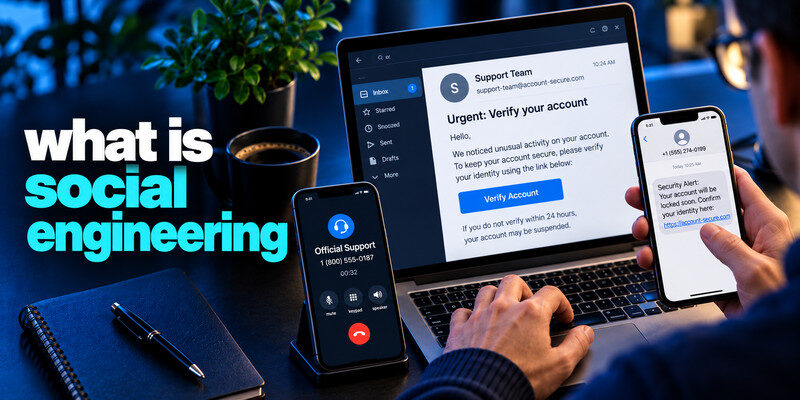
What is social engineering? Social engineering is the manipulation of a person into taking an action that benefits an attacker, such as revealing a secret, granting access, or sending money. It can use email, text, phone, chat, or an in-person pretext. The attacker often borrows authority, urgency, or familiarity rather than defeating a technical safeguard directly. The useful response is to separate the claim from its channel and verify it through an established process before acting.
Apply the answer
- Find the requested behavior change.
- Verify the person through an established channel.
- Apply approval controls to sign-ins, files and payments.
What is social engineering? A single incident can cross several channels
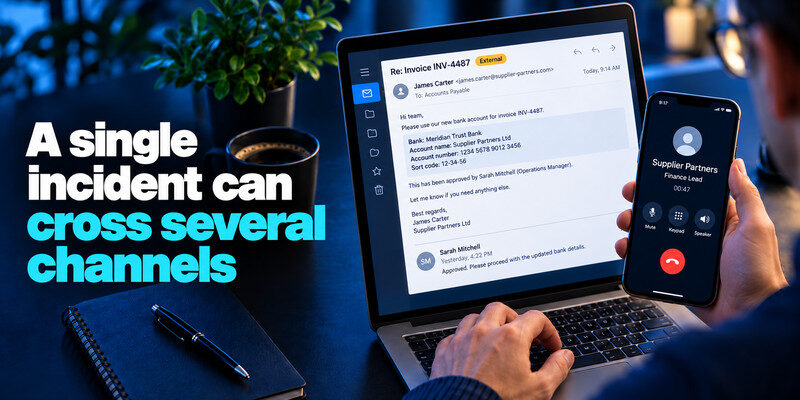
Consider a supplier invoice that arrives in a real email thread. It changes the bank account and says a manager has approved the transfer. A caller then follows up, claiming to be the supplier’s finance lead. The thread and call appear mutually reinforcing, but both may depend on a compromised mailbox or spoofed number. The payer uses the contract’s known phone number and the normal second approver before changing payment details.
The attacker controls the context
A scammer may know names, job roles, old invoices, or a recent order from public sources or a breach. Those details make the story plausible but do not validate the new instruction. Social engineering attacks often combine several communication channels to make a fraudulent request appear legitimate. Our guide on how to recognize social engineering attacks explains how attackers use impersonation, urgency, and familiar details across email, phone calls, and workplace messages.
The point of failure
The attack succeeds when a person treats the request’s own contact information as its proof. A call-back to a number in the suspicious email is still inside the same controlled channel.
A vendor emails finance that its bank account has changed. The sender’s signature matches prior invoices and the tone is routine. The risky step is not reading the message but replacing the beneficiary account based on that same message. The vendor mailbox may have been compromised, or an attacker may have registered a lookalike domain. The established vendor-change procedure should require a callback to a previously recorded contact and a second approval.
Why context is not proof: An attacker can read old threads in a compromised mailbox and refer to real invoices. A forwarded attachment can also look authentic. Check the changed data against the known vendor record, and ask whether the request fits the normal workflow. Replying in the thread is insufficient if the mailbox itself is under attacker control.
Human pressure matters: The message may mention a late fee, angry executive, or confidential acquisition to discourage consultation. A routine verification step should survive urgency. If the requester refuses the known process, pause the payment and escalate through an established channel. Document the exception attempt without spreading sensitive invoice details unnecessarily.
Broader account protection: Unique passwords, passkeys or MFA where available, and careful recovery settings reduce account takeover risk. They do not decide whether a legitimate account holder has been tricked into making a fraudulent request. Strong authentication and independent transaction approval solve different parts of the problem.
Secure your accounts with fast, reliable two-factor authentication. Download now and protect your login in seconds.Download Authenticator App
Common forms to know What is social engineering?

Phishing messages lure a user to a form or attachment. Vishing moves the conversation to a call. Smishing uses text. A fake IT support call can seek remote access; an impersonated executive can seek a transfer. Physical social engineering may involve someone claiming they forgot a badge.
| Form | Typical pretext | Target action |
| Email phishing | Account problem or document | Click and sign in |
| Smishing | Delivery or toll fee | Tap and pay |
| Vishing | Bank fraud or support | Read code or install tool |
| Business email compromise | New supplier payment details | Transfer funds |
| Physical pretext | Forgotten badge | Grant facility access |
| Channel | Example | Verification boundary |
| Fake payroll change | Known HR portal | |
| Phone | Impersonated support agent | Published help desk number |
| Chat | Urgent executive request | Established internal workflow |
Read more: What Is Vishing? Recognize Voice Phishing Calls
The persuasion tactics

Authority makes a request sound like policy. Urgency reduces time to inspect it. Scarcity can make a fake offer attractive. Familiarity can come from a spoofed colleague or a genuine account an attacker controls. Reciprocity appears when a caller says they “fixed” an issue and now needs a code.
A code is not proof of trust
An attacker can trigger a real SMS or authenticator prompt at the provider. The message is genuine, but it may belong to the attacker’s attempted sign-in. Never read a code or approve a prompt you did not initiate.
Embarrassment can delay reporting
People may hide a mistaken click because they fear blame. Fast reporting lets a security team revoke sessions and warn other recipients. A good organizational process makes reporting easy and non-punitive. Attackers may use publicly available details alongside exposed account information to make impersonation attempts more convincing. Our guide on what a credential leak is explains how usernames, passwords, and related account data can become exposed. Accurate personal details do not prove that a message or caller is trustworthy.
Read more: What Is Smishing? How Text Message Phishing Works
Why technical controls still matter
Unique passwords limit cross-site reuse. MFA blocks many password-only logins, while passkeys and security keys resist phishing sites better when implemented and recovered safely. Payment approvals, access reviews, and device updates address other paths. No one control stops every kind of human manipulation.
TOTP’s useful boundary
can generate TOTP codes for compatible accounts. It separates a code from the password, but a caller can still persuade someone to reveal the live code. Train the decision habit along with the technology.
Recovery is a target
Attackers may ask an employee to change a recovery email or add a new device instead of requesting the password. Treat changes to recovery and MFA settings as sensitive actions requiring independent verification. One of the most common forms of social engineering is phishing, in which attackers impersonate trusted organizations or individuals to obtain sensitive information or trigger unsafe actions. Read our guide on what is phishing to understand how deceptive messages, fake login pages, and malicious links are used in these attacks.
Read more: How to Protect Yourself From Smishing: A Phone-First Safety Routine
A verification routine for individuals
Pause, identify the action requested, find a contact route from your own records, and confirm the request there. If the sender is a relative, call their saved number. If it is a bank, use the number on your card. For a work change, use the directory and approval system.
Make refusal routine
“I will call back through our normal number” is enough. A legitimate requester can wait for a secure process. You do not need to debate whether the caller is a criminal.
Record unusual requests
Keep the time, claimed identity, requested action, and independent verification outcome. Avoid copying passwords and codes into a shared note.
A forged email display name is cheap. A lookalike domain can have valid email authentication. A real compromised mailbox can send a request inside an existing thread. A caller can spoof a familiar number. Each may appear authentic in one dimension and still be fraudulent in the requested action.
Verify through a record created earlier: Use the vendor number in a contract, the bank number on a card, the employee directory, or a saved family contact. A new number in the message is part of the claim, not independent evidence.
Confirm the action, not only identity: Even a genuine colleague could forward a mistaken or compromised instruction. Ask whether the bank change, new administrator, or document release has the required approval. Process controls catch mistakes as well as scams. Verification codes should only be entered during a sign-in or security action you initiated through the genuine service. Our guide on how to use an authenticator app explains how to enroll compatible accounts, generate temporary codes, and protect recovery information. Never share a live code with someone who contacts you unexpectedly.
A defense process for teams
Document who may approve payment changes, new administrators, recovery changes, and remote support. Require a second person or verified call-back for high-impact actions. Publish a simple reporting route and rehearse it with realistic examples.
Avoid blame-based training
Measures that punish every reported click can discourage early disclosure. Focus on prompt containment and the points where a process can catch a fraudulent request.
Review exceptions
Attackers often exploit “urgent exceptions.” Keep a safe route for real emergencies that still verifies identity and records the approval. An emergency should not remove all checks.
Have an employee receive a realistic but fictional supplier-change request. Observe whether they can find the approved call-back route and second approver within minutes. Fix the confusing process rather than merely telling them to “be more careful.”
Measure reporting speed: Staff should know how to report a suspicious message or mistaken click without searching for a policy. Fast reports can contain related messages and sessions.
Measure recovery: Practice revoking a session and identifying who can contact a bank. A process is only useful if it works under pressure.
Read more: What Is Dark Web Monitoring? Coverage, Alerts, and Limits
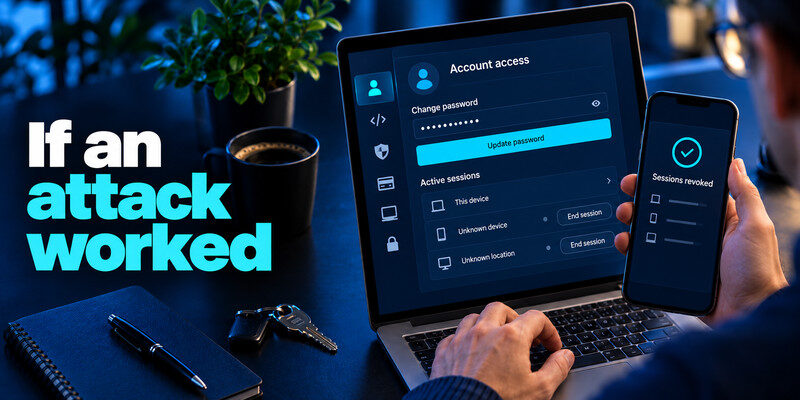
If an attack worked
Determine whether the exposure was a credential, code, session, device access, payment, or physical access. Revoke sessions and secrets, inspect recovery changes, contact the bank, or alert facility security accordingly. Preserve a timeline.
Account access
From a trusted device, change relevant credentials and end unknown sessions. Secure the primary email if it can reset other accounts. Check forwarding rules and connected apps.
Financial action
Call the bank immediately through its official channel and provide transaction details. A later password change does not automatically recall funds. Work users should involve the designated incident team.
A practical map of attack objectives
Social engineering is defined by manipulation, but the target action matters more than the label. An attacker may want a reusable password, a live code, an active session, a bank transfer, a confidential document, or physical entry. Each objective has a different containment step. Before responding, ask exactly what crossed from your control to theirs.
Reusable secret
Replace it at the genuine service and at every site where it was reused. Review successful sessions and recovery methods. Password uniqueness limits the spillover.
One-time approval
A code or push can authorize an immediate sign-in. Revoke unknown sessions and inspect account changes. The fact that the code expires soon does not undo a session already created.
Payment or document
Contact the bank promptly for a transfer; alert the organization about an exposed document and follow its incident process. A password reset may be necessary for an account but does not retrieve a copied file.
Read more: How to Use a Password Manager: Your First Week with a Vault
Frequently Asked Questions
Is social engineering the same as phishing?
Phishing is a subset of social engineering, usually involving a deceptive message or site. The broader term includes calls, physical pretexts, and payment manipulation.
Can a real colleague be involved without knowing it?
Yes. Their account may be compromised. Verify unusual requests by a separate established route.
Does AI voice cloning change the defense?
It increases the value of an independent call-back or approval process. A familiar-sounding voice is not sufficient proof for a high-impact transfer.
What is the first step after sharing a code?
Check the real provider’s successful activity, revoke unknown sessions, and secure recovery methods. Tell work security promptly if it is an organizational account.
Final Thoughts
Social engineering is a decision attack. Strong tools help, but the decisive safeguard is an independent, familiar verification route for unusual requests.
Next step
For accounts that still rely on TOTP, can hold the codes. Set it up from each real account’s security settings, keep recovery codes safe, and never type a live code into a page reached through a suspicious message.
