
Passkeys vs Password Manager: Do You Need Both?
Published November 5, 2026
Passkeys provide stronger protection against password phishing, while password managers help users securely store, generate, and organize login credentials. The two technologies are not direct replacements. Many modern password managers can also store and synchronize passkeys.
In the passkeys vs password managers comparison, the best solution for most people is to use both: passkeys for passwordless authentication and a trusted password manager for organizing credentials across multiple accounts.
According to the FIDO Alliance’s October 2026 Passkey Index, passkey sign-ins achieved a 93% success rate, compared with 78% for traditional authentication flows among participating services. Passkeys were also nearly three times faster.
However, passwords remain necessary for many websites, making password managers an important security tool.
This guide explains how these technologies work, their security differences, the best password management options, and how to build a safer authentication strategy in 2026.
What Are Passkeys and Password Managers?
Understanding passkeys vs password managers begins with recognizing that they serve different purposes.
A passkey is a cryptographic credential used to authenticate your identity. A password manager is an application that stores and manages credentials, including passwords and, in many cases, passkeys.
What is a passkey?
A passkey is a passwordless authentication credential based on FIDO2 and WebAuthn standards.
Instead of entering a traditional password, users authenticate through a supported device or credential provider.
Passkeys rely on two cryptographic keys:
- Public key: Stored by the website or online service.
- Private key: Protected by the user’s device or passkey provider.
When a user signs in, the service sends a cryptographic challenge that the private key signs.
The server verifies the response using the public key.
The private key is never sent to the website during authentication.
This design makes properly implemented passkeys resistant to common credential-phishing attacks.
Users typically authorize authentication using a fingerprint, facial recognition, device PIN, or another supported verification method.
What is a password manager?
A password manager is software designed to create, store, organize, and retrieve login credentials.
Most modern password managers offer:
- Encrypted password storage.
- Strong password generation.
- Automatic password filling.
- Secure synchronization across devices.
- Password reuse detection.
- Security alerts for compromised credentials.
- Passkey management, depending on the provider.
Instead of memorizing dozens of passwords, users can manage their credentials through one protected vault.
Some managers use a master password, while others offer device-based authentication or alternative account-unlocking methods.
A password manager protects and organizes credentials, but storing a password does not automatically make that password phishing-resistant.
For more guidance, read how to use a password manager.
Difference between a passkey and a password
The difference passkey and password searches often refer to is how each credential proves identity.
A password is a reusable secret that users submit to an authentication system.
A passkey proves possession of a private cryptographic key without exposing that private key to the service.
Passwords can be stolen through phishing, reused across websites, or exposed during security incidents.
Passkeys are associated with legitimate websites, making them much harder to exploit through lookalike login pages.
This distinction is central to the passkeys vs password managers discussion because password managers can support both credential types.
Passkeys vs Password Managers: Key Differences
The most important passkeys vs password managers differences concern functionality, security, convenience, and compatibility.
A passkey changes the authentication process itself. A password manager makes credential management easier and more secure.
Passkeys vs password managers comparison table
| Feature | Passkeys | Password Managers |
|---|---|---|
| Primary purpose | Authenticate users | Store and organize credentials |
| Technology | Public-key cryptography | Encrypted credential vault |
| Password required | Usually no | Often uses or stores passwords |
| Phishing protection | Strong by design | Depends on credential and autofill safeguards |
| Password generation | Not needed for passkey login | Usually supported |
| Cross-device access | Depends on passkey provider | Often supported |
| Account recovery | Depends on service and provider | Depends on vault recovery options |
| Website compatibility | Requires passkey support | Works with most password-based websites |
| Credential storage | Device or passkey provider | Passwords, passkeys, and other secrets |
| Best use | Passwordless authentication | Comprehensive credential management |
Authentication vs credential management
Imagine having 50 online accounts.
With a conventional password manager, you can generate a unique password for every account and store those passwords in an encrypted vault.
When you visit a website, the manager can automatically fill in your credentials.
With passkeys, supported websites allow you to authenticate without entering passwords.
However, passkeys do not independently provide all the organizational features of a credential manager.
For example, they do not automatically create password entries for legacy services or organize every type of sensitive information.
Passkeys improve authentication security, while password managers simplify credential management.
Convenience and everyday usability
Password managers reduce the effort required to remember and enter unique passwords.
Passkeys simplify authentication further by eliminating passwords from supported login processes.
For users with many accounts, the passkeys vs password managers comparison is therefore less about choosing one technology and more about combining their advantages.
A modern password manager that supports passkeys can offer a convenient place to manage both types of login credentials.
Security Comparison: Which Protects Your Accounts Better?
Security is the most important consideration when evaluating passkeys vs password managers.
Both technologies improve online safety, but they address different vulnerabilities.
1. Protection against phishing
Phishing attacks frequently rely on fake websites designed to steal passwords and verification codes.
A password manager may detect mismatched website domains and refuse to autofill credentials on suspicious pages.
This provides useful protection, but users can still manually copy passwords into fraudulent websites.
Passkeys offer stronger protection through cryptographic authentication associated with the legitimate website.
A passkey created for one domain cannot be used to authenticate a different attacker-controlled domain.
Passkeys are inherently more resistant to conventional credential phishing than passwords stored in a password manager.
The National Institute of Standards and Technology (NIST) recognizes WebAuthn-based authentication as a phishing-resistant approach in its SP 800-63B-4 guidelines.
Learn more about what is phishing and how attackers attempt to steal login information.
2. Protection against password breaches
Password managers encourage users to create unique, complex credentials.
If a website suffers a breach, using unique passwords reduces the risk that one compromised credential will unlock multiple accounts.
However, passwords remain reusable secrets.
Passkeys eliminate that particular weakness for supported authentication processes.
Even if an attacker obtains a website’s stored public keys, those keys cannot be used to reconstruct the corresponding private keys.
Passkeys reduce the risks associated with stolen or reused passwords.
This represents a major security advantage in the passkeys vs password managers comparison.
3. Device compromise and account recovery
Neither solution eliminates every security risk.
Password managers can be exposed to threats involving malware, compromised devices, stolen vault credentials, or weak recovery procedures.
Passkeys also depend on the security of the devices or providers protecting their private keys.
A compromised unlocked device may create account-access risks, while weak account recovery can undermine otherwise strong authentication.
Important security practices include:
- Protecting devices with strong unlock credentials.
- Keeping operating systems updated.
- Enabling MFA for password manager accounts.
- Reviewing account recovery methods.
- Removing unknown authorized devices.
- Maintaining secure backup access.
Strong authentication cannot compensate for every weakness in device security or account recovery.
4. Should passwords and passkeys be stored together?
Storing credentials in one encrypted password manager can improve convenience.
However, concentration creates a potential single point of failure.
If an attacker gains sufficient control over a password manager account or its unlocked vault, multiple credentials may be exposed.
Users with particularly sensitive accounts may prefer additional separation, such as storing high-value credentials on hardware security keys.
The passkeys vs password managers security decision should therefore consider the sensitivity of individual accounts, not merely convenience.
How Password Managers Store and Sync Passkeys
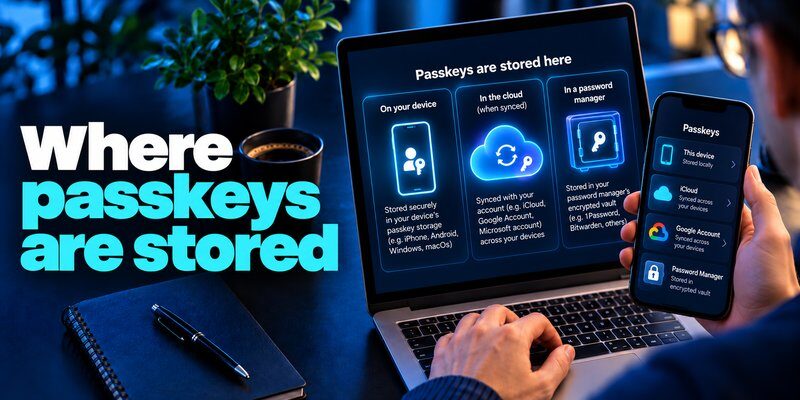
One common misconception is that passkeys will make password managers obsolete.
In reality, many password managers have evolved into passkey providers.
This is a critical point in the passkeys vs password managers discussion.
Can a password manager store passkeys?
Yes. Several established password managers support creating, storing, and using passkeys.
Examples include:
- 1Password.
- Bitwarden.
- Apple Passwords.
- Google Password Manager.
- Other compatible passkey providers.
The precise features and supported platforms vary.
For example, some managers offer passkey synchronization between multiple operating systems, while others work best within a particular device ecosystem.
How passkey synchronization works
When you create a passkey through a compatible password manager, the provider securely stores the credential.
For synced passkeys, the credential can become available on other authorized devices using the same provider.
A typical workflow is:
- Create a passkey on a supported website.
- Choose a compatible passkey provider.
- Complete the required authentication.
- Save the passkey in the provider.
- Access it on another authorized device, subject to the provider’s synchronization and security requirements.
FIDO Alliance guidance explains that synced passkeys can be protected through end-to-end encryption.
This makes it possible to combine passwordless authentication with cross-device convenience.
Can passkeys be transferred between password managers?
Passkey portability has improved significantly.
In September 2026, Google announced an Android experience for transferring passwords and passkeys between compatible password managers without requiring users to download unencrypted files.
However, transfer support still depends on the operating system, provider, application version, and supported exchange mechanisms.
Users should verify export and import capabilities before switching providers.
Traditional password migration can also require care because exported files may contain sensitive unencrypted credentials.
See import passwords into a password manager for practical migration considerations.
What happens when a passkey provider becomes unavailable?
Recovery depends on how credentials are stored.
Synced passkeys may be recoverable through a provider’s protected account recovery process.
Device-bound passkeys may require access to the original hardware or another registered authentication method.
Users should maintain secure alternatives for important accounts and avoid relying on a single device.
Ultimately, the passkeys vs password managers relationship is complementary: passkeys provide the authentication mechanism, while compatible managers help users store and access those credentials.
Best Password Manager Options to Consider in 2026
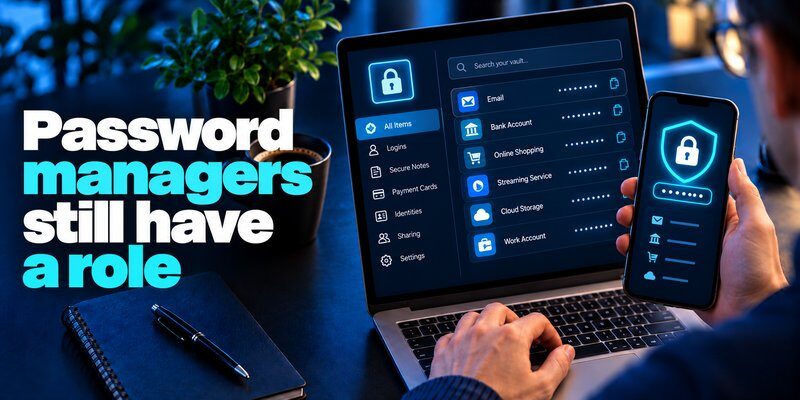
When users compare password managers, they should examine security architecture, passkey compatibility, recovery options, pricing, and supported platforms.
There is no universal winner for everyone.
The following products are representative options rather than a market-share ranking or an independently benchmarked performance test.
Password managers compared
| Password Manager | Main Strength | Suitable For |
|---|---|---|
| 1Password | Password and passkey organization | Families and businesses |
| Bitwarden | Open-source password management | Privacy-conscious users |
| Apple Passwords | Integration with Apple devices | Apple ecosystem users |
| Google Password Manager | Chrome and Android integration | Google ecosystem users |
| Dashlane | Password management and security tools | Individuals and teams |
| Keeper | Credential management and administrative controls | Organizations |
This comparison is not a ranking based on market share or independent security testing.
1Password: Flexible credential organization
1Password supports traditional password storage and passkeys.
It provides encrypted vaults, autofill, credential organization, and tools to identify accounts where passkeys may be available.
Its ability to manage passwords and passkeys makes it useful for users transitioning toward passwordless authentication.
However, the availability of certain features varies by plan, platform, and application version.
Bitwarden: Open-source password management
Bitwarden provides an open-source password management platform with support for storing and using passkeys.
Its features include password generation, encrypted vault storage, and cross-device access.
Bitwarden can be attractive to users who value transparency and flexibility.
Its official documentation also covers passkey storage through browser extensions and compatible mobile or desktop applications.
Apple Passwords and Google Password Manager
Apple Passwords is designed for users who rely heavily on compatible Apple devices.
It supports passwords, passkeys, and verification codes, with synchronization through Apple’s supported credential infrastructure.
Google Password Manager integrates closely with Chrome and Android.
It supports storing and using passkeys across compatible devices.
For users who frequently switch between operating systems, compatibility should be checked before choosing either ecosystem.
Which password manager is the most popular?
The most popular password manager depends on how popularity is measured.
Possible metrics include active users, downloads, business customers, browser integration, or paid subscriptions.
Built-in tools such as Apple Passwords and Google Password Manager have different distribution models from standalone subscription services.
Therefore, a precise universal ranking would require a consistent, independently verified market-share dataset.
Search results showing password managers ranked may reflect editorial preferences, affiliate programs, pricing, or specific testing criteria rather than actual user numbers.
How to choose the right option
When considering which are the best password managers, prioritize:
- Strong encryption and secure authentication.
- Independent security assessments where available.
- Support for passwords and passkeys.
- Compatibility with your devices.
- Clear backup and recovery processes.
- Reliable credential export and migration.
- Transparent pricing and privacy policies.
The passkeys vs password managers question becomes easier when you choose a credential manager that supports both traditional and passwordless authentication.
For further guidance, read how to choose a password manager.
How to Set Up Passkeys, Password Managers, and 2FA
A secure authentication strategy combines modern passkeys, unique passwords, and additional verification where appropriate.
Step 1: Set up a password manager
Choose a reputable password manager compatible with your operating system.
Then:
- Install the official application or extension.
- Create an account if required.
- Configure strong account protection.
- Enable MFA when supported.
- Import existing credentials carefully.
- Review duplicated or compromised passwords.
For accounts that require passwords, use a generator to create unique credentials.
Learn how to generate a strong password instead of reusing familiar passwords.
Step 2: Enable passkeys on supported websites
Open an account’s security settings and find its passkey option.
Choose a trusted device or compatible passkey provider.
Follow the authentication prompts to create and save your passkey.
Test the new login method before removing existing recovery options.
Creating a passkey does not necessarily remove the account’s password or weaker fallback authentication methods.
Review those settings separately.
Step 3: Add authenticator-based 2FA where needed

Not every website supports passkeys.
For services that continue requiring passwords, authenticator-generated verification codes provide a useful additional layer of protection.
An Authenticator app can be used with compatible services that support time-based one-time passwords.
A typical setup requires scanning a QR code, entering a generated verification code, and saving the service’s recovery codes.
For Mac users, the guide to google authenticator for mac discusses authentication options and compatibility considerations.
Apple users can also learn about apple authenticator and the verification features available within Apple’s ecosystem.
Important: A TOTP authenticator application is not necessarily a passkey manager. Users should confirm the actual features of their chosen application.
Step 4: Protect account recovery
Strong recovery procedures are especially important when using passkeys and credential managers.
Consider registering a second trusted authentication method for important accounts.
Store recovery codes securely, avoid weak recovery channels when alternatives exist, and review account access after changing devices.
A secure passkeys vs password managers setup includes a recovery plan rather than relying entirely on one phone or application.
Passkeys or Password Managers: Which Should You Choose?
The answer to passkeys vs password managers is simple: use passkeys when available, and use a trusted password manager to manage both passwords and passkeys.
The technologies solve related but different problems.
Choose passkeys for phishing-resistant authentication
Passkeys are particularly useful for:
- Primary email accounts.
- Financial services supporting passkeys.
- Password manager accounts that support compatible passkey authentication.
- Business accounts.
- Cloud services.
- Other high-value accounts.
They provide strong protection against common password-phishing techniques.
According to the FIDO Alliance’s October 2026 Passkey Index, passkeys accounted for 36% of successful sign-ins among participating services reporting this measure, compared with 26% in the previous year’s index.
This suggests substantial progress in passkey adoption, although the figures are not a global measurement of all website logins.
Choose password managers for comprehensive credential management
Password managers remain useful because many websites still require passwords.
They help users maintain unique credentials, identify insecure passwords, and organize access across devices.
They can also support passkeys, depending on the provider.
NIST’s 2025 Digital Identity Guidelines recommend that services allow password managers and autofill functionality because these tools help users choose stronger passwords.
What about community discussions?
People searching passkeys vs passwords reddit often want practical experiences concerning account recovery, device compatibility, and switching between credential providers.
These are legitimate considerations, but individual forum experiences do not establish universal security outcomes.
The right choice depends on the services you use, your threat model, and your ability to maintain secure recovery options.
For most users, the strongest practical strategy combines passkeys, a password manager, and authenticator-based 2FA for accounts that still depend on passwords.
Frequently Asked Questions About Passkeys vs Password Managers
1. Are passkeys safer than passwords stored in a password manager?
Passkeys generally provide stronger phishing resistance than traditional passwords, even when those passwords are stored securely.
Password managers protect credentials in storage and can help prevent incorrect autofill.
However, traditional passwords can still be stolen or entered into fraudulent login pages.
Passkeys use cryptographic authentication associated with the legitimate service.
2. Will passkeys replace password managers?
No. Passkeys may reduce the need for traditional passwords, but users still need tools to manage credentials across devices.
Many password managers already support passkey storage and synchronization.
Their role is evolving from password storage toward broader credential management.
3. Can I use passkeys without a password manager?
Yes.
Passkeys can be stored through supported operating-system credential providers or compatible hardware security keys.
However, using a compatible password manager can improve organization and cross-device access.
4. Is it safe to store all passkeys in one password manager?
It can be appropriate when the provider uses strong encryption, secure authentication, and reliable recovery procedures.
However, concentrating credentials in one vault increases the importance of protecting that vault.
Users should consider additional safeguards for particularly sensitive accounts.
5. Do I still need two-factor authentication with passkeys?
A passkey login that includes possession of the credential and local user verification can provide multi-factor authentication.
However, security policies vary.
Traditional 2FA remains valuable for services without passkey support.
6. What if I lose the device containing my passkeys?
Recovery depends on the storage method.
Synced passkeys may be available on another authorized device through the same provider.
Device-bound passkeys may require a backup credential or the service’s account recovery process.
Always configure recovery options before losing access.
7. Can a password manager generate passkeys?
Compatible password managers can create and save passkeys when a supported website initiates passkey registration.
However, passkeys are not interchangeable with randomly generated passwords.
The service must support the appropriate cryptographic authentication standard.
8. What is the best authentication strategy for 2026?
Use passkeys for supported accounts, unique passwords for legacy services, and app-based 2FA where stronger authentication is unavailable.
A trusted credential manager can help organize these authentication methods and reduce the risk of forgotten or reused passwords.
Final Verdict: Passkeys vs Password Managers
The passkeys vs password managers comparison is not about replacing one security solution with another.
Passkeys offer phishing-resistant passwordless authentication, while password managers provide secure organization and management of login credentials.
As passkey adoption increases, credential managers are becoming more important for managing passwords and passkeys together.
The best approach in 2026 is to use passkeys whenever supported, protect legacy accounts with unique passwords, and maintain secure recovery options.
For accounts that still require verification codes, you can Download authenticator app to add an authentication method compatible with supported TOTP-based services.
Combining passkeys, reliable credential management, and appropriate 2FA provides a practical foundation for stronger account security.
Download Authenticator App
Secure your accounts with fast, reliable two-factor authentication. Download now and protect your login in seconds.
