
How to Spot a Phishing Email Before You Click
Published October 27, 2026
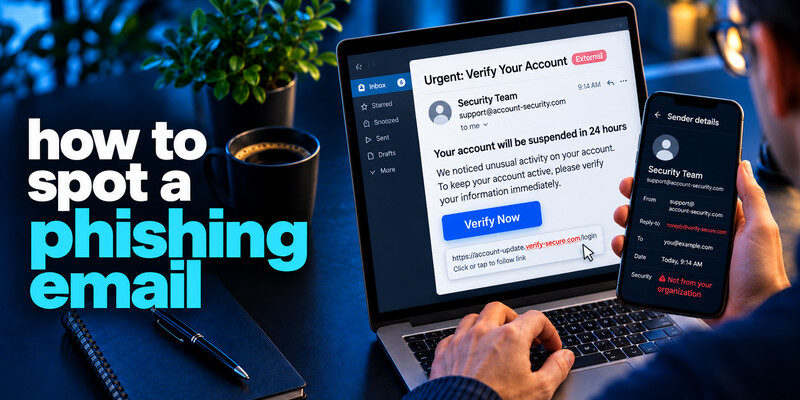
How to Spot a Phishing Email Before You Click? To spot a phishing email, compare its request with the real account or organization through a channel you already trust. A message that pressures you to open a link, download a file, pay, or reveal a password may be fraudulent even when it has a polished design and your name. Inspect the full sender and destination, but use the company’s own app or bookmarked website for the decisive check. The FTC notes that unexpected messages commonly invent problems or rewards to prompt a click.
Do this now
- Read the actual request and destination.
- Open the service from a bookmark or app.
- Report the email and secure the account if you submitted a password or code.
This phishing email guide checks the requested action before judging the sender’s logo or writing style.
How to Spot a Phishing Email Before You Click? Start with what the message wants you to do
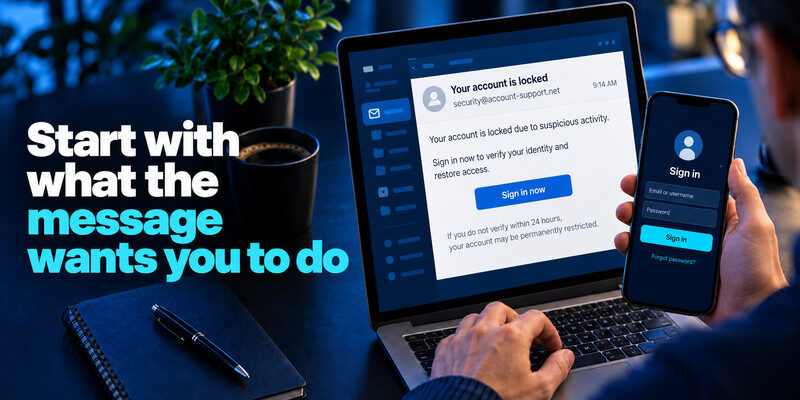
Read the requested action before judging the design. Is the email asking for credentials, a one-time code, a payment, a file download, or a change to bank details? The action often reveals the risk faster than a logo. A legitimate alert can still be safely checked without using the email’s link.
Phishing emails often imitate account security warnings to trick users into entering passwords or recovery information. Our guide on how to secure your email account explains how to protect your mailbox, review recovery settings, and strengthen authentication. Always open the email provider’s official website independently rather than signing in through an unexpected message.
A credential request
An email claiming “your account is locked” may send you to a lookalike sign-in page. Open the actual service separately and inspect account notifications there. Never send a password or recovery code in reply.
A payment or invoice change
An invoice that changes bank instructions should be confirmed using a number already in your records, not the number printed in the email. A familiar conversation thread can be compromised, so a real sender name alone is not enough.
| Email request | Why it matters | Safer verification |
| Sign in now | May lead to a fake form | Open saved site or app |
| Read a six-digit code aloud | Can complete a live takeover | Decline and inspect account |
| Pay new bank details | Can redirect money | Call known contact independently |
| Open unexpected attachment | Can contain malicious content | Confirm sender and purpose |
| Clue | What it can mean | Safe verification |
| Unexpected invoice | Possible attachment lure | Open the vendor account directly |
| Account suspension timer | Pressure to rush | Check the account notification center |
| Code request | Attempt to hijack sign-in | Never share a live code |
Secure your accounts with fast, reliable two-factor authentication. Download now and protect your login in seconds.Download Authenticator App
Inspect sender and reply details
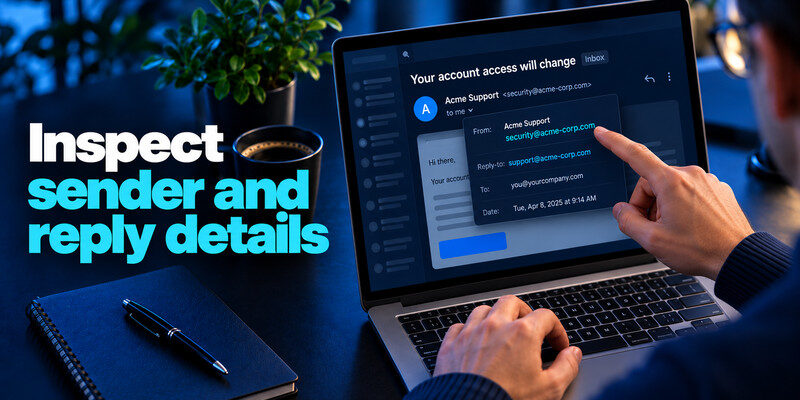
Expand the sender address rather than relying on the display name. Compare the actual domain with the organization’s known domain. A message can use a lookalike character, extra word, or unrelated free-mail address. Also note where a reply would go.
A familiar email thread does not guarantee that the sender’s account is still secure. If you suspect an email account was compromised, our guide on how to spot suspicious login activity explains how to review unknown sessions, recovery changes, and other evidence of unauthorized access. Verify payment instructions through an established contact channel.
Why correct spelling is not proof
How to Spot a Phishing Email Before You Click? Attackers can write fluent messages and reproduce brand style. A legitimate account can also be compromised and send a malicious email. Treat the sender check as one clue, not a final verdict.
Why a strange sender is not automatically malicious
Large organizations use third-party mail systems and subdomains. If uncertain, do not guess from the address alone. Open the organization through a known route and check whether it sent the notice.
Read more: Email Breach Alert Notification: Verify It and Act on the Right Data
Examine links without trusting them
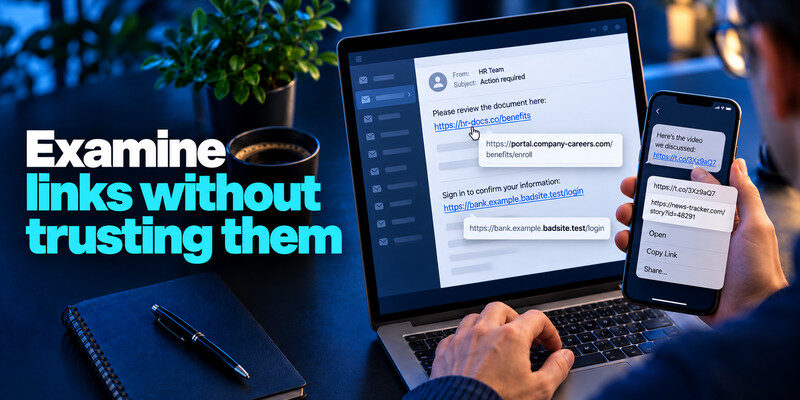
On a desktop, hovering may reveal a destination; on a phone, a long press may preview it, though interfaces vary. Do not open the URL just to investigate. Shorteners and tracking links obscure the final destination. If a link appears to go to a login page, navigate to the service independently.
Read the actual host
How to Spot a Phishing Email Before You Click? In a URL, the decisive domain may be before a slash and after a long string of subdomains. A name such as “bank.example.badsite.test” belongs to the badsite.test host, not the bank. Browsers can display international characters that look similar to familiar letters, another reason to use a saved address.
Beware QR codes and attachments
A QR code in an email can conceal a destination just as a button can. A PDF or document may contain a link or request to enable content. Confirm the business reason through a separate channel before opening unexpected files.
Read more: Dark Web Scan for Personal Information: What a Result Can and Cannot Show
Match the story to your actual account
Phishing messages often invent unpaid tolls, failed deliveries, expiring cloud storage, payroll changes, or a security emergency. Ask whether you were expecting that interaction. If it claims a charge, open the real financial app and check transactions. If it claims a parcel, use the courier’s official tracking route.
Urgency is a tactic, not a verdict
How to Spot a Phishing Email Before You Click? Some legitimate notices are time-sensitive. The point is that urgency should not force you to use the message’s own contact information. A trustworthy provider lets you reach it independently.
Personalization can come from a breach
Your name, job title, or old address may have appeared in public or leaked records. Personalized details make a scam convincing without proving the sender controls the organization.
QR codes are also used during legitimate authenticator app enrollment, but their purpose depends on the context. Our authenticator app security guide explains how verification codes and setup secrets work. Never scan an unexpected authentication QR code or enter a live verification code on a website reached through a suspicious email.
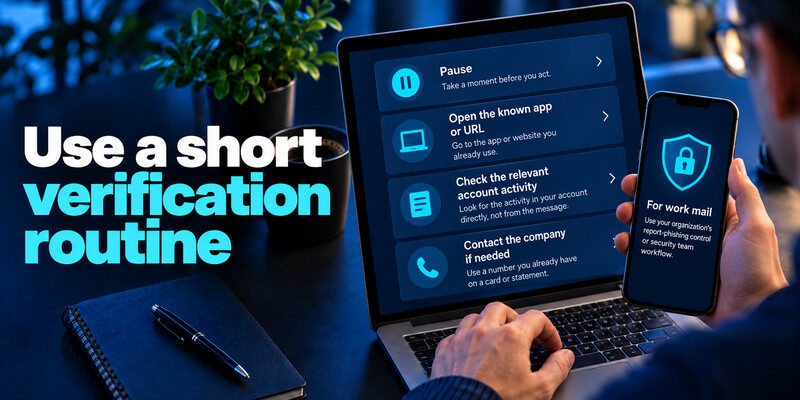
Use a short verification routine
Pause, open the known app or URL, check the relevant account activity, and contact the company with a number already on a card or statement if needed. Do not copy a phone number from the suspicious message. The FTC recommends contacting the company through information you know is real.
For work mail
Use your organization’s report-phishing control or security team workflow. Preserve the original message if instructed; forwarding can alter headers or expose it to more people. Ask security before interacting with an attachment.
Attackers may use information from public profiles or exposed datasets to make phishing emails appear more convincing. Our guide on what a credential leak is explains how usernames, passwords, and related account information can become exposed. Personal details in an email are not proof that the sender is legitimate.
For personal mail
Mark the message as phishing in your provider and delete it after any evidence you need is preserved. The FTC accepts scam reports at ReportFraud.ftc.gov; the Anti-Phishing Working Group accepts forwarded phishing email at [email protected].
Read the sender’s full address, reply-to, and the stated request, but do not treat any one field as conclusive. Attackers can use a real compromised mailbox, and legitimate vendors can send through third-party mail systems. The practical question is whether the request matches something you can verify independently in your account.
An invoice you did not expect: Do not open the attachment to find out whether it is real. Search your purchase history and contact the vendor through a known site. A common variation lists a help number and asks you to call immediately to “cancel” a charge; that phone number may be the attack path rather than the invoice itself. Check your actual card statement before assuming money moved.
A sign-in alert with a code request: A real service may warn of a sign-in attempt, but it should not need you to send a one-time code to a person. Open the account’s security page and review successful sessions, devices, and recovery methods. If you did not initiate a code, leave it unused; repeated unexpected codes may indicate someone knows the password and is testing MFA.
A familiar colleague asking for urgency: The display name and signature may be copied. A message that changes payment details, asks for gift cards, or requests a file export should go through the established approval channel. If the account itself was compromised, replying in the same thread does not provide an independent check. Call the colleague at a known number or use an internal workflow.
Read more: Data Breach Notification Meaning: What the Notice Actually Tells You
If you already interacted with it
The response depends on what happened. Merely reading a message is different from entering credentials, downloading software, approving an MFA request, or sending money. Act on the specific exposure.
Entered a password or code
Open the genuine service on a trusted device, change the password, revoke unknown sessions, inspect recovery settings, and contact support if access is lost. A one-time code can be used immediately, so do not wait for a breach checker. For compatible accounts, can add TOTP protection, but you must still refuse unexpected code requests.
Opened a file or paid money
Follow your device’s security process and tell a work security team promptly. For unauthorized payments, contact the bank or payment provider through its official channel and preserve transaction details. A password reset alone does not reverse a transfer.
After entering credentials, secure the account and every reused copy, revoke sessions, and inspect recovery. After paying, call the institution immediately. After opening software, follow device-security guidance. This branching avoids the generic advice to “change everything,” which can overlook a payment or active session.
Verify recovery changes: Attackers may add a phone number or forwarding rule before you notice. Check these settings on primary email, because it can reset other accounts.
Preserve the timeline: Record message time, link or attachment name, action taken, and provider case number. Keep passwords and one-time codes out of the record. The FTC’s advice to report phishing supports both personal and broader filtering responses.
Read more: Has My Email Been Hacked? How to Tell and What to Do
Compare five messages in a real inbox
The same morning, a person receives a cloud-storage warning, a delivery notice, a bank alert, a colleague’s shared document, and a genuine receipt. Reading all five by logo would be unreliable. Instead, classify each by its demand: sign in, pay, call, open a file, or simply retain the receipt. For the first four, open the relevant service independently; the receipt can be checked against actual purchase history without using its links.
Cloud storage warning
Check usage and billing in the real account. If the warning does not appear there, report the email. If it does, complete the change within the genuine site. The message’s urgency does not determine the route.
Colleague’s shared document
Ask the colleague in an existing chat or call if the file was expected. Their real mailbox can be compromised, so seeing the familiar address is not enough. Work users should report the original if the page requested a fresh password or code.
Read headers as evidence, not as a magic verdict
Advanced users and security teams may examine full email headers and SPF, DKIM, or DMARC results. Those signals help assess sender alignment, but a passing result can belong to a malicious lookalike domain or a compromised legitimate account. Most readers can make a safer decision by using the official account and a known contact route.
Mismatched reply-to
An address that differs from the displayed sender can indicate redirection. Legitimate mail workflows sometimes use specialized reply addresses, so confirm the requested action rather than declaring fraud on that clue alone.
Authenticated but deceptive
A scammer can register a new domain and configure its email authentication correctly. Technical authenticity of that domain does not authorize a request to alter your payroll or disclose a code.
Frequently Asked Questions
Can a phishing email come from a real address?
Yes. A compromised account can send malicious messages, and display names can be spoofed. Verify the request through an independent route even when the thread looks familiar.
Is bad grammar still a useful sign?
It can be a clue but is not reliable. Many scams are fluent and visually polished. Focus on the requested action, account context, and independent verification.
Can I safely click just to inspect?
Avoid doing so. A link may load a tracking or malicious page. Use the known site or app directly and report the suspicious message.
Does MFA stop phishing?
It blocks many password-only attempts but live codes can be phished. Passkeys and security keys offer stronger resistance where supported; recovery paths also need protection.
Final Thoughts
The most reliable way to spot a phishing email is to treat its request as an unverified claim. Inspect clues, then make the decision in the real service or through a contact channel you already know.
Next step
For accounts that still rely on TOTP, can hold the codes. Set it up from each real account’s security settings, keep recovery codes safe, and never type a live code into a page reached through a suspicious message.
