
What Is a VPN? How It Works, Benefits, Risks, and Setup Guide
Published October 30, 2026
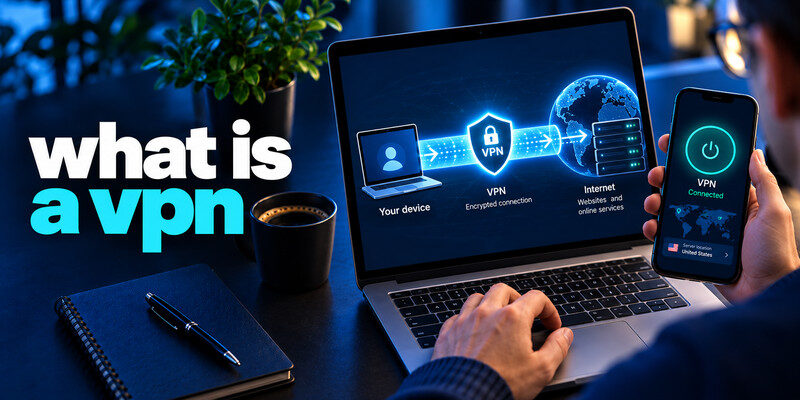
Short answer: What is a VPN? A virtual private network (VPN) is a technology that creates an encrypted connection between your device and a VPN server. It can protect traffic from inspection on the local network, conceal your home IP address from websites, and provide secure access to a workplace network. It does not make you anonymous, block every cyberattack, or replace HTTPS and strong account security.
This guide answers what is a vpn with practical examples, limitations, and setup advice, informed by the NIST VPN glossary and the EFF’s July 2026 guidance.
What Is a VPN? A Simple Definition
VPN stands for Virtual Private Network. It is a way to create a private logical connection across an existing network, usually the public internet. In its formal explanation, the US National Institute of Standards and Technology (NIST) describes a VPN as a virtual network built on physical networks that can provide a secure mechanism for transmitting data and IP information.
Here is a vpn definition without technical jargon: a VPN sends your internet traffic through another server, usually protecting the journey to that server with encryption. The websites you reach ordinarily see the VPN server’s public IP address, not the public IP address assigned to your home connection.
For readers looking for a vpn meaning in everyday terms, think of a sealed delivery route. Your internet provider still carries the package but cannot normally read what is inside the VPN tunnel. At the other end, the VPN server forwards your requests. The analogy has one crucial limitation: the VPN operator may be able to observe destinations or other metadata, so choosing a trustworthy operator matters.
The answer to what is a vpn should always include that trade-off. Encryption protects a connection segment; it does not erase cookies, signed-in identities, browser fingerprints, or information you voluntarily share with a site.
How Does a VPN Work? Step by Step

To understand what is a vpn at the network level, follow one website request from your phone or computer. Most consumer VPN apps create a tunnel using a protocol such as WireGuard, OpenVPN, or IKEv2/IPsec. The exact encryption and routing details depend on the product.
Step 1: You connect to a VPN server
For anyone asking what is a vpn on a phone, this starts with the app’s Connect button. You open the VPN app and select a location or accept its recommended server. The app authenticates and establishes a protected connection. Some VPNs also install a virtual network interface so compatible traffic can flow through the tunnel.
Step 2: Your device encrypts traffic for the tunnel
The client encrypts outgoing data for the tunnel. Local Wi-Fi observers and the ISP generally cannot read the protected payload, although they can see the VPN endpoint, timing, and data volume.
Step 3: The server forwards your request
This forwarding step is central to what is a vpn in practice. The server forwards traffic to the destination. HTTPS remains important beyond the VPN server: ordinary HTTP traffic may be exposed on that final leg.
Step 4: The response returns through the tunnel
The VPN server sends the response through the tunnel; your app receives it after the VPN layer is decrypted.
This is a vpn explained as a simple route:
Your device → encrypted VPN tunnel → VPN server → website or app. The return path runs in reverse. For a corporate VPN, the last destination might instead be an internal company system.
People often ask how does a vpn work without realizing that there are two separate protections: VPN encryption between the device and the VPN server, and HTTPS encryption between the browser and a secure website. They solve related but different problems.
What Does a VPN Hide, and What Can Others Still See?
One reason people search what is a vpn is to find out who can watch their browsing. The answer depends on which observer you mean. A VPN changes visibility; it does not make every participant blind.
| Observer | Usually visible with a correctly configured VPN | What the VPN can hide |
|---|---|---|
| Local Wi-Fi operator | VPN endpoint, timing, approximate traffic volume | Destinations and payload within the tunnel |
| Internet provider | Connection to a VPN service, timing, data volume | The individual sites contacted through the tunnel |
| Website you visit | VPN exit IP, browser details, cookies, account identity | Your ordinary residential public IP |
| VPN provider | Subscriber/account data and potentially traffic metadata | Nothing automatically; logging policy and architecture matter |
| Apps with location permission | GPS or device-derived location, when granted | A VPN generally does not override device location permission |
IP address versus identity
The distinction is often missed in answers to what is a vpn. An IP address can suggest your general location and ISP. Masking it helps, but websites may still recognize logins, fingerprints, or cookies. A new IP address does not make you anonymous.
The EFF warns that a VPN shifts trust from the local network and ISP to the VPN operator. That caution is central to explaining what is a vpn responsibly. Even excellent encryption cannot fix a dishonest provider or a compromised device.
Why Do People Use a VPN?
There are practical reasons to use the technology. The right reason is more useful than any promise of total invisibility.
Add protection on networks you do not control
On hotel or airport Wi-Fi, HTTPS already protects many sessions. A VPN can additionally hide destination information from the local operator. It is an extra layer, not an excuse to ignore HTTPS warnings.
Reduce browsing visibility to an ISP
This is a practical motivation behind searches for what is a vpn. The FTC’s 2021 study examined six major US internet service providers, which collectively accounted for about 98% of the mobile internet market at the time the study was commissioned. The agency reported extensive collection and sharing practices among providers in its sample. These historical findings help explain why some people prefer routing traffic through a VPN, although a VPN company may collect data too.
Access approved work resources remotely
Companies use VPN gateways to let staff reach internal systems without exposing those systems directly to the open internet. Business access may be combined with device checks and multifactor authentication. For a related example, our guide to google authenticator openvpn discusses authentication used with OpenVPN environments. A VPN protects a connection; authentication verifies who is allowed to use it.
Change your apparent network location
A commercial VPN may offer exit servers in different countries. Websites then see the exit server’s approximate location, although they may still recognize your logged-in identity. Regional services may block VPN addresses, and local laws or platform terms can limit particular uses.
If your question is what is a vpn useful for, these four scenarios are better starting points than a claim that everyone must leave one on constantly.
VPN vs. Proxy, HTTPS, and Incognito Mode
A frequent source of confusion is mixing a VPN with other privacy tools. They overlap in some areas but are not interchangeable.
| Tool | Main purpose | Important limitation |
|---|---|---|
| VPN | Route selected device traffic through an encrypted tunnel to another network | Provider must be trusted; not anonymity |
| Proxy | Relay requests through an intermediary | Encryption and app coverage depend on the proxy configuration |
| HTTPS | Encrypt the connection between a browser/app and the destination service | Does not necessarily conceal the destination from the network |
| Incognito/private mode | Limit local browser history and session storage | Does not hide activity from websites, networks, or employers |
| Tor Browser | Route supported browser traffic through a distributed anonymity network | Different performance and threat model; not a universal shield |
When comparing what is a vpn with a proxy, consider coverage. A browser proxy may route only browser requests, while a full-tunnel VPN may cover many apps. Some proxies encrypt traffic; split tunneling can exclude apps from a VPN.
When learning what is a vpn, do not confuse it with a secure website connection. HTTPS is essential even with a VPN. It protects data between you and the site you are using and helps authenticate the site. A VPN should supplement that protection, not replace it. Private browsing is useful for limiting traces on a shared computer, but it does not hide your traffic from your employer’s network.
Types of VPNs and Common VPN Protocols
Understanding the basic categories helps you choose the right product instead of installing the first app you see.
Remote-access VPN: Connects an individual device to a company or private network. The organization manages authorization, and it may route only corporate applications through the tunnel.
Site-to-site VPN: Connects entire offices or networks through gateways. Employees may not need to launch an individual app for every connection.
Consumer VPN service: Routes personal internet traffic through servers operated by a third party. It is commonly used for network privacy and an alternative apparent IP address.
VPN protocols determine how the encrypted tunnel is established. WireGuard is a modern protocol with a streamlined design. OpenVPN is widely supported and configurable. IKEv2/IPsec is another established option, commonly found on mobile and enterprise systems. Encryption, authentication, reconnect behavior, and availability depend on the implementation.
How to Choose a VPN You Can Trust
Once you understand what is a vpn, the next decision is whether the provider deserves access to your network traffic. Price, advertising, and download counts are weaker signals than verifiable policies and competent engineering.
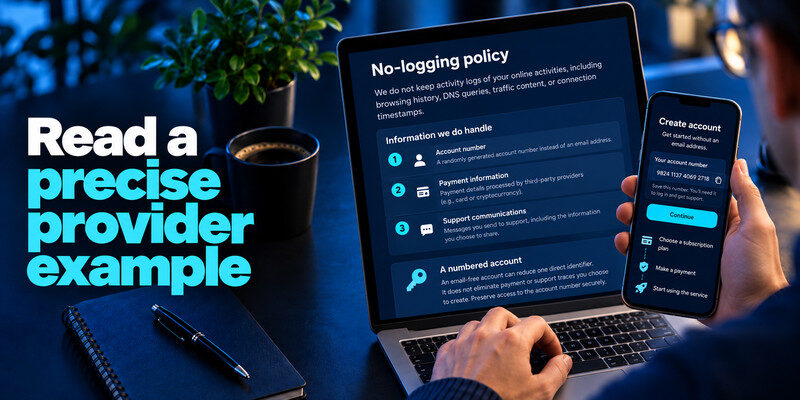
Read the logging policy
A trustworthy answer to what is a vpn includes who handles your data. Look for explicit statements about browsing activity, source IP addresses, connection timestamps, DNS queries, and data retention. Distinguish privacy-related records from billing or support records. An independent audit is helpful, but read its date and scope: it is a snapshot, not a permanent guarantee.
Check app permissions and security features
A trustworthy app should use appropriate encryption, offer leak protection where applicable, and explain its kill switch. A kill switch is intended to stop selected network traffic when the tunnel fails; its actual coverage varies by system. Check the provider’s update history and vulnerability disclosure process.
The FTC’s VPN app guidance discusses research involving almost 300 VPN apps. It highlights potential problems such as missing encryption, unexpected permissions, and data sharing with third parties. That older research does not imply that all current free VPNs are unsafe, but it gives practical reasons to investigate a provider.
Consider speed, support, and price
Encryption adds work, and sending traffic to a remote server can add latency. Server distance, load, congestion, and your original connection all affect results. Compare performance on your own devices rather than trusting claims such as ‘zero speed loss.’ Check renewal prices, device limits, refund terms, and customer support.
For beginners, pair your VPN decision with best cybersecurity tips for beginners. Installing a VPN while reusing weak passwords leaves important risks untouched. Understanding what is a vpn should lead to a layered security approach, not a single-tool solution.
How to Set Up a VPN and Check That It Works

You do not need specialist networking knowledge to start, but verify the connection instead of assuming the app is protecting everything.
- Choose a provider deliberately. Read its privacy policy, independent reviews, supported platforms, and any applicable workplace rules.
- Download the official application. Use the provider’s website or verified app-store listing. Avoid lookalike installers and unsolicited browser extensions.
- Select a server and connect. For routine use, a nearby location often reduces additional latency. Wait for confirmation that the tunnel is active.
- Check the public IP address. Record the address displayed by a reputable IP-checking site before and after connecting. It should usually change to the VPN’s exit address.
- Test DNS and IPv6 behavior. Confirm that the app is not unexpectedly sending requests outside the tunnel. Remember that split tunneling intentionally excludes some traffic.
- Review reconnection and kill-switch settings. Try switching between networks during a non-sensitive session to understand what happens if the VPN disconnects.
- Protect the account itself. Enable a strong unique password and, when supported, a two factor authentication app or passkey. Security of the provider account matters too.
If your goal is to understand what is a vpn in daily practice, run the simple IP and leak checks, then repeat them after major app or operating system updates. A ‘Connected’ icon alone does not confirm that every application follows the tunnel.
Frequently Asked Questions About VPNs
Is a VPN necessary for everyone?
No. HTTPS and updated devices already provide meaningful protections. A trusted VPN may be worthwhile if you frequently use networks you do not control, want to reduce ISP visibility, or need remote access to an organization. The right choice depends on your risks, not fear-based advertising.
Can a VPN make me completely anonymous?
This is the most important follow-up to what is a vpn. No. Websites can identify users through accounts, cookies, fingerprints, or other personal details. GPS location, payment records, and malware are separate issues. The EFF explicitly warns against treating VPNs as complete anonymity tools.
Does a VPN prevent hacking or phishing?
Not on its own. It does not reliably stop fraudulent websites, malicious downloads, or stolen passwords. Complement it with software updates, backups, phishing awareness, and best account security practices.
Is a free VPN safe?
Some legitimate providers offer limited free plans, but business models matter. Check how the service is funded, what it records, whether it encrypts traffic, and whether its claims have credible outside support. A price tag is not proof of safety either.
Does a VPN slow down my internet?
It can. The extra network route and encryption overhead may add latency or reduce throughput. Results depend on the server, protocol, congestion, and your internet connection. Speed differences should be tested rather than assumed.
Can my internet provider tell that I use a VPN?
Usually yes. It can typically observe a connection to a VPN server, along with timing and volume. A correctly configured tunnel can conceal the individual destinations carried within it, but not the fact that network traffic exists.
What is a VPN on an iPhone or Android phone?
It is a VPN app or device configuration that routes selected mobile traffic through a protected tunnel. The concept is the same as on a laptop. Whether all apps are covered depends on operating-system rules, split tunneling, and app settings.
Final Verdict: Do You Need a VPN?
What is a vpn in one sentence? It is a secure network tunnel that routes traffic through another server, helping protect the local connection and change the IP address websites see. It can be valuable on untrusted networks and for authorized work access, but it does not guarantee anonymity or prevent every cyberattack.
Use a provider you can evaluate, keep HTTPS enabled, secure your accounts, and refer to this personal cybersecurity checklist 2026 for the broader habits that a VPN cannot replace.
Editorial Sources
- NIST: Virtual Private Network glossary
- Electronic Frontier Foundation: Choosing the VPN That’s Right for You (reviewed July 28, 2026)
- Federal Trade Commission: ISP privacy report (October 2021)
- FTC: In the Market for a VPN App? (2018)
- NIST: Guide to IPsec VPNs, Revision 1
- Cloudflare: VPN Overview (updated April 2026)
