
Google Authenticator OpenVPN: Setup 2FA with PAM A-Z
Published August 12, 2026
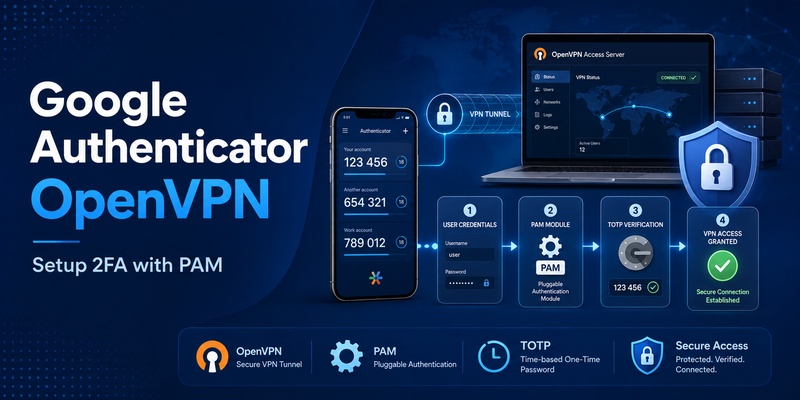
Passwords alone are increasingly insufficient for protecting VPN access. If a user’s VPN password is leaked through phishing, credential reuse, malware, or another breach, an attacker may be able to attempt remote access without possessing the user’s physical device. This is where google authenticator openvpn becomes useful.
A typical implementation combines OpenVPN username/password authentication with Linux PAM and a TOTP-compatible authentication module. Google maintains the google-authenticator-libpam project, which provides the pam_google_authenticator module for PAM-based authentication. OpenVPN Community Edition can authenticate usernames and passwords through its openvpn-auth-pam plugin.
The result is a practical two-factor authentication architecture:
Password + temporary TOTP code → PAM validation → OpenVPN connection.
However, google authenticator openvpn should not be confused with OAuth, JWT authentication, Google Sign-In, Amazon Cognito, or GitHub’s own 2FA implementation. These technologies can all involve tokens or verification codes, but they solve different authentication problems.
This guide focuses first on implementing google authenticator openvpn, then explains how the same TOTP concept relates to application development with PAM, GitHub, AWS Cognito, Spring Boot, JWT, and Node.js.
1. What Is Google Authenticator OpenVPN?
Google authenticator openvpn is a configuration in which an OpenVPN server requires a time-based one-time password in addition to another credential such as the user’s normal password.
Google Authenticator itself does not function as an OpenVPN server plugin. Instead, a common Linux architecture uses PAM as the connection layer between OpenVPN and the TOTP verification component.
OpenVPN documentation states that the server can receive a username and password from a client using auth-user-pass. The server can then pass these credentials to an authentication plugin. For production PAM authentication, OpenVPN documents its openvpn-auth-pam shared-object plugin.
The flow can be visualized as:
OpenVPN Client
↓
Username + Password/OTP
↓
OpenVPN Server
↓
openvpn-auth-pam
↓
PAM Stack
↓
pam_google_authenticator
↓
TOTP validated
This makes google authenticator openvpn especially suitable for Linux environments that already use PAM.
PAM can combine multiple authentication modules in a stack. For example, one module can validate a Unix password while another validates the current TOTP.
The Google Authenticator PAM project specifically supports options that help applications with limited password prompts. Its forward_pass option can request the system password and verification code together and then pass the password to the next PAM module.
Therefore, the important concept is not that OpenVPN talks directly to the mobile application. The server and the user’s authenticator share information that enables matching time-based codes.
🧭 Explore Guides:
Google Authenticator for Mac: Setup, Use & Best Alternatives
2. How Google Authenticator OpenVPN Works With PAM
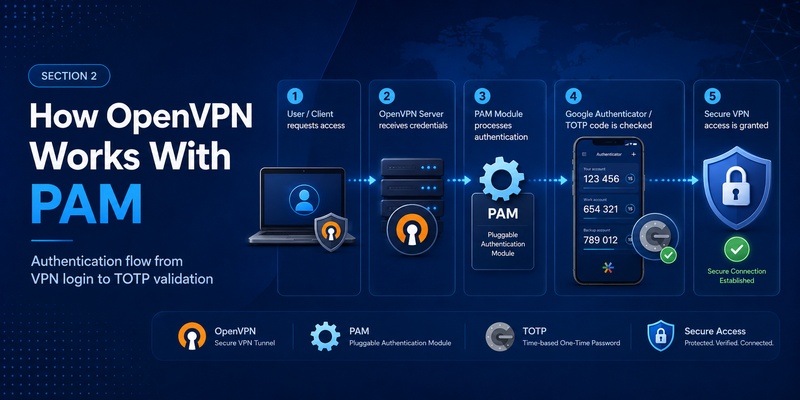
The key component behind many google authenticator openvpn deployments is google authenticator pam.
PAM, or Pluggable Authentication Modules, allows Linux applications to use configurable authentication stacks rather than implementing every login mechanism internally.
OpenVPN provides a PAM plugin for this purpose. The OpenVPN documentation shows a server-side configuration concept such as:
plugin /usr/share/openvpn/plugin/lib/openvpn-auth-pam.so login
The exact plugin path can vary depending on Linux distribution and packaging, but the purpose is the same: OpenVPN passes submitted credentials into the selected PAM service.
The google authenticator pam module then validates the TOTP supplied by the user.
A simplified PAM configuration can contain:
auth required pam_google_authenticator.so
You can also combine the module with another password module when both password and OTP verification are required.
One useful feature of libpam google authenticator is its handling of applications that cannot present multiple independent prompts. The project documents forward_pass, try_first_pass, and use_first_pass as options for credential stacking.
For google authenticator openvpn, this matters because the VPN client interface may present only a traditional username/password dialog.
A deployment can therefore adopt a credential format that PAM can separate or process according to its configured authentication stack.
The exact configuration should be tested with the actual OpenVPN client software used by employees because different clients can handle credential prompts differently.
Download Authenticator App
Secure your accounts with fast, reliable two-factor authentication. Download now and protect your login in seconds.
3. Install and Configure Google Authenticator PAM
Before enabling google authenticator openvpn for production users, install the Google Authenticator PAM package supplied by your Linux distribution or build the upstream google-authenticator-libpam project when appropriate.
After installation, each user normally needs a TOTP secret.
The Google Authenticator PAM project includes a google-authenticator utility that can create the user’s configuration.
The secret file requires careful protection. The upstream PAM module normally expects the secrets file to be owned by the authenticating user and, by default, requires restrictive permissions. The project’s documentation warns that disabling ownership checks or allowing more permissive file modes reduces security.
That makes file permissions an important part of a secure google authenticator openvpn setup.
PAM options worth understanding
The module includes several useful options.
forward_pass helps when the PAM application provides only one password prompt.
nullok allows a user without an OTP configuration to continue through the module, but the upstream documentation notes that another PAM module must still return success.
This option may be useful during migration but should be evaluated carefully. Leaving it enabled indefinitely could undermine the goal of mandatory VPN 2FA.
noskewadj disables automatic clock-skew adjustment.
Time synchronization is important because TOTP is time based. The PAM documentation specifically notes that incorrect server/device clock alignment can cause valid-looking codes to fail.
For that reason, keep the VPN server’s system clock synchronized before troubleshooting TOTP failures.
🧭 Explore Guides:
Google Authenticator for iPhone: Setup, Transfer & Fixes
4. Connect the PAM Module to OpenVPN
Once PAM works locally, the next step is connecting it to google authenticator openvpn.
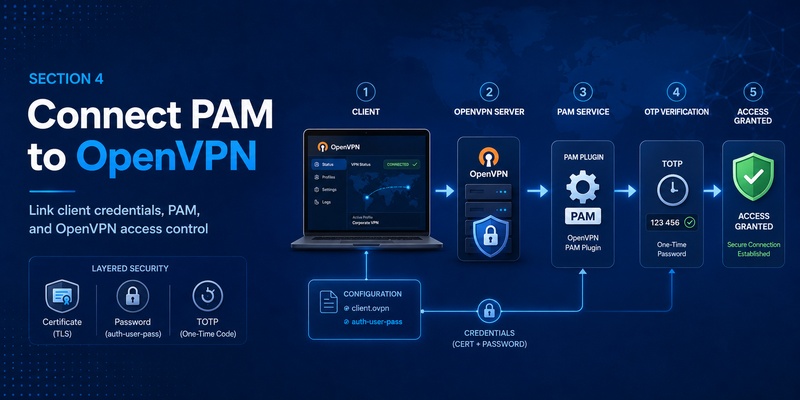
On the client side, OpenVPN documents:
auth-user-pass
This instructs the client to obtain username/password credentials and send them securely through the TLS connection to the server.
On the server side, enable the PAM authentication plugin and point it to the PAM service you have configured.
OpenVPN notes that using username/password authentication alongside normal client certificates results in dual authentication by default: both the certificate and username/password checks must succeed.
That can provide a layered google authenticator openvpn design:
Client certificate
+
User password
+
TOTP
This is generally preferable to removing certificate-based client authentication merely for convenience.
A practical rollout process is:
- Configure the PAM stack.
- Test password authentication locally.
- Enroll one test user in Google Authenticator.
- Verify TOTP through PAM.
- Configure OpenVPN’s PAM plugin.
- Test from a separate VPN client.
- Confirm invalid OTP codes are rejected.
- Test recovery procedures.
- Only then migrate additional users.
Do not immediately roll google authenticator openvpn out to every administrator account without first testing a recovery path.
A PAM typo or authentication-stack ordering mistake can lock legitimate users out of VPN access.
5. Security Tips and Common OpenVPN 2FA Problems
Several problems repeatedly appear in google authenticator openvpn deployments.
Correct password but OTP is rejected
Check server time first.
TOTP authentication depends on time windows, and the Google PAM project notes that server/device clock differences are a common reason codes fail.
New users can connect without OTP
Review whether nullok has been enabled.
That option intentionally allows users without a configured OTP secret to bypass that PAM module, although another PAM module must still authenticate them.
If 2FA is mandatory, remove migration exceptions after enrollment is complete.
PAM works but OpenVPN does not
Verify:
- PAM service name
- OpenVPN plugin path
- File permissions
- Plugin availability
- OpenVPN server logs
- PAM logs
- Credential format
OpenVPN recommends its compiled openvpn-auth-pam plugin rather than the demonstration PAM script for real-world use. The official documentation notes that the shared-object plugin supports a split-privilege model and avoids passing credentials through temporary files or environment variables.
A reliable google authenticator openvpn deployment should also maintain recovery codes or an administrator-controlled re-enrollment process rather than disabling MFA whenever someone loses a phone.
📖 Explore Articles: Google Authenticator: Complete 2FA Setup & Security Guide
6. GitHub and Google Authenticator 2FA
The search terms github 2fa google authenticator and github google authenticator refer to a different implementation.
GitHub supports TOTP applications as a two-factor authentication method. GitHub’s current documentation states that users can configure a TOTP application on mobile or desktop as a 2FA method.
The concept resembles google authenticator openvpn because both use an authenticator application to produce temporary codes.
The infrastructure, however, is separate.
With GitHub:
GitHub account
→ TOTP secret
→ Authenticator app
→ Verification code
→ GitHub
With OpenVPN:
VPN account
→ PAM/TOTP secret
→ Authenticator app
→ PAM
→ OpenVPN
A code created for a GitHub account cannot be reused as the OTP for your VPN unless both systems were intentionally and insecurely provisioned around the same secret—which should not be your design.
GitHub also recommends configuring recovery methods so users can regain access if their authentication device is lost.
Apply the same recovery planning to google authenticator openvpn.
7. Google JWT Tokens and Spring Boot Authentication
TOTP should also not be confused with a google jwt token.
Google’s OpenID Connect implementation returns an id_token as a digitally signed JSON Web Token containing identity information. Google states that this JWT must be verified using Google’s published key material.
A simplified google jwt token example conceptually contains claims such as:
{
“iss”: “https://accounts.google.com”,
“sub”: “USER_ID”,
“aud”: “YOUR_CLIENT_ID”,
“exp”: 1234567890
}
This JWT is fundamentally different from the six-digit TOTP in google authenticator openvpn.
For google login jwt, an application receives an identity token after the Google authentication flow and validates it on the backend. Google recommends sending ID tokens to backend servers over HTTPS and verifying them rather than trusting client-provided user identifiers.
For Java developers searching google authenticator spring boot, first determine the goal.
If the goal is Google login, Spring Security and Spring Boot support OAuth 2.0/OIDC client configuration. Spring Boot’s current documentation includes Google as an OAuth client registration provider.
A spring boot jwt google login system usually deals with Google OIDC authentication, verified ID tokens, and optionally the application’s own session or JWT architecture.
If the goal is TOTP 2FA, implement a standards-compatible TOTP layer separately rather than treating a Google ID token as an Authenticator code.
8. AWS Cognito and Google Authenticator TOTP
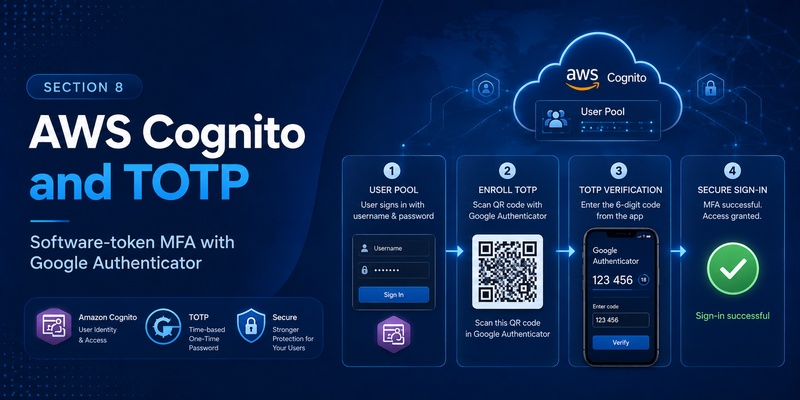
The phrase cognito google authenticator usually means configuring Amazon Cognito User Pools to use TOTP MFA with Google Authenticator or another compatible application.
Amazon Cognito officially supports software-token MFA using authenticator applications that generate TOTP codes.
The enrollment process is similar in concept to google authenticator openvpn:
Create secret
→ Show QR code
→ User scans it
→ Authenticator generates TOTP
→ User submits code
→ Server verifies code
AWS documents that Cognito can generate a shared secret through AssociateSoftwareToken; the application can display it as a QR code, and users can scan that QR code with an application such as Google Authenticator. Cognito then verifies the submitted code with VerifySoftwareToken.
This is often what developers mean when searching aws google auth, although that phrase can also refer to federated Google login.
Do not confuse Cognito TOTP MFA with Google OAuth federation. One verifies an additional authentication factor; the other can establish or federate user identity.
9. Google Authenticator With Node.js Applications
Developers searching 2fa google authenticator node js typically want to add TOTP MFA to their own application.
The conceptual architecture is similar to google authenticator openvpn, even though PAM is no longer involved.
A Node.js application generally needs to:
- Generate a unique TOTP secret for the user.
- Store that secret securely.
- Create an otpauth:// provisioning URI.
- Present it as a QR code.
- Ask the user for a generated code.
- Verify the code.
- Mark 2FA as enabled only after successful verification.
The authenticator app and the server independently calculate the temporary code from the shared secret and time.
Never use one global TOTP secret for every account.
Likewise, never treat a TOTP secret like an ordinary preference field. Anyone who obtains the secret can potentially reproduce valid OTP codes.
The same principle applies to google authenticator openvpn: the server-side TOTP material must be protected just as carefully as other authentication credentials.
🛠️ Learn with Step-by-Step Guides: Google Authenticator Lost: How to Recover Codes and Account Acces
10. Best Practices for Google Authenticator, VPN, and Application Security
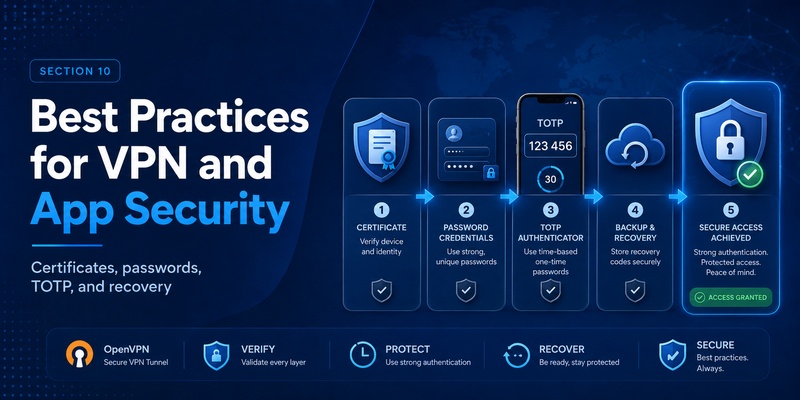
A production google authenticator openvpn deployment should be designed as an authentication system rather than as a quick PAM modification.
Protect TOTP secret files with strict ownership and permissions. The upstream Google PAM module intentionally performs ownership and permission checks and labels options that weaken them as dangerous.
Keep server clocks synchronized.
Retain certificate authentication where practical instead of weakening the VPN architecture simply to add TOTP.
Test PAM independently before connecting it to OpenVPN.
Use an enrollment and recovery process for lost or replaced devices.
Avoid permanently enabling bypass options for users without TOTP configuration.
Most importantly, distinguish between authentication technologies.
Google authenticator openvpn uses TOTP as an additional VPN authentication factor.
A google jwt token can carry signed identity claims in Google OpenID Connect.
GitHub can use TOTP for account 2FA.
Amazon Cognito can manage TOTP MFA for application users.
Spring Boot can use OAuth 2.0 and OpenID Connect for Google login.
Node.js applications can implement their own TOTP verification layer.
These technologies may appear similar because they all involve “tokens,” but their tokens have different meanings.
For VPN administrators, the strongest starting point is a layered design:
TLS-protected OpenVPN connection
+
Client certificate
+
User password
+
TOTP verification
OpenVPN’s PAM plugin provides the bridge to Linux authentication, while Google’s PAM module provides TOTP verification.
When configured carefully, google authenticator openvpn adds a practical second factor without requiring the VPN server to depend on the mobile Google Authenticator application itself.
The phone generates the temporary code; PAM verifies it; OpenVPN enforces the authentication result.
That separation is the key to understanding google authenticator openvpn and also explains why JWT, OAuth, Cognito, GitHub 2FA, and application-level TOTP should remain distinct components in a modern security architecture.
Download Authenticator App
Secure your accounts with fast, reliable two-factor authentication. Download now and protect your login in seconds.
