
Common Phishing Email Examples and the Clues That Matter
Published October 28, 2026
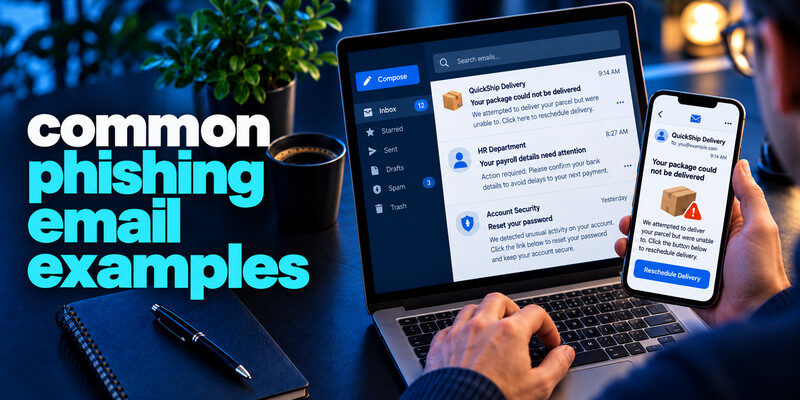
Common phishing email examples include fake account lockouts, missed deliveries, shared documents, invoice changes, and payroll notices. The exact wording changes, but the dangerous move is consistent: the email wants you to use its link, file, reply address, or phone number to complete a sensitive action. The examples below are fictional illustrations, not copied live scams. Verify any claim in the real service or through a contact channel you already know.
Apply the answer
- Sort the email by what it asks you to submit.
- Verify the claim in the real account.
- Use the matching response for a password, card, file or payment.
Common Phishing Email Examples 1: “Your account will be closed today”
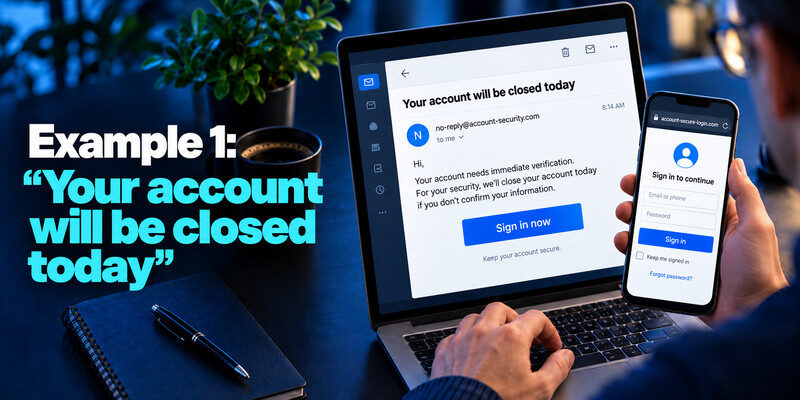
The message says an email or streaming account needs immediate verification and presents a large sign-in button. It may copy branding and name you. The link leads to a lookalike login page.
What to inspect
Check the actual sender and destination without opening them, but do not rely on spelling alone. Open the provider’s app or saved URL and inspect security notifications. A real issue will have an independent route. Fake account suspension notices are among the most recognizable phishing email patterns. Our guide on how to spot a phishing email explains how to examine suspicious sender addresses, unexpected sign-in links, and urgent security warnings before taking action.
If you entered a password
Change it at the genuine service, revoke unfamiliar sessions, replace reused copies, and review recovery details. A live MFA code entered on the fake page could have been relayed, so check successful activity.
The visible subject line is only the hook. A “shared document” email wants a sign-in; a “refund” email wants card or bank details; a “security notice” wants a password or code. Label the requested action before judging typography or grammar. Modern phishing can be well written and can copy legitimate branding closely.
Fake cloud share: The message names a collaborator and a document title. Instead of opening its link, enter the cloud drive through your saved app and inspect shared files. If no file appears, contact the collaborator through a known chat or number. A fake sign-in page may copy the real provider’s layout, but its domain and credential behavior can reveal the mismatch.
Fake invoice cancellation: A PDF or email claims an expensive purchase and offers a number to dispute it. Check the actual bank or merchant account. The listed number may lead to a scammer who requests remote access or payment details. The absence of a real charge is a reason to report the attempt, not a reason to call the supplied number for reassurance.
Fake security escalation: A notice says your account will close unless you submit a code. Open the provider’s security page directly and review successful sessions. Do not approve a push you did not initiate. If you already entered information, change the password at the real site and inspect recovery settings. The same subject line can be a harmless attempt or an active account incident depending on what you submitted.
Secure your accounts with fast, reliable two-factor authentication. Download now and protect your login in seconds.Download Authenticator App
Common Phishing Email Examples 2: “Your package needs a small fee”
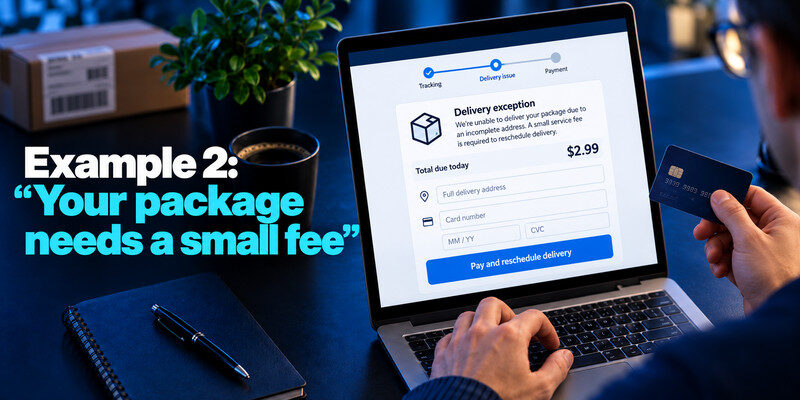
The message cites a delivery problem and asks for an address and card on a courier-styled page. The low amount is meant to lower resistance. Open your order history and the carrier’s official tracking route; do not use the email’s link.
What makes it believable
Many people expect parcels, and a scammer can use a real name from other data. A plausible tracking-like number is not proof. If you entered your password on a phishing website, treat the credential as compromised even if you have not noticed unauthorized activity. Follow our guide on how to recover a hacked account to replace exposed passwords, revoke unfamiliar sessions, and review account recovery settings.
If you entered a card
Contact the card issuer through the number on the card or its app, review transactions, and follow replacement advice. Changing your email password alone does not address the card exposure.
Read more: Phishing vs Spear Phishing: Differences, Examples, and Defenses
Common Phishing Email Examples 3: “A document was shared with you”
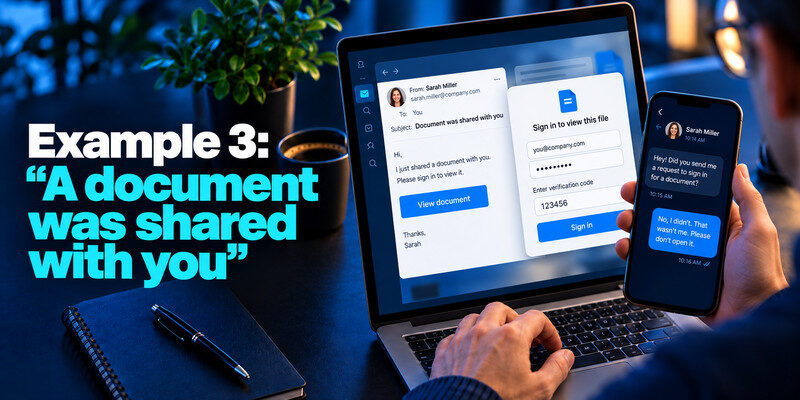
An email appears to be from a coworker or cloud service and asks you to sign in to view a file. The fake page may capture both password and one-time code. Confirm with the coworker through a known chat or call and open the document service directly.
Familiar sender does not settle it
The coworker’s mailbox may be compromised. An existing thread or genuine display name can make the request look normal. Fake delivery notifications often exploit urgency and small payment requests to collect card details or personal information. Our guide on how to avoid phishing scams explains why unexpected payment links should be verified through the genuine retailer or delivery provider.
Work response
Report the original message to the security team, including whether you opened the file or entered details. Avoid forwarding the active link to a large group.
| Example | Sensitive action | Independent check |
| Account lock | Enter password and code | Provider security page |
| Parcel fee | Enter card and address | Order and courier app |
| Shared document | Open file or sign in | Known coworker and service |
| Invoice update | Pay new account | Supplier contract number |
An account-lock email asks for credentials, a parcel asks for card data, a document lure may ask for a download, and an invoice change asks for money. The correct response starts with the exposed asset. A single “delete and change passwords” rule misses several paths.
Credential branch: Change the secret at the genuine service, replace copies, revoke sessions, and inspect recovery. An unexpected code may indicate a live attempt.
Device branch: If a file installed software or an extension, follow official security guidance and tell workplace IT. A password change performed on a compromised device may not settle the problem.
Payment branch: Contact the bank or card issuer. Record amounts, dates, and case numbers. A scammer may follow up posing as a recovery agent.
Read more: What Is Phishing? Meaning, Examples, and a Safe Response
Common Phishing Email Examples 4: “Use our new bank details”
A supplier email or a message inside an existing chain requests payment to a different account. The danger is financial redirection, not necessarily malware. Verify the change by calling a number already in the vendor record and use your normal second approval.
A real thread can be compromised
Replying to the email may reach the attacker if the supplier’s account is under their control. A call to a number printed in the suspicious message also fails as independent verification.
If payment was sent
Contact the bank immediately through an official channel and provide transaction details. Alert the supplier and internal finance/security team. Speed matters for possible recovery.
Common Phishing Email Examples 5: “Payroll needs your details”
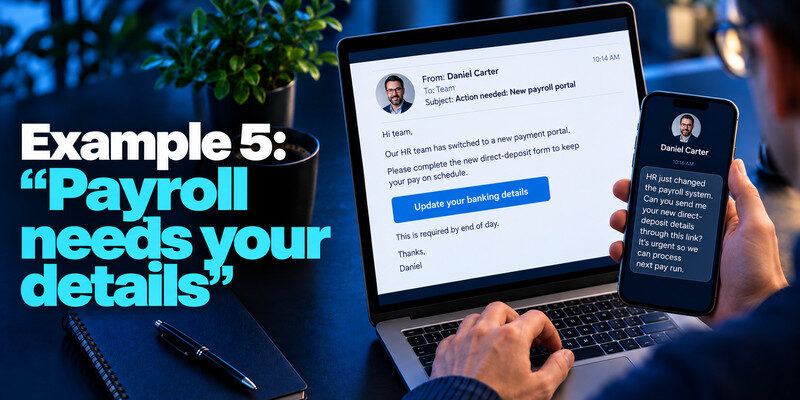
The message claims HR has changed the payment portal or needs a new direct-deposit form. It may mention a real manager. Contact HR through the directory or existing payroll system before submitting identity or banking details.
Check the process
Organizations usually have a known way to update payroll. A demand for an exception is a reason to slow down, even when it appears to come from a senior person.
Protect identity information
If you submitted a government identifier, consult official identity-theft guidance. A password reset alone cannot make that identifier secret again. A familiar display name does not prove that a document-sharing email came from the expected sender. Attackers may forge sender information, use lookalike domains, or exploit compromised mailboxes. Learn what is a spoofed email to understand how sender impersonation works and why the full address and requested action matter.
The pattern across examples
Scams move from an unsolicited claim to a controlled channel and then to a secret, file, or payment. Good grammar, a real logo, and personalized details are not enough to authenticate the request. The FTC recommends reaching the company through contact information you know is real.
Protect accounts ahead of time
Unique passwords prevent a stolen secret from working elsewhere. MFA adds a barrier; can generate TOTP for compatible accounts, but never share a live code with a caller. Passkeys and security keys resist fake-domain sign-ins more strongly where supported.
Keep a reporting route ready
Use your mail provider’s report-phishing control. Work users should know the organization’s route. In the US, the FTC accepts reports through ReportFraud.ftc.gov.
| Example | Requested action | Safe route |
| Fake tax notice | Open attachment | Use official tax portal |
| Shared document invite | Sign in through link | Open cloud drive directly |
| Password expiry warning | Enter current password | Check account security settings |
Read more: How to Recognize Social Engineering Attacks Across Calls, Chat, and Email
A sixth example: a fake security investigation
An email claims to be from a breach-response team and asks you to confirm your identity by submitting a password and a fresh code. The breach story may cite a real incident, making it more convincing. The correct move is to open the organization’s official incident page or account app independently and read what it actually requests.
What the scam wants
The password and live code can let the attacker sign in while the victim thinks they are protecting the account. No genuine investigator needs a one-time code to “cancel” an unauthorized login.
What a real notice may say
It may name affected data classes, dates, and recommended account actions. A legitimate reset should occur within the real service, not a reply email or unknown form.
A seventh example: a fake charity or urgent cause
A message uses a real-world event to request an immediate donation through a copied logo and payment page. The danger is payment and card collection, not necessarily an account password. Find the organization’s established site and donate there if you choose.
Verify the recipient
Inspect the actual organization and its payment route. A social post or forwarded email can be sincere yet contain a fraudulent link.
If you already paid
Contact the payment institution promptly and preserve transaction details. Changing a password helps only if one was also shared.
Read more: What Is Smishing? How Text Message Phishing Works
Frequently Asked Questions
Are these exact messages real?
No. They are illustrative patterns; scammers change wording and design frequently. Evaluate the action and verification route.
Can a legitimate provider send an urgent email?
Yes. You can still handle the issue through its real app or website, without using the email’s link.
Is hovering over a link enough?
It can reveal a mismatch but cannot prove a destination is safe. A shortener or redirect may obscure the final page. Navigate independently.
What if I only opened an email?
Reading is different from submitting data or opening a malicious attachment. Report the message and investigate only the actions you actually took.
Final Thoughts
These phishing email examples differ in subject but converge on one decision: do not let the message provide both the problem and the path to solve it. Verify first, then act in the genuine service.
Next step
For accounts that still rely on TOTP, can hold the codes. Set it up from each real account’s security settings, keep recovery codes safe, and never type a live code into a page reached through a suspicious message.
