
Phishing vs Spear Phishing: Differences, Examples, and Defenses
Published October 28, 2026
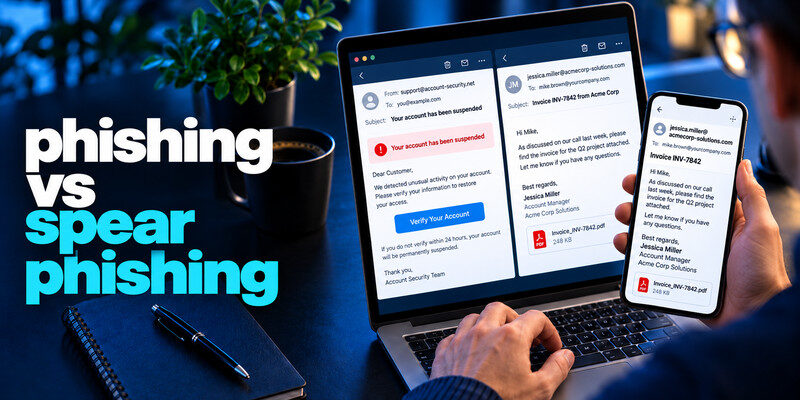
Phishing targets people with deceptive requests; spear phishing is phishing tailored to a specific person, role, or organization. Phishing vs Spear Phishing, the difference is targeting, not a different kind of malware or a guaranteed level of sophistication. A generic parcel text may be phishing; an email citing your real supplier and current invoice may be spear phishing. In both cases, verify the requested action independently and protect credentials and payment approvals.
Apply the answer
- Compare the scope of targeting.
- Verify the requested action independently in both cases.
- Use stronger transaction approval for a personalized vendor request.
The difference between phishing vs spear phishing is the level of targeting, not a separate technical channel.
Compare the phishing vs spear phishing at a glance

| Dimension | Broad phishing | Spear phishing |
| Audience | Many recipients | Selected person or group |
| Context | Generic account or delivery story | Names, role, project, vendor |
| Preparation | Reusable lure | Research or obtained records |
| Typical channel | Email, text, web | Email, chat, call, sometimes combined |
| Best verification | Real account or company app | Known contact and established approval |
Spear phishing is not automatically more technically advanced. It can use an ordinary email with one carefully chosen detail. Broad phishing can also be polished and dangerous. The label helps you understand why a message feels convincing; it does not determine whether you should report it.
A generic account alert
“Your account expires today” sent to thousands of people relies on a common service and urgency. The recipient can open the service’s actual app to verify the claim. Both broad phishing and spear phishing rely on deceptive requests, but spear phishing uses information tailored to a specific person or organization. If you are new to the topic, our guide on what is phishing explains how fraudulent messages, fake login pages, and impersonation attempts work across different communication channels.
A targeted invoice change
A message names a supplier, project, and invoice and asks for new bank details. The payer should call the supplier using a number already in records and obtain the usual second approval. A familiar thread can be compromised.
Secure your accounts with fast, reliable two-factor authentication. Download now and protect your login in seconds.Download Authenticator App
How targeting information is collected

Public profiles, company websites, social posts, breached contact lists, and compromised mailboxes can reveal roles and relationships. The attacker may not know your password; enough accurate context can persuade someone to share it or authorize a transfer.
Names and job titles
A genuine signature or manager name may be copied from public sources. Treat it as context rather than authentication.
Conversation history
If a supplier account is compromised, the attacker may reply within a real chain. This is why a callback to a previously recorded number matters more than a reply to the email. Generic phishing emails often rely on urgent account warnings, fake delivery notices, or unexpected password reset requests. Learn how to spot a phishing email by checking the actual sender address, examining suspicious links, and verifying account alerts through the genuine service.
Read more: What Is a Spoofed Email? Sender Impersonation Explained
The decision about phishing vs spear phishing are similar
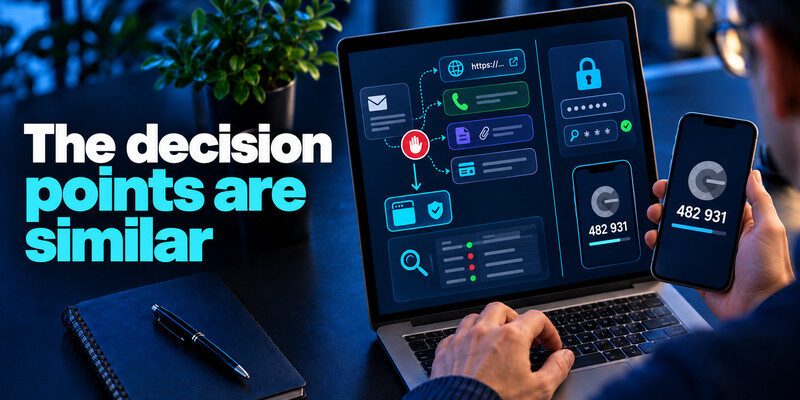
Both forms often ask you to cross from a message into a controlled URL, phone call, attachment, or payment instruction. Stop at that crossing and use a separate route. Inspect account activity and transaction records there.
Credentials and codes
A phished password can be reused. Make passwords unique and add MFA. can provide TOTP codes for compatible accounts, but do not enter a live code into a lookalike site or share it with a caller. Passkeys and security keys offer stronger site binding where supported. Targeted invoice fraud often uses social engineering to make an unauthorized payment request appear routine. Our guide on how to recognize social engineering attacks explains how attackers exploit familiar business details, impersonate trusted contacts, and create pressure to bypass normal verification procedures.
Money and access
MFA alone cannot prevent a legitimate employee from sending money to an attacker or granting a new user access. Use second-person approval, vendor verification, and change logs.
| If the request asks for… | Verify with… | Escalate when… |
| Account login | Saved service URL | Unknown successful session |
| MFA approval | Your own initiated sign-in | Prompt was unexpected |
| New bank account | Existing vendor record | Money sent or approval bypassed |
| Remote support | Official help desk | Tool installed or session granted |
What changes in organizational defense
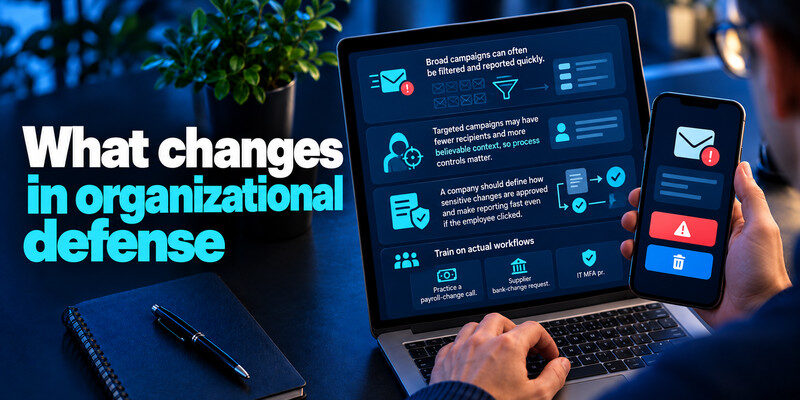
Broad campaigns can often be filtered and reported quickly. Targeted campaigns may have fewer recipients and more believable context, so process controls matter. A company should define how sensitive changes are approved and make reporting fast even if the employee clicked.
Train on actual workflows
Practice a payroll-change call, supplier bank-change request, and IT MFA prompt, not merely an email with bad spelling. Staff need permission to pause a senior-sounding request. Attackers may combine public professional information with exposed account data to personalize spear phishing messages. Our guide on what a credential leak is explains how usernames, passwords, and other account information can become exposed. Accurate personal details do not prove that a message is legitimate.
Keep evidence
Original messages, call times, requested changes, and transaction IDs help investigation. Do not circulate a live malicious link in a warning email.
Read more: What Is Social Engineering? The Human Side of Account Attacks
Respond after interaction

The label “spear” does not change the first response. Identify the exposure: credentials, code, device access, or payment. Change and revoke account access, contact IT or bank, and document the timeline.
If only a message arrived
Report it, verify the claim through the genuine service, and avoid unnecessary password changes unless a credential was entered, exposed, or used in an unknown session.
If a high-impact action occurred
Alert the institution or security team immediately. A fraudulent transfer or changed administrator access requires steps beyond a password reset.
A trusted password manager app can help generate unique passwords for different accounts and reduce credential reuse. Domain-aware autofill may also help identify unfamiliar login websites, although it cannot prevent every targeted phishing attempt.
Compare the same request in two campaigns
A mass email says “your payroll account expires” to thousands of recipients. A targeted email says “the payroll export for Tuesday’s hiring batch is ready” to one finance employee and names a real manager. Both can lead to the same fake sign-in form. The targeted context changes credibility, not the technical mechanism of a password capture.
Mass campaign response
Report the message, check the real payroll site, and avoid the link. If you did not interact, the account may be unaffected. A mail provider may filter similar copies for others.
Targeted campaign response
Report the original to security with the specific context. Verify the manager and document through known channels. If credentials were entered, revoke sessions and examine account actions, since a targeted attacker may have a clear next step.
A broad phishing message says every customer must update billing details. It can be cheaply sent to thousands of addresses with generic branding. A spear-phishing message to a finance manager names a real vendor, quotes a previous invoice, and asks for a specific account change. The first is often easier to spot because its context is thin; the second can pass a superficial familiarity check.
What changes in detection: For a generic lure, a suspicious domain, unexpected attachment, or broad greeting may be enough to pause. For a targeted lure, those signals may be absent. Verify the business process itself: is the payment account changing, is a file export requested, or is someone bypassing approval? A correct name or an old thread does not authenticate the new instruction.
What does not change: Both forms can use email, links, attachments, and fake sign-in pages. Both can be reported to a provider or workplace security team. Use an independently opened account to assess alerts and a known channel to confirm high-risk requests. MFA can reduce some account access, but real-time code relay and fraudulent payments require additional judgment.
A practical team drill: Write down one normal process for changing a vendor account and one for receiving shared files. In a drill, ask employees where they would verify each request without following the incoming link. The exercise should test the workflow, not shame an individual for failing to recognize a perfectly written message.
Why spear phishing can be hard to recognize
Public professional profiles, leaked contact lists, and compromised conversation histories can provide real project terms. The email may have correct grammar, timing, and participants. Instead of searching for a typo, focus on whether a new sensitive action has an independent authorization route.
Changed vendor details
The supplier relationship may be real. Call the preexisting vendor number and use second approval before updating bank records. A reply to the email is not independent if the mailbox is controlled.
New administrator request
A message from an apparent executive asking IT to add a new admin should go through the usual identity and change process. Seniority does not replace authorization.
Read more: Strong Password vs Passphrase: Which Should You Use?
Prevention beyond email filtering
Filters may block known links but miss a carefully tailored message. Unique passwords limit reuse, passkeys can resist fake-domain sign-in, and payment approvals catch transfers. Training should rehearse the actual workflow rather than only classify suspicious emails.
Escalation after a click
Ask what happened next: password, code, file, or payment. Report promptly and contain that path. The label “spear” does not change the need to revoke an active session or contact a bank.
Protect recovery
A targeted attacker may know which mailbox resets a valuable account. Secure that mailbox and check forwarding or recovery changes after suspected access.
Frequently Asked Questions
Which is more dangerous?
Either can cause serious harm. Spear phishing’s relevance can increase the chance of trust, but the outcome depends on the request and controls.
Can a text be spear phishing?
Yes. Targeting is about tailoring, not the channel.
Is business email compromise spear phishing?
It can involve targeted phishing and a compromised account, often to redirect payments. The terms describe overlapping aspects of an incident.
Do passkeys stop spear phishing?
They help resist lookalike login pages, but cannot stop a fraudulent payment instruction or every recovery-channel attack.
Final Thoughts
The practical difference in phishing vs spear phishing is how much context the attacker brings. Keep the same independent verification rule, and add strong approval controls where a tailored request could move money or access.
Next step
For accounts that still rely on TOTP, can hold the codes. Set it up from each real account’s security settings, keep recovery codes safe, and never type a live code into a page reached through a suspicious message.
