
Binance Hack 2026: Can Authenticator Protect Your Account?
Published October 30, 2026

The Binance security incident reported on October 30, 2026, has raised serious concerns about cryptocurrency account security. Binance estimated that approximately $6.3 billion in assets were affected, while around $3 billion had been frozen. The exchange said its preliminary investigation pointed to a compromised employee laptop, not a confirmed breach of users’ authenticator apps.
Short answer: Binance Authenticator can help protect individual accounts from unauthorized logins, but it cannot prevent every type of exchange-level security breach. If you use Binance, enable strong two-factor authentication (2FA), secure your email, review account activity, and remain alert to phishing scams exploiting the incident.
Understanding what happened—and what authentication can realistically prevent—is essential to protecting your cryptocurrency.
Binance Hack 2026: What Happened?
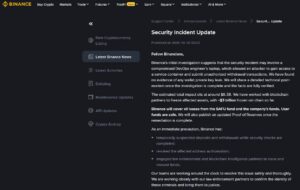
On October 30, 2026, Binance published an official security update concerning unauthorized cryptocurrency withdrawal transactions.
According to the Binance security incident announcement, preliminary findings suggest that an attacker may have compromised a DevOps engineer’s laptop.
The compromised device allegedly enabled access to a service container, allowing unauthorized withdrawal transactions.
Key facts about the incident
| Security incident detail | Reported information |
|---|---|
| Date | October 29–30, 2026 |
| Exchange | Binance |
| Estimated assets affected | Approximately $6.3 billion |
| Assets frozen | Approximately $3 billion |
| Suspected entry point | Compromised DevOps employee laptop |
| Wallet private keys | No evidence of leakage reported |
| User funds | Binance says user funds are safe |
Important: The estimated $6.3 billion affected is not the same as a confirmed final financial loss. The amount ultimately recovered, frozen, or lost remains subject to investigation.
Binance also temporarily suspended deposits and withdrawals, revoked the affected authorization, and contacted law enforcement and blockchain intelligence partners.
The company has stated that it intends to cover losses using its SAFU fund and company resources.
These findings remain preliminary. A detailed technical post-mortem is expected after the investigation is completed.
Why the incident matters to Binance users
The incident highlights an important distinction between exchange infrastructure security and personal account security.
Even when a customer uses strong authentication, an attack against an exchange’s internal infrastructure may create risks outside the customer’s control.
However, the event also creates opportunities for scammers to impersonate Binance support, distribute fraudulent security notices, and steal login credentials.
That makes personal security precautions especially important.
Was Binance Authenticator Compromised?
There is currently no confirmed evidence that Binance Authenticator or users’ authentication codes were compromised in this incident.
Binance’s initial statement identifies a possible infrastructure-level intrusion involving an employee device. It does not establish that attackers bypassed individual customer 2FA protections.
This distinction matters because different attacks require different defenses.
| Threat | Can Authenticator help? |
|---|---|
| Someone steals your Binance password | Yes. A second factor can block login attempts |
| Someone guesses your password | Yes. 2FA adds another verification requirement |
| A scammer requests your current OTP code | Partially. Shared or phished codes may still be abused |
| Malware steals a valid login session | Not reliably. Session theft can sometimes bypass a new 2FA prompt |
| Attackers compromise Binance’s internal withdrawal infrastructure | No. User 2FA cannot directly protect exchange backend systems |
The key takeaway: Binance Authenticator is an account-level security control, not a guarantee against exchange-wide attacks.
Users should continue using 2FA while recognizing its limitations.
How Binance Authenticator Protects Your Crypto Account
Binance supports authenticator-based two-factor verification, including BAuthenticator and compatible authentication apps.
These tools typically generate a six-digit time-based one-time password (TOTP) that changes periodically.
When an authentication challenge is required, the user must provide both their primary credentials and the additional verification factor.
This makes account takeover more difficult when attackers obtain only a password.
1. Adds protection against stolen passwords
Suppose an attacker obtains your Binance password through a data breach or a malicious website.
Without another authentication factor, that password could potentially provide account access.
With 2FA enabled, an additional verification challenge makes unauthorized entry harder.
For more information, read our guide to Binance 2FA authenticator.
2. Protects sensitive account actions
Depending on your Binance settings and account eligibility, additional authentication can be required for actions involving login, assets, account settings, and security management.
Binance also supports passkeys for eligible devices and accounts.
Passkeys are generally more phishing-resistant than manually entered OTP codes because properly implemented passkey authentication is bound to the legitimate website or application.
For further reading, see our explanation of Binance biometric authentication.
3. Reduces dependence on SMS verification
SMS authentication can be vulnerable to SIM-swapping attacks and certain mobile-network threats.
An authenticator app generates codes without relying on SMS delivery.
However, authentication apps still require a secure device and careful handling of setup keys.
A phishing website may trick users into entering a valid one-time code. For this reason, never share authentication codes with anyone claiming to represent Binance support.
7 Ways to Secure Your Binance Account After the Hack
The Binance hack 2026 is a reminder to review account protections before suspicious activity occurs.
The following actions address common account-takeover risks rather than the suspected internal cause of the reported incident.
1. Enable Binance Authenticator immediately
If your account currently relies only on a password, enable an authenticator app or supported passkey.
Open the official Binance application, navigate to Account → Security, and locate the authenticator settings.
Follow the verification process to connect an authentication app.
For detailed setup instructions, see how to add Binance Authenticator.
Security tip: Never share the authentication setup QR code, secret key, or generated OTP with anyone.
2. Enable passkeys when available
A passkey can help protect against phishing attempts involving fake login pages.
Binance supports passkey authentication for supported platforms, and certain accounts can customize verification requirements for important actions.
Check your Security → Passkeys settings to see which features are available.
Do not remove your existing recovery methods until you understand how to regain access if a device is lost.
3. Activate Binance anti-phishing codes
Binance allows users to configure a unique anti-phishing code that appears in supported official emails.
This helps distinguish certain legitimate messages from impersonation attempts.
To enable it, open Binance Security settings and locate Anti-Phishing Code.
A missing or incorrect code is a warning sign, but a matching code alone should never replace verification of the sender and destination.
Avoid opening account-security links from unexpected emails or messages.
4. Enable the withdrawal address whitelist
A withdrawal whitelist restricts withdrawals to addresses approved in your Binance settings.
This can reduce risks associated with unauthorized withdrawals to newly added destinations.
Visit your account’s withdrawal security settings to check whether the feature is available.
Review existing approved addresses carefully, especially if you suspect someone has already accessed your account.
5. Review devices, sessions, and API access
Sign in through the verified Binance application or website.
Inspect account activity, recent login attempts, recognized devices, and any API keys.
Remove unfamiliar devices and revoke unused API credentials.
Do not approve a new login or security change that you did not initiate.
For additional protection, follow these best account security practices.
6. Protect the email linked to your Binance account
Your email account may be involved in password recovery, notifications, and security verification.
Use a unique password and strong multifactor authentication for the associated email address.
Keep your device software updated and avoid installing unverified browser extensions.
Securing Binance without securing the connected email account leaves an important attack route exposed.
7. Avoid fake Binance hack recovery messages
Major security incidents often create opportunities for phishing.
Attackers may send messages claiming:
- Your Binance account must be verified immediately.
- You need to transfer assets to a temporary safety wallet.
- A special refund portal is available for affected customers.
- You must disclose your Authenticator code to restore withdrawals.
These are major warning signs, not instructions you should follow.
Do not transfer funds to an address presented by an unsolicited support contact. Never provide recovery keys, passwords, or live authentication codes.
Use official Binance channels to confirm announcements and contact support.
How to Enable Binance Authenticator
If you have not configured app-based verification, the following process describes the usual Binance setup flow.
Step 1: Open Binance Security settings
Sign in using the official Binance app.
Go to your account profile and select Security.
Step 2: Select Authenticator App
Find the authenticator option and choose to enable it.
Binance may require an existing verification method before allowing changes.
Step 3: Connect your authenticator
Binance displays a setup QR code or secret key.
Open a supported authenticator app and scan the QR code or enter the key manually.
If you need help understanding this process, read our Binance Authenticator QR code guide.
Step 4: Verify the generated code
Enter the current six-digit code into Binance’s official verification screen.
Once Binance confirms the setup, authentication challenges can use the new factor.
Step 5: Review recovery options
Check the supported recovery process and keep any required recovery information in a secure location.
Avoid saving authentication secrets in unencrypted screenshots or public cloud folders.
Binance’s official BAuthenticator setup guide provides additional instructions.
What to Do If Your Binance Account Is Compromised
The exchange incident does not automatically mean your individual account has been accessed.
However, unexpected login alerts, unknown devices, unauthorized trades, or unfamiliar withdrawal requests should be investigated promptly.
If you still have access
Use a trusted device and open Binance directly.
Review recent activity, change credentials where appropriate, revoke suspicious sessions or API keys, and contact official support.
If there is evidence of an active compromise, Binance provides an account-disabling option through its Security settings.
Disabling an account can restrict access and may require additional recovery steps, so use the official process carefully.
If your authenticator device is lost
Do not follow recovery links from strangers or social media accounts.
Binance offers an official 2FA reset process.
According to its 2FA recovery guidance, certain withdrawals and transfers may be restricted for up to 48 hours after resetting authentication devices.
You can also review our guide to Binance Authenticator reset.
You do not need to reset a functioning authenticator solely because an exchange-level incident occurred. Reset it when there is a specific security reason or trusted support guidance.
Frequently Asked Questions
Was Binance hacked on October 30, 2026?
Binance confirmed a major security incident involving unauthorized withdrawal transactions. Its preliminary investigation suggests that an employee’s compromised laptop may have provided access to an internal service. The company estimated approximately $6.3 billion in affected assets, with around $3 billion frozen. The final technical findings and financial impact had not yet been established at the time of this article.
Is Binance Authenticator still safe after the hack?
There is no confirmed evidence in Binance’s initial incident announcement that the authenticator system itself was compromised. App-based 2FA remains a useful protection against password-based account takeover, although it cannot prevent exchange infrastructure attacks or every phishing scenario.
Should I change my Binance Authenticator after the hack?
Not automatically. First check for unauthorized account activity, unexpected verification requests, or evidence that authentication credentials were exposed. If your setup key or device has been compromised, follow Binance’s official recovery or replacement procedure.
Can hackers bypass Binance 2FA?
Some attacks can defeat or circumvent certain 2FA protections. Real-time phishing can capture manually entered OTP codes, and malware may steal authenticated sessions. Passkeys offer stronger phishing resistance when properly implemented, but no authentication method guarantees protection against every threat.
Can I use Google Authenticator instead of Binance Authenticator?
Binance supports compatible authenticator-based verification methods. Both Binance Authenticator and Google Authenticator can provide time-based codes, although recovery options, device synchronization, and app features differ.
For a detailed comparison, see Binance Authenticator vs Google Authenticator.
Are Binance deposits and withdrawals working again?
Binance temporarily suspended deposits and withdrawals while conducting security checks. Service availability may change as the investigation progresses. Check the latest official Binance announcements rather than relying on an article published earlier in the day.
💡 Discover Helpful Guides: Binance 2FA Authenticator: Setup, Code Errors, Reset, and Security Guide
Final Thoughts: Strengthen Your Binance Security Without Panic
The Binance hack 2026 demonstrates why cryptocurrency security requires multiple layers of protection.
Binance Authenticator cannot prevent a compromise of exchange infrastructure, but it can help reduce the risk of unauthorized access to your personal account.
Users should prioritize strong authentication, phishing awareness, account activity reviews, withdrawal controls, and secure recovery methods.
Most importantly, do not let urgency surrounding the incident lead you to disclose credentials or transfer funds to an unverified destination.
Secure your account, verify official information, and stay alert to follow-up scams.
- Binance — Security Incident Update, October 30, 2026
- Associated Press — Binance Investigates Security Incident
- Binance — Account Security Tips
- Binance — How to Use BAuthenticator for 2FA
- Binance — How to Reset 2FA
