
What Is a Cold Wallet? Definition, How It Works, Types and Safety Guide
Published November 5, 2026
What is a cold wallet? A cold wallet is a crypto wallet that keeps your private keys offline, fully disconnected from the internet, so hackers, malware and phishing attacks cannot reach them remotely. Hardware wallets, metal seed backups, paper wallets and air-gapped computers are all common cold wallet formats, and together they make cold storage the go-to choice for protecting large or long-term crypto holdings.
Crypto gives you full ownership of your money, but it also gives you full responsibility for keeping it safe. Exchange breaches, wallet-draining malware and fake apps have cost users billions of dollars, and the community mantra “not your keys, not your coins” exists for a reason. This guide explains what a cold wallet is, how a cold wallet works step by step, which types exist, how cold storage compares with a hot wallet, and the real risks that many beginner guides skip.
What Is a Cold Wallet in Crypto?
A cold wallet, also called cold storage or an offline wallet, is any setup that keeps the private keys to your cryptocurrency isolated from the internet. A crypto wallet does not actually hold coins the way a leather wallet holds cash. Your balance is a record on a blockchain such as Bitcoin or Ethereum, and the wallet simply holds the cryptographic keys that prove you own that balance and allow you to move it. Whoever controls the keys controls the funds.
Because the keys inside a cold wallet never touch an online system, the usual attack routes (viruses, remote access tools, phishing links and malicious browser extensions) have nothing to grab. An attacker would need physical access to your device or your backup instead. That is why governments, banks, exchanges, businesses and everyday investors all rely on offline storage for their most valuable assets.
One detail is worth remembering: “cold” describes a state, not a specific product. A wallet is cold only while its keys stay offline. The moment a key is exposed to a connected device, that protection is gone.
Three building blocks sit behind every wallet, and understanding them makes the rest of this guide easier:
- Private key: a secret code that proves ownership and authorizes (signs) transactions. It must never be shared.
- Public key and address: the shareable part. You give your address to anyone who wants to send you crypto, and it reveals nothing that lets others spend your funds.
- Seed phrase (recovery phrase): a list of 12 or 24 random words that works as the master backup of your wallet. Anyone who can read it can take your money, and anyone who loses it, along with the device, loses access for good.
A cold wallet is designed to generate and store these secrets in an environment that is never exposed to the internet.
Read more: What Is a Hardware Wallet? A Complete Guide to Offline Crypto Security
Secure your accounts with fast, reliable two-factor authentication. Download now and protect your login in seconds.Download Authenticator App
How Does a Cold Wallet Work?
A cold wallet works by separating the place where your keys live from the place where transactions are broadcast. The keys stay offline and do the signing. A connected phone or computer only prepares the transaction and passes along the result. Sending crypto from a hardware-style cold wallet typically follows these steps:
- Create the transaction. On an internet-connected device or companion app, you enter the amount and the recipient address. This produces an unsigned transaction.
- Move it to the offline device. The unsigned data travels to the cold wallet through USB, Bluetooth, NFC, a QR code or an SD card.
- Verify and approve on the device. The amount and destination appear on the wallet’s own screen, and you confirm with a PIN or a physical button press.
- Sign offline. The device uses the hidden private key to sign the transaction internally.
- Broadcast the signed transaction. Only the signed approval, never the key, returns to the online device, which sends it to the blockchain network.
Because the private key never leaves the cold wallet, your funds can stay safe even if your phone or laptop is infected with malware. Modern devices add further layers: a tamper-resistant secure element chip that stores keys, a PIN that locks the device, and a wipe after several wrong PIN attempts, so a thief who steals the device still cannot easily get in.
Receiving crypto is simpler. You share the public address, which is safe to show, and funds arrive on the blockchain. A good habit is to compare the address shown on your computer with the one displayed on the device’s screen before you send anything, because malware can swap addresses copied to the clipboard.
A recovery phrase is often the most important backup for a self-custody wallet because it can be used to recreate the wallet’s cryptographic keys. If you are unfamiliar with recovery words, read our guide on what is a seed phrase to understand how wallet recovery works, how seed phrases differ from private keys, and why they must remain confidential.
Read more: How to Protect Your Seed Phrase: 10 Essential Tips
What Are the Types of Cold Wallets?
Cold storage comes in several forms. They differ in security, durability, cost and ease of use.
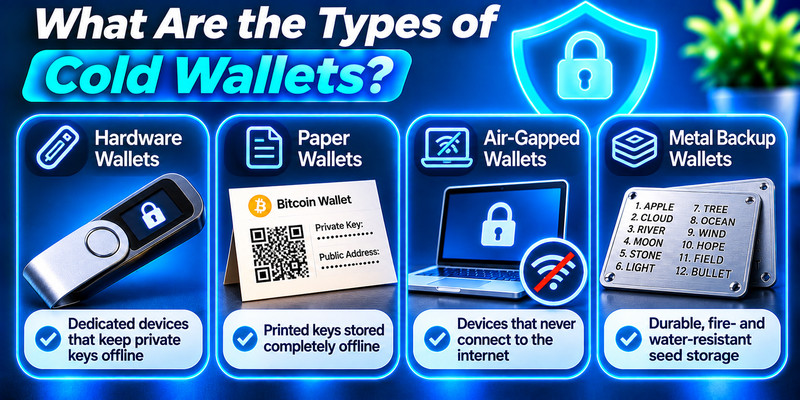
Hardware wallets
A hardware wallet is a dedicated physical device built to generate and protect private keys. It usually has a small screen and buttons for confirming transactions, and it pairs with a companion app on your phone or computer. Some connect by USB or Bluetooth, some work like a contactless card using NFC, and the most isolated models are air-gapped and exchange data only through QR codes scanned by a built-in camera. Well-known names include Ledger and Trezor, plus Bitcoin-focused options such as Coldcard, Passport and Bitkey. Prices typically run from about $50 to $200, and some premium models cost more. During setup the device generates a seed phrase so you can restore access on a new device if the original is lost or broken.
Offline (air-gapped) software wallets
An offline software wallet is a program installed on a computer that never connects to the internet. Think of it as the do-it-yourself version of a hardware wallet. You create an unsigned transaction on an online machine, carry it over by QR code or USB drive, sign it on the offline machine, and carry the signed result back to broadcast it. It is secure but slow and technical, so it suits advanced users. Electrum and Armory are examples for Bitcoin.
Paper wallets
A paper wallet is a physical record of your private key or seed phrase, written by hand or printed as a QR code. It is cheap and simple, but it burns, tears, fades and gets lost easily, and it has no built-in recovery. Spending from it usually means importing the key into software, which exposes the key to risk. Never use an online paper wallet generator, since you cannot know whether it steals keys, and avoid printers, which can store or leak data. Most experts now consider paper wallets outdated.
Metal wallets (metal backups)
A metal wallet is a steel or titanium plate, or a set of tiles, with your seed phrase stamped or engraved on it. It does the same job as paper but survives fire, floods and everyday wear. Keep in mind that it is usually just a backup, not a device that signs transactions, and the phrase should be generated offline on a hardware wallet or an air-gapped computer.
Sound wallets and deep cold storage
Sound wallets encode keys as audio files stored on discs or drives, decoded later with special tools. They are rare, fragile and offer little advantage over other options. Deep cold storage, used by institutions managing very large balances, makes access deliberately difficult, for example with vaults that need several steps and approvals to open.
Cold wallet types at a glance
| Type | How it works | Security | Convenience |
|---|---|---|---|
| Hardware wallet | Dedicated device with a secure chip signs transactions | Very high | Moderate |
| Air-gapped computer | Offline machine signs transactions | Very high | Low |
| Metal backup | Seed phrase engraved on steel | High (survives fire and water) | Low |
| Paper wallet | Key or seed written on paper | Medium, fragile | Low |
| Sound wallet | Key encoded as audio | Low to medium | Very low |
Read more: Best Cold Wallet for Crypto in 2026: Top Picks, Safety Tips and How to Choose
Cold Wallet vs Hot Wallet: What Is the Difference?
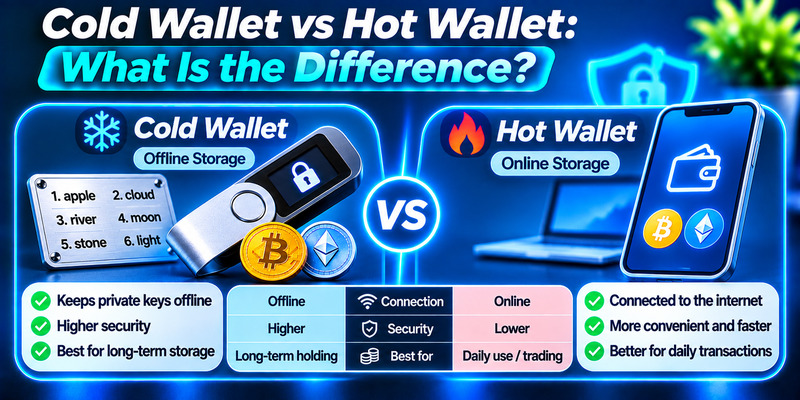
The main difference is internet connectivity. A hot wallet keeps its keys on an internet-connected device such as a phone, laptop, browser extension or exchange account. A cold wallet keeps them offline. Everything else, including speed, cost and risk, follows from that single choice.
| Feature | Cold wallet | Hot wallet |
|---|---|---|
| Internet connection | Offline | Always online |
| Remote hacking risk | Minimal | Present (malware, phishing, platform breaches) |
| Speed of transactions | Slower, extra signing step | Fast and instant |
| Cost | Often a device purchase | Usually free |
| Best for | Long-term, large holdings | Daily use, small balances, active trading |
| Examples | Ledger, Trezor, metal seed backup | Mobile apps, MetaMask, Trust Wallet |
Two clarifications help avoid confusion. First, “hot” describes connectivity, not control. A hot wallet can be custodial, where a company such as an exchange holds your keys, or non-custodial, where you hold them yourself. Second, an exchange account is not a cold wallet. Exchanges often use cold storage behind the scenes, but the app you log into is an online, custodial service.
If you plan to use a dedicated cold-storage device, follow our step-by-step guide on how to set up a hardware wallet. It covers genuine-device checks, official companion software, recovery backup verification, receiving-address confirmation, and safe test transactions.
What is a warm wallet?
A warm wallet sits between the two. It is connected to the internet but protected by extra approval steps, such as multi-signature requirements, spending limits or policy controls. Institutions often split funds into three tiers: a hot tier for small operational balances, a warm tier for assets that need controlled access, and a cold tier for deep reserves.
Is a hardware wallet the same as a cold wallet?
Not automatically. A hardware wallet is a device, while cold is a state. A hardware wallet behaves like a cold wallet when its keys stay offline and are used only to sign transactions. When you connect it to a decentralized app to approve something, it acts more like a warm wallet for that moment. The device still protects the key, but only your own careful review protects you from approving a malicious transaction.
What Are the Benefits of a Cold Wallet?
- Strong protection against online attacks. Offline keys cannot be reached by remote hackers, malware or phishing, which removes the biggest attack surface in crypto.
- True ownership. You control your keys, so you do not depend on an exchange or third party staying solvent, secure or online.
- Safe for the long term. Hardware devices and metal backups are built to last years, which suits a long-term holding strategy.
- Extra security features. Secure element chips, PIN codes, encryption, passphrases and tamper-evident packaging add layers beyond the offline design.
- Peace of mind. Even if your computer or phone is compromised, the keys remain out of reach.
- Institutional fit. Many financial institutions use cold storage to help meet requirements for safeguarding client assets.
Cold wallets reduce exposure to many online attacks, but fake wallet applications, malicious websites, and deceptive transaction requests can still put funds at risk. Follow our guide on how to avoid phishing scams to recognize fraudulent recovery requests, suspicious download links, and attempts to steal wallet secrets.
Read more: What Is Phishing? Meaning, Examples, and a Safe Response
What Are the Risks and Limits of Using a Cold Wallet?
- Loss and damage. If the device is lost, destroyed or its backup is missing, funds can be gone permanently. No company can reset your access.
- Physical theft. A cold wallet defends against online threats, not against someone walking off with an unprotected device or an exposed seed phrase.
- Inconvenience. Extra signing steps make frequent trading slow.
- Cost and learning curve. Quality devices cost money, and setup mistakes, such as generating a seed phrase on a compromised computer, can ruin the security benefits.
- User error and scams. Fake support agents, counterfeit devices and malicious approvals target people, not code.
- Inheritance planning. If loved ones cannot find your backup, they cannot recover your funds.
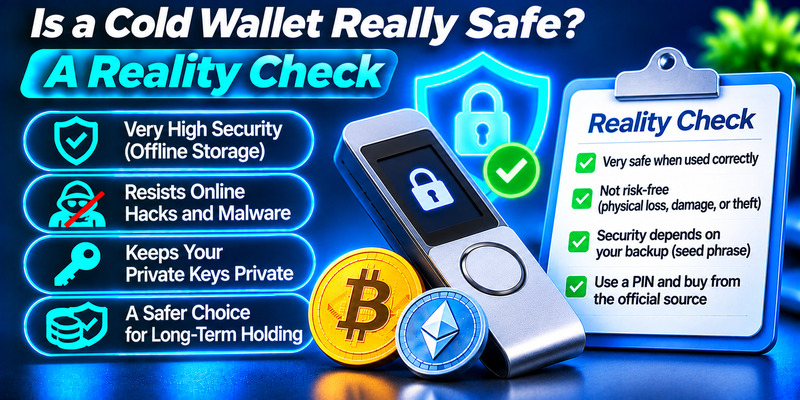
Is a Cold Wallet Really Safe? A Reality Check
A cold wallet is much safer than a hot wallet against remote attacks, but it is not unbreakable. Engadget reported a 2026 incident in which a software bug in some Coldcard devices produced weak, predictable private keys, letting attackers rebuild wallets and drain thousands of Bitcoin even though the devices stayed offline. The lesson is that design flaws and poor randomness matter as much as isolation, and that using well-reviewed hardware, updating firmware and adding a passphrase all help.
The 2025 Bybit theft, roughly $1.5 billion, teaches a second lesson. Attackers manipulated a signing process rather than stealing keys outright, which shows that the approval step matters as much as the storage layer. Always read what you are signing on the device itself.
Do You Need a Cold Wallet?
It depends on how much you hold and how often you trade. A cold wallet is a smart move if you:
- plan to hold crypto for months or years without touching it,
- hold an amount you would be uncomfortable losing in a single breach,
- have already experienced a security incident, or
- simply want maximum control regardless of the amount.
If you trade daily or hold only a small amount you can afford to lose, a reputable hot wallet is more practical. A simple rule many people follow: keep in a hot wallet only what you would carry as pocket cash, and move the rest into cold storage. Using both is common and sensible.
Read more: How to Recover a Lost Crypto Wallet: The Complete 2026 Guide
How to Choose a Cold Wallet
- Security design: look for a secure element chip, strong encryption, and ideally open-source or independently audited code.
- On-device verification: choose a device with its own screen so you can confirm the address and amount.
- Supported coins: confirm the wallet supports every asset you own now or plan to own.
- Reputation and support: pick established manufacturers with a track record and regular firmware updates.
- Backup and recovery: make sure restoring from a seed phrase is straightforward, and consider a metal backup.
- Price: compare the cost with the value you plan to protect.
- Where you buy: purchase only from the manufacturer or an authorized reseller, since a tampered device may arrive with a seed phrase someone else already knows.
Cold Wallet Best Practices
- Write your seed phrase on paper or metal, never digitally. No photos, cloud notes, password managers or screenshots.
- Store backups in more than one secure place, away from the device itself, such as a fireproof safe.
- Add a strong PIN and, ideally, a passphrase.
- Verify every address and transaction on the device screen.
- Update firmware from official sources only.
- Never type your seed phrase into a website or app, and ignore anyone who asks for it. Real support teams never need it.
- Practice a small test transaction and a recovery before moving large amounts.
- Plan for emergencies so trusted people can find your instructions if something happens to you.
How Two-Factor Authentication Complements a Cold Wallet
Most people use a cold wallet together with online accounts: exchanges for buying and selling, email for recovery, and hot wallets for daily spending. Those accounts are the weak link if they are not protected. Turn on two-factor authentication (2FA) with an authenticator app rather than SMS codes, because app-based one-time codes are harder to intercept or SIM-swap. 2FA does not replace a cold wallet, since it protects logins and not your private keys, but the two defenses work well together: the cold wallet guards your long-term savings, and 2FA guards the accounts you use to reach the market.
Frequently Asked Questions About Cold Wallets
What is the point of having a cold wallet?
The point of a cold wallet is to protect your private keys from online threats while keeping full control of your crypto. By staying offline, the keys cannot be reached by hackers, malware or phishing, and you do not rely on an exchange to keep your assets safe. It is especially useful for long-term savings and large balances you do not need to access often.
What are the disadvantages of a cold wallet?
The main disadvantages are lower convenience, upfront cost and the responsibility you take on. Transactions need extra steps, good devices cost money, and setup can be technical. If you lose the device and the seed phrase, no one can recover your funds. A cold wallet also does not stop physical theft or scams that trick you into approving a bad transaction.
Should I put my XRP in a cold wallet?
If you hold a meaningful amount of XRP for the long term, moving it to a cold wallet from an exchange is a common way to take self-custody and cut exchange risk. Check that your chosen device supports XRP, remember that the XRP Ledger requires a small reserve to activate an account (confirm the current amount in the official XRPL documentation), and test with a small transfer first. If you trade XRP often, keep only the working amount on an exchange or in a hot wallet. This is general information, not financial advice.
Is a cold wallet 100% safe?
No. A cold wallet is very safe against remote hacking, but nothing is 100% safe. Risks include losing the device or seed phrase, physical theft, counterfeit or tampered devices, firmware or randomness bugs, and signing a malicious transaction. Using a trusted manufacturer, a PIN and passphrase, offline seed backups in separate locations, and on-device verification reduces these risks greatly.
What happens if I lose my cold wallet?
If you saved your seed phrase safely, you can restore your funds on a new compatible device. Without the phrase, the funds are lost permanently, so make and test your backups on day one.
Are MetaMask and Coinbase Wallet cold wallets?
No. Both are hot wallets that run as apps or browser extensions on internet-connected devices. They are convenient for everyday use but are not offline storage.
A cold wallet keeps your private keys offline, which shuts down the most common ways crypto is stolen. It is best for long-term and larger holdings, while a hot wallet remains useful for small, everyday amounts. Choose a reputable device, protect your recovery phrase like cash and gold combined, verify every transaction on the device, and secure your connected accounts with an authenticator app. Used this way, a cold wallet offers some of the strongest protection available in crypto.
