
Data Breach Notification Meaning: What the Notice Actually Tells You
Published October 27, 2026
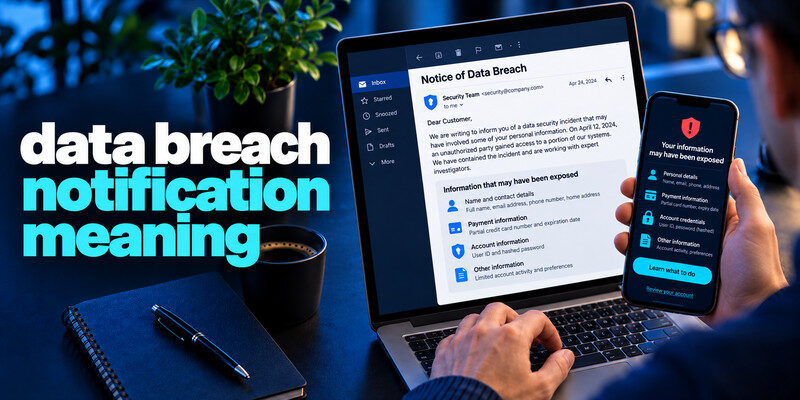
A data breach notification meaning is that an organization believes your information may have been exposed in a security incident. It is a warning about a particular event, not proof that someone has entered your account or stolen your identity. Read the notice for the affected service, dates, information types, and actions the organization recommends. Then verify it through the company’s own website or support channel before clicking any email link. The right response depends on whether the exposed material was a password, payment card, identity document, or contact information.
Do this now
- Verify the sender through the organization’s own site.
- Note the incident and notice dates.
- Match each exposed data field to a specific account, card or identity response.
Read the four facts before taking action
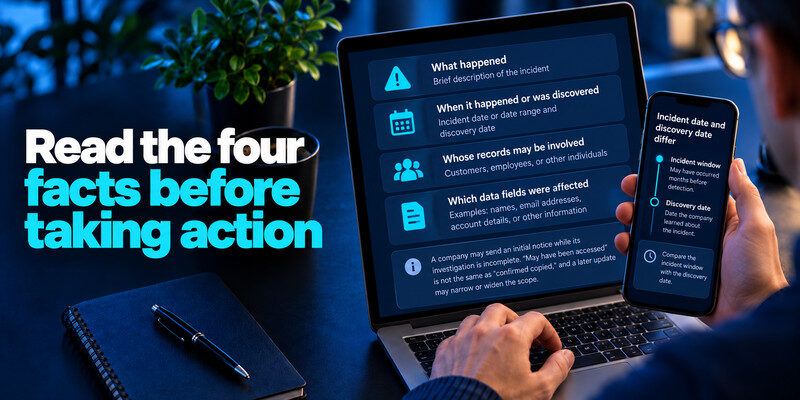
A useful notice should tell you what happened, when it happened or was discovered, whose records may be involved, and which data fields were affected. A company may send an initial notice while its investigation is incomplete. Preserve that distinction: “may have been accessed” is not the same as “confirmed copied,” and a later update may narrow or widen the scope.
Incident date and discovery date differ
The incident may have occurred months before detection. Compare the incident window with your password changes and account activity, not merely the date the email arrived. A delayed notification does not automatically mean the information is new to an attacker.
Read more: What Is a Data Breach? Meaning, Examples, and What to Do
Your account may be included by category
Some notices go to all customers when the company cannot identify exactly whose records were viewed. Others identify a specific person and data class. Read the exact language. If you are unsure whether you are affected, use the official support route and ask whether your own records were in the affected set.
| Notice phrase | Reasonable interpretation | What to check |
| Potentially affected | Investigation has not settled every record | Official updates and account activity |
| Email addresses exposed | Contact data was involved | Phishing attempts and reuse elsewhere |
| Passwords or hashes involved | A login secret may be at risk | Unique replacement and sessions |
| Payment data involved | Card misuse may be possible | Issuer guidance and transactions |
Open the organization’s known website before reading the email closely. Search for an incident page with the same date and compare the scope, affected fields, and contact channel. A personalized notice can say your record was involved even when the public statement gives only a broad population. If the website is silent, call a number from an old statement or official app; do not use a phone number embedded only in the message.
Keep three dates separate: The breach date is when unauthorized access may have occurred; the discovery date is when the organization learned of it; the notice date is when it told you. A months-long gap does not by itself prove concealment. It does mean you should review the account history across the incident window and current sessions, especially if the exposed fields include usable credentials. Save the version of the notice you relied on because its scope can change.
Decide whether an offered service helps: Credit monitoring is relevant to some identity-data exposures. It does not replace changing a compromised password, disputing a card transaction, or examining an email account’s forwarding rules. Check the offer’s start date, term, provider, and information it requires from you. If enrollment asks for data not described in the official notice, verify it directly with the organization.
Write a short incident record: Record affected account, data categories, actions, dates, and confirmation numbers. Do not put live passwords or recovery codes in the record. This is especially useful when the organization issues a later update that adds a field such as a date of birth. You can then see which action remains open instead of resetting unrelated accounts repeatedly.
Secure your accounts with fast, reliable two-factor authentication. Download now and protect your login in seconds.Download Authenticator App
Verify the notification independently
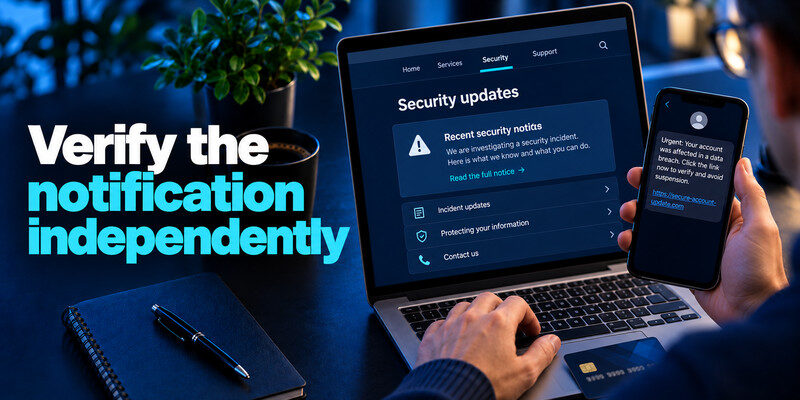
Scammers copy breach language to create urgent phishing messages. Open the organization’s app or type its known website yourself. Look for the notice in its security or incident area; call the number on a card or statement when financial data is involved. Do not provide a current password, one-time code, or recovery code to a caller who claims to be “helping with the breach.”
If the notification does not confirm whether your specific records were affected, use the organization’s official support channel and review available breach information. Our guide on how to check if your data was breached explains how to investigate exposure without assuming that every reported incident involved your personal information.
Compare more than the logo
A convincing logo and sender display name are easy to copy. Check the real sender address and the linked destination, but do not rely on a visual inspection of a shortened URL. An independently reached official page or in-app notification is stronger confirmation.
Keep the original without forwarding secrets
Save the date, subject, incident reference, and official support response. If you need to report a suspected fake, use the mail service’s report control. Redact account numbers and private data before sharing screenshots. The evidence may matter if a later notice changes the stated scope.
Match the exposed field to the response
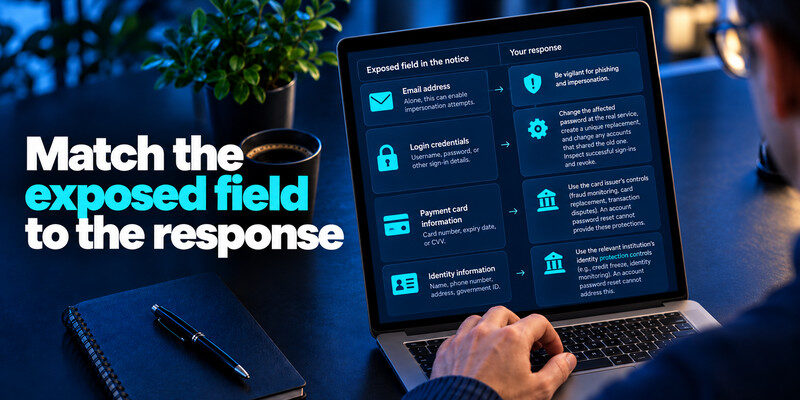
The notice’s data inventory is the central decision point. An email address alone calls for vigilance against impersonation. A current password calls for replacement anywhere it was reused. Payment or identity information needs the relevant institution’s controls, which an account password reset cannot supply.
Login credentials
Change the affected password at the real service, create a unique replacement, and change any accounts that shared the old one. Inspect successful sign-ins and revoke unfamiliar sessions. If a TOTP method is offered, can generate codes; keep backup codes separate and never read a live code to a caller. A passkey or security key may be a stronger phishing-resistant choice where supported.
Payment or identity information
Contact the card issuer or bank through its official channel and review transactions. For government identifiers or other identity data, use the FTC’s identity-theft guidance to decide whether a credit freeze or other measure applies to you. A monitoring subscription cannot make a leaked identifier secret again.
| Exposed category | First action | Follow-up |
| Email/contact data | Verify suspicious messages independently | Review recovery addresses |
| Password | Replace every reused copy | Revoke sessions and add MFA |
| Payment card | Contact issuer | Review transactions and alerts |
| Identity records | Use official identity-theft guidance | Watch for misuse and notices |
Read more: Check Email Data Breach Free Online: Fast, Safe Options
Separate a breach from an account takeover
A company database may have been exposed while your individual account remains intact. Conversely, your account could be phished without appearing in any public breach list. Check the service’s sign-in history, connected apps, recovery changes, and transactions for evidence of account access.
A failed sign-in is not a successful one
An alert about a failed attempt can mean your email is known. It does not prove a current password was accepted. Still inspect the event through the real service; verify that your password is unique and MFA is active.
An unknown successful session needs containment
Use a trusted device to change the password, sign out other sessions, remove unauthorized recovery methods, and review what was done. For work accounts, contact the administrator promptly. A password change may not revoke every active token, so use the provider’s explicit session controls.
Because breach notices often arrive by email, attackers may imitate them to steal passwords or verification codes. Our guide on how to secure your email account explains how to review recovery settings, suspicious activity, and sign-in protection before responding to an unexpected security message.
Understand what a breach checker can add
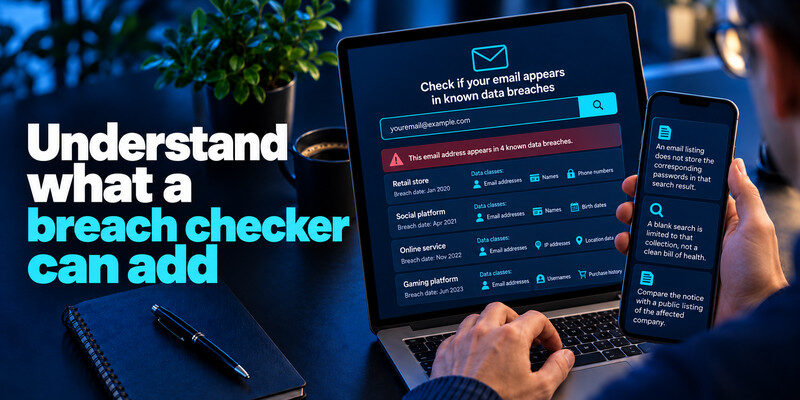
Have I Been Pwned can show whether an email address appears in its known breach collection and list data classes for each entry. Its FAQ explains that an email listing does not store the corresponding passwords in that search result. A blank search is limited to that collection, not a clean bill of health.
Compare the notice with a public listing
The affected company’s notice can be more specific about your record, while a public checker can provide historical context. The two may be published at different times. Do not dismiss the official notice because a public database has not yet indexed the incident.
Avoid “scan your password” impostors
Never type a live password into an unfamiliar breach site. Use your trusted password manager’s compromised-password check or the genuine Pwned Passwords service with its documented privacy mechanism. A search result should not demand a one-time authentication code.
Read more: What Is a Credential Leak? Passwords, Tokens, and Recovery Secrets
Respond if the notice is incomplete
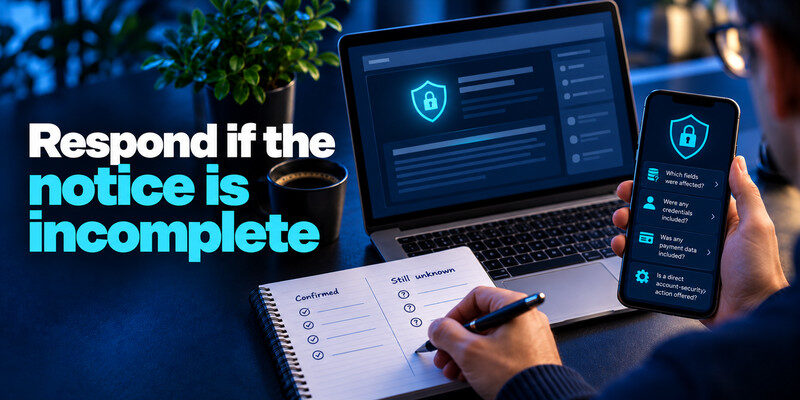
Write down what is confirmed and what remains unknown. Ask the company which fields were affected, whether any credentials or payment data were included, and whether it is offering a direct account-security action. Revisit its official update page rather than relying on copied headlines.
Prioritize reversible protections
You can change a reused password, turn on MFA, and check sessions while the investigation continues. A credit freeze is a more consequential but often appropriate step for certain identity exposures; consult official guidance for your situation. Avoid paying for a vague “dark web cleanup” that promises to erase circulated data.
Watch for a second wave
A genuine breach often inspires fake compensation and “verify your account” messages. Treat later email and texts as separate claims. Navigate to the company independently, and compare case numbers and dates with the official page.
Ask whether your own record was confirmed in scope, which exact data classes were involved, whether credentials were usable, what time period the investigation covers, and how it will notify you of changes. A careful company may not know every answer immediately. Record the response and distinguish a confirmed fact from an estimate.
If support cannot identify your record: Apply low-cost protective steps such as checking sessions and replacing reused credentials while watching official updates. Avoid submitting more sensitive information to a third-party site to “prove” you were affected. The company may later issue a narrower personalized notice.
If the notice offers monitoring: Read which identifiers are monitored, for how long, and whether you must provide more data. A monitoring offer can be useful for particular identity exposures, but it is separate from revoking sessions, contacting a card issuer, or changing a credential. Do not interpret enrollment as the entire response.
If the notice confirms that passwords or password hashes were involved, replace any affected or reused passwords with unique credentials. A trusted password manager app can help generate strong replacements, identify reused passwords, and manage your updated logins without relying on memory.
Work through three notice scenarios
A notice is actionable only after the affected fields and your own account status are separated. Imagine a retailer says names and email addresses were exposed, a software service says hashed passwords may be involved, and a health provider says identity and medical records may have been viewed. Calling all three “a breach” is accurate but does not produce one universal response. The first may lead to targeted phishing; the second to credential replacement and session review; the third to privacy and identity steps under the provider’s instructions.
Retailer with contact details only
You do not need to assume the mailbox was entered. Open the retailer’s site yourself, read its current notice, and examine suspicious follow-up messages carefully. If the account uses a reused password, change it because reuse is a separate weakness even if the notice does not confirm password exposure. Check saved shipping addresses and payment methods if you see actual account activity.
Password-containing incident
The word “hashed” describes a storage format, not a promise that the password is safe forever. If the service recommends a reset, do it at the real site and replace any reused copies. Determine whether the old credential was still active during the incident window. Check unknown successful sessions and revoke them explicitly where the service allows.
Identity or medical fields
A password reset does not protect an identity number or medical record already copied. Follow the provider’s individual notice, the relevant institution’s advice, and official identity-theft resources. Keep case numbers and dates; if a later update names additional fields, revise the response.
Read more: Best Free Password Manager: What You Get Without Paying
Frequently Asked Questions
Does a breach notification mean my password was stolen?
Only if the notice says a password or related login secret was involved, or another trusted source flags the password. Read the data fields. If you reused a password or see suspicious access, replace it even while awaiting more detail.
Why did I receive the notice long after the incident?
Discovery, investigation, and notification happen at different times. The company may need time to determine affected records. Compare the incident window with your own account history and follow later official updates.
Is a free monitoring offer required?
No. Assess what it covers and whether the exposed data calls for that kind of monitoring. You can still change passwords, check accounts, contact financial institutions, and use official identity-theft resources without accepting an offer.
Should I delete my account?
Deletion may reduce future data stored with a service but cannot retrieve already exposed copies. First secure the account, export anything needed, inspect payments and linked services, and then consider deletion under the provider’s retention terms.
Final Thoughts
The meaning of a data breach notification lies in its scope. Verify the notice, identify your exposed data types, distinguish exposure from actual account use, and take the action that matches each field. Keep checking official updates as the investigation develops.
Next step
If the affected service still uses time-based codes, set up after changing a compromised password. Scan the QR code from the real account’s security page and store its backup codes separately.
