
VPN vs Proxy in 2026: Which Is Better for Privacy, Security, and Speed?
Published October 30, 2026
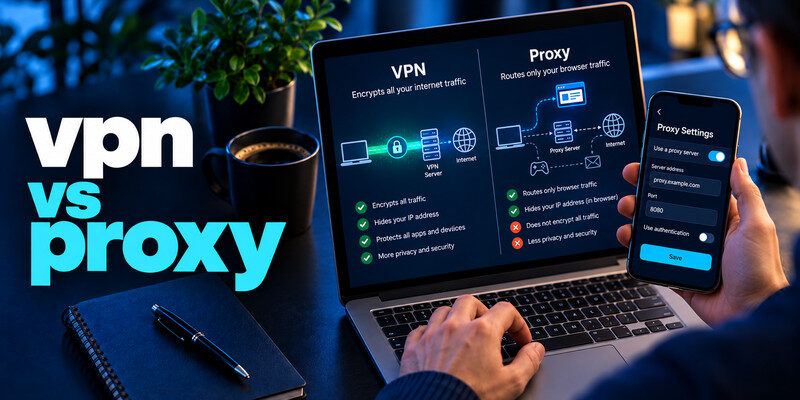
Quick answer: A trustworthy VPN is usually better for everyday privacy and public Wi-Fi protection because it encrypts the connection between your device and the VPN server and typically covers multiple apps. A proxy usually redirects traffic from a configured browser or application, making it useful for IP-address changes, testing, or narrowly scoped access. Some secure proxies also encrypt connections, so the answer depends on the technology and configuration.
The vpn vs proxy decision can feel confusing because both tools can make websites see a different IP address. But hiding an IP address is not the same as protecting all network traffic. The scope of protection, trust in the operator, and how applications handle DNS requests all matter.
This vpn vs proxy guide draws on Mozilla, MDN, the Electronic Frontier Foundation (EFF), and internet standards to explain privacy, security, and practical use cases.
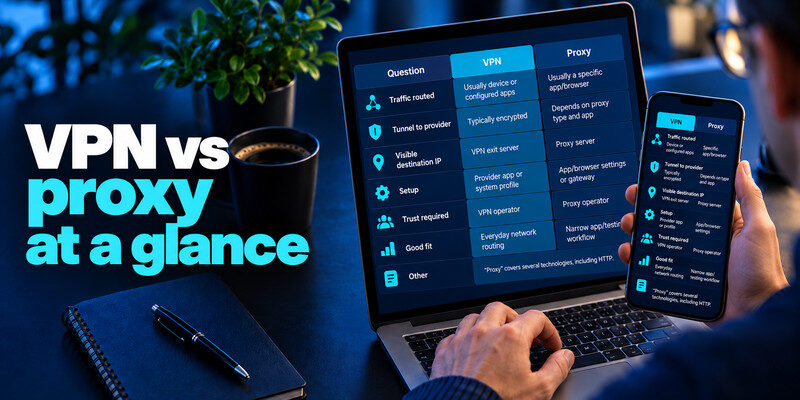
1. VPN vs Proxy: Quick Comparison
Here is the essential difference between vpn and proxy services: a typical consumer VPN creates an encrypted tunnel for device traffic, while a conventional proxy relays selected application requests. Neither solution makes you automatically anonymous.
| Feature | VPN | Conventional proxy |
|---|---|---|
| Main function | Creates a protected route through a VPN server | Forwards selected requests through an intermediary |
| Encryption | Encrypts device-to-VPN-server traffic | Depends on proxy type and connection; not inherent in SOCKS5 |
| Coverage | Commonly device-wide; settings may exclude apps | Usually one browser, app, or configured network route |
| IP masking | Yes, for routed traffic | Yes, for proxied traffic |
| DNS handling | Often routed through the VPN, depending on settings | Can leak through a local resolver if misconfigured |
| Typical use | Public Wi-Fi, privacy, remote access | Browser-only access, testing, routing selected apps |
| Performance | Depends on protocol, server load, and distance | Depends on proxy type, server load, and distance |
| Main risk | Trusting the VPN provider | Trusting the proxy operator and missing unproxied traffic |
Bottom line: For most nontechnical users, a reputable VPN is easier to configure consistently across apps. A proxy can be the more precise tool when only one application should use a different network route.
Match traffic coverage to the problem you need to solve.
🗺️ Browse How-To Guides: Best No Log VPN in 2026: 6 Privacy-Focused Services Compared
2. What Is a VPN and How Does It Work?
A virtual private network (VPN) connects your device to a remote VPN server through an encrypted tunnel. Websites generally see the server’s public IP address rather than the original address assigned by your network provider.
A standard consumer VPN connection follows four basic steps:
- You launch the VPN client and connect to a chosen server.
- Your device establishes an encrypted connection to that server.
- The server forwards your requests to websites and online services.
- Replies return through the server and encrypted tunnel to your device.
In a typical setup, the VPN handles traffic from your browser, messaging apps, and other applications. Split tunneling may deliberately exclude selected apps, so coverage is not universally absolute.
VPN protocols such as WireGuard and OpenVPN encrypt the client-to-server connection. In a vpn vs proxy decision, that built-in tunnel is a defining difference.
What Can a VPN Actually Hide?
A VPN can conceal your original public IP from websites. Your provider can still detect your connection to a VPN server and approximate data volume.
It does not erase cookies, stop all browser fingerprinting, or prevent a website from recognizing you after you sign in. A VPN changes which party you trust; it does not remove the need for trust.
The EFF’s VPN guide, reviewed in July 2026, emphasizes that VPN services are not complete anonymity tools. That warning matters whenever a vpn vs proxy article claims one button makes users invisible.
3. What Is a Proxy Server and How Does It Work?
A proxy server forwards requests to a destination, potentially showing its own IP instead of yours. This vpn vs proxy routing difference is important.
Imagine configuring a browser to use a proxy. Its website requests pass through the intermediary, but an unrelated app may still connect directly. That difference in scope is critical.
The term “proxy” covers several distinct technologies.
HTTP and HTTPS Proxies
An HTTP forward proxy can handle web requests and enforce policies, including filtering, access control, or caching. An HTTP proxy can also use the CONNECT method to establish a tunnel to an HTTPS website.
With CONNECT, the browser can maintain a TLS-encrypted HTTPS session to the destination while the proxy relays its traffic. It is inaccurate to say that every proxy strips away HTTPS encryption.
Some secure browser proxies also encrypt browser-to-proxy traffic.
SOCKS5 Proxies
SOCKS5 operates at a lower level than an HTTP-specific proxy and can relay multiple kinds of application traffic. RFC 1928, published in 1996, specifies TCP and UDP-associated operations.
However, SOCKS5 does not automatically encrypt the relayed content. Encryption must come from the application, a transport layer, or an additional tunnel.
Forward vs. Reverse Proxies
A forward proxy serves clients; a reverse proxy serves websites, often supporting caching or load balancing.
When discussing vpn vs proxy for consumers, the relevant comparison is usually a personal VPN against a forward proxy, not a reverse proxy protecting a company’s servers.
The MDN guide to proxies and tunneling explains these distinctions in detail.
4. VPN vs Proxy: Privacy, Encryption, and Security
For people focused on protecting data, this is the most important vpn vs proxy comparison. Three questions matter: which traffic is routed, what is encrypted, and who can observe the connection?
Encryption Is Not the Same as IP Masking
An ordinary proxy may change the apparent IP address while leaving its client-to-proxy connection without a dedicated encrypted tunnel. If the application already uses HTTPS, its web content can still be encrypted from browser to website.
A VPN adds an encrypted connection between your device and its server. This shields the routed traffic from straightforward inspection by the local Wi-Fi operator or internet provider, although they can observe some connection metadata.
HTTPS is important with either tool. The VPN server is not automatically the final encryption endpoint for the website itself.
Google’s archived HTTPS report, last updated August 2024, showed 94% of Google traffic from the United States and 99% from Belgium was encrypted. These are historical Google-only measurements, not 2026 internet-wide figures.
DNS and WebRTC Leaks
A browser can proxy web requests while using ordinary DNS resolution. Your network provider may then see domain lookups.
WebRTC behavior also depends on browser, permissions, and network settings.
A properly configured VPN often handles DNS for routed traffic. However, neither product is immune to leaks or configuration mistakes.
Logging and Trust
Both providers may possess information about your connections. Read their privacy policies, retention periods, ownership details, and independent security assessments where available.
The Federal Trade Commission warns that some VPN apps monetize user information through advertising or third-party sharing. A proxy operator should be evaluated with the same skepticism.
A trustworthy provider is more important than a dramatic claim of “100% anonymity.” In the vpn vs proxy debate, good implementation and transparent operations matter more than a label.
💡 Discover Helpful Guides: Best VPN for Privacy in 2026: 5 Most Private VPNs Compared
5. VPN vs Proxy: Speed, Pricing, and Performance
Is a proxy always faster? No. Although encryption creates some computational work for a VPN, real-world performance depends heavily on server capacity, distance, routing, congestion, and the application.
A proxy may be efficient for narrow tasks, but a quality VPN can outperform a congested proxy. Test vpn vs proxy performance under comparable conditions.
There is no credible universal speed percentage that proves one category is always faster. To compare fairly, test both services from the same connection, at similar times, and with nearby endpoints.
Streaming and Location Changes
Both tools may provide an IP address in another region. Neither guarantees access to a specific streaming catalog: platforms can detect hosting networks or block shared IP addresses, and licensing rules may limit content availability.
A VPN commonly covers the streaming application itself, whereas a browser-configured proxy may affect only browser playback. Smart TVs and gaming consoles can require different setups.
Cost and Convenience
Free web proxies can seem attractive because they require little setup. Yet they may provide weak privacy disclosures, unstable performance, or crowded servers.
Paid proxies suit targeted workflows; paid VPNs often suit broader everyday use.
In a vpn vs proxy cost comparison, consider both subscription price and the time needed to configure, verify, and troubleshoot traffic routing. A low-cost tool is not good value if it creates hidden security gaps.
6. Which Should You Choose for Different Activities?
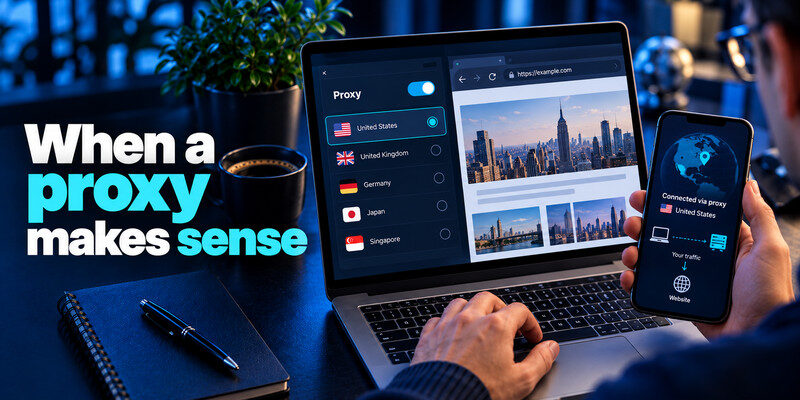
The question vpn vs proxy which is better depends on which traffic you need protected. A clear vpn vs proxy use-case checklist helps.
Public Wi-Fi and Everyday Privacy
Choose a reputable VPN if your goal is consistent protection when moving between cafes, hotels, and other networks you do not manage. It generally provides a more straightforward encrypted path for apps beyond the browser.
Still, modern HTTPS already protects website content in transit, and a VPN cannot block phishing or stolen credentials. The value of the VPN is additional network privacy, not magic protection.
A Single Browser or Testing Application
Choose an appropriate proxy if you need only one browser or test environment to use a different route. Developers may use forward proxies to inspect requests, verify regional site behavior, or reproduce network conditions with permission.
Remote Work and Corporate Systems
Follow your employer’s approved architecture. Organizations may use VPN gateways, authenticated proxies, zero-trust access systems, or combinations of these technologies.
Protect remote-access accounts with multi-factor authentication. For related setup concepts, see Google Authenticator and OpenVPN, noting that each organization’s actual configuration may differ.
Gaming, Downloads, and Video Calls
A VPN may cover more apps, but a browser proxy might not affect a game or video-call app.
If you only want to change one application’s route, a proxy may be simpler. If you want broad encrypted routing, a VPN is usually the better fit.
For readers deciding on a vpn or proxy solution, first write down exactly which apps need routing. That single check prevents many configuration mistakes.
7. Free VPNs and Free Proxies: Are They Safe?
Free is not automatically unsafe; paid is not automatically trustworthy. Any vpn vs proxy safety assessment should prioritize data practices and safeguards.
Check operator identity, logging, privacy terms, encryption, and app permissions.
Never enter sensitive credentials into an unknown web proxy that can read or modify the page content. A TLS tunnel can limit what an intermediary sees, but an untrusted proxy website that fetches and re-renders pages may behave differently from a standard browser’s HTTPS connection.
Be cautious of apps promising unlimited anonymity or guaranteed access to every blocked service. The EFF and FTC both explain why those claims are misleading.
For account security, a VPN is not a substitute for a two-factor authentication app. You can also read is an authenticator app safe when evaluating your login protections.
The vpn vs proxy safety decision therefore involves two layers: protect the connection, then protect the accounts used through it.
8. How to Set Up and Test Your Connection

You should never assume that a service works correctly just because its app says “connected.” Use a consistent vpn vs proxy test to verify routing.
Testing a VPN
- Install the provider’s official application and review its privacy policy.
- Connect to a server and enable the kill switch if supported.
- Check your public IP address before and after connecting.
- Check DNS behavior and test browsing, messaging, and any essential apps.
- Disconnect or switch networks to see what happens when the tunnel drops.
Testing a Proxy
- Configure the proxy only in the intended browser or application.
- Verify which proxy protocol and authentication method you are using.
- Check the apparent public IP address in that application.
- Compare it with another app that is not configured to use the proxy.
- Verify DNS behavior and whether HTTPS certificates remain valid.
Do not ignore certificate warnings or install an unfamiliar root certificate just to make a proxy work. In managed workplaces, follow approved inspection policies and seek help from your IT team.
If you use OpenVPN or another organization-controlled remote access system, also secure the associated login with approved MFA. You can review SMS vs authenticator app when comparing verification methods; phishing-resistant authentication is preferred where available.
9. VPN vs Proxy FAQs and Final Verdict
What is the main difference between a VPN and a proxy?
A typical consumer VPN encrypts routed traffic between your device and a VPN server, often across multiple applications. A conventional proxy relays traffic for the browser or app that uses it. Secure HTTPS proxies are an exception to the simplistic claim that proxies never encrypt traffic.
Does a proxy hide my IP address?
Usually yes, for the traffic actually routed through it. Other applications may still reveal your ordinary public IP address, and the proxy operator can potentially observe connection information.
Which is better for privacy in 2026?
In a vpn vs proxy 2026 comparison, a reputable VPN is generally easier to use for device-wide protection. A well-designed secure browser proxy can be appropriate when you only need browser-level privacy. Read the threat model and privacy policy rather than trusting marketing language.
Does SOCKS5 encrypt my traffic?
No, not inherently. SOCKS5 supports traffic relaying and authentication methods, but encryption must be supplied separately. HTTPS can protect web contents traveling through a SOCKS5 connection.
What about browser features labeled “VPN”?
Names can be confusing. Mozilla’s 2026 Firefox privacy notice describes a browser feature labeled “VPN” that uses a proxy and does not route traffic from other device applications. Check the actual coverage instead of assuming every product bearing “VPN” protects the entire system.
Is a VPN or Proxy Enough to Stay Anonymous?
No. Account sign-ins, cookies, GPS permissions, browser fingerprints, and device identifiers may still connect online actions to you. For stronger anonymity needs, consult the EFF.
Final Verdict: VPN vs Proxy in 2026
For most people, choose a trustworthy VPN for broad, encrypted network protection and a properly configured proxy for a specific browser, app, or testing workflow. Avoid making decisions based on IP masking alone.
The strongest vpn vs proxy recommendation is to examine encryption, traffic coverage, DNS handling, and the operator’s data practices together. Neither category is automatically private, fast, or anonymous. The right tool is the one that solves your actual problem without introducing unnecessary trust or configuration risks.
Sources and Further Reading
- EFF – Choosing the VPN That’s Right for You (reviewed July 28, 2026): privacy limits, provider trust, and public networks.
- Mozilla – The Difference Between a VPN and a Web Proxy: device-level versus browser-level protection.
- MDN – Proxy Servers and Tunneling: forward proxies, reverse proxies, and HTTP CONNECT.
- RFC Editor – RFC 1928, SOCKS Protocol Version 5: SOCKS5 capabilities and security considerations.
- Google – Archived HTTPS Transparency Report (last updated August 2024): historical TLS adoption data.
- FTC – In the Market for a VPN App?: provider trust and data-sharing risks.
- Mozilla – Firefox Privacy Notice: browser-only proxy service labeled VPN.
- CISA – Mobile Communications Best Practice Guidance: phishing-resistant MFA advice.
