
Why You Need a VPN on Public WiFi in 2026: Risks, Benefits, and Safety Tips
Published October 30, 2026
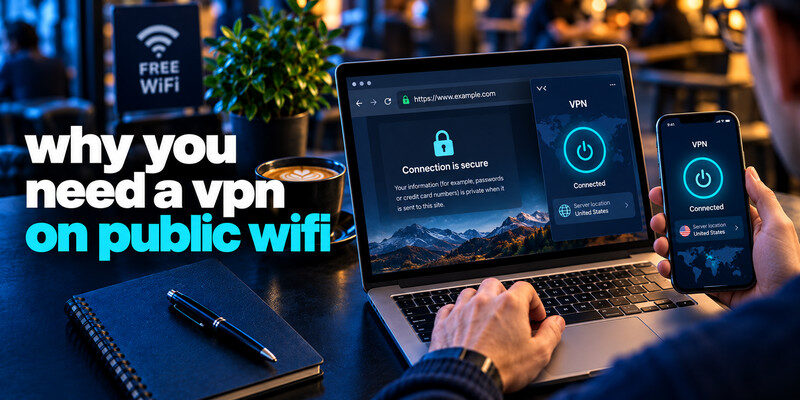
Quick answer: A VPN is worth using on public WiFi when you do not trust the network or want to reduce what its operator can observe. It encrypts traffic between your device and the VPN server and can conceal destination-related information from local observers. However, HTTPS already protects most modern website content, so a VPN is an extra privacy layer—not a universal requirement or a substitute for safe browsing.
Understanding why you need a vpn on public wifi starts with identifying the risks you actually face. A crowded airport, hotel, train station, or cafe network might be perfectly legitimate, poorly configured, or impersonated by an attacker.
This guide explains why you need a vpn on public wifi, when HTTPS is sufficient, and how to stay safer without exaggerated claims.
1. Why Public WiFi Can Put Your Data at Risk
Public wireless networks share a physical environment with people you do not know. Some are open, some use shared passwords, and some support newer wireless encryption. Public does not always mean unencrypted, but network ownership and configuration may be unclear.
Fake hotspots and evil-twin networks
An attacker may create a hotspot with a name resembling an airport or cafe’s official network. A traveler who selects the wrong entry might connect through equipment controlled by that attacker. It could display a deceptive sign-in page or intercept unprotected requests.
Always verify the network name with staff or official signage. Do not treat a familiar-looking name as proof of authenticity. This is one practical reason why you need a vpn on public wifi in unfamiliar places: a functioning VPN limits what a network operator can inspect inside the protected tunnel, even if the network is less trustworthy than expected.
Unencrypted traffic and network metadata
Unencrypted traffic can be intercepted. Modern browsers and apps typically use TLS, but network operators may still observe IP addresses, timing, and traffic volume. The distinction helps explain why you need a vpn on public wifi even when ordinary browsing is encrypted.
A VPN reduces local visibility into routed traffic, though the VPN provider can become a new party with access to some metadata. That trade-off matters when you evaluate why you need a vpn on public wifi instead of assuming it makes every online action anonymous.
What do recent figures actually show?
In June 2026, Kaspersky reported examining 69,473 unique WiFi hotspots across Mexico City, Guadalajara, and Monterrey and finding 17% with weak or no encryption. That result describes sampled hotspots in those three cities; it is not a global rate for all public WiFi.
An August 2026 survey of 1,000 U.S. adults by HighSpeedInternet.com reported that 31.43% of respondents never used a VPN on public WiFi, while 12.02% always used one. This self-reported survey does not establish attack rates.
Together, these examples demonstrate why knowing why you need a vpn on public wifi is useful without claiming that everyone using a hotspot faces the same level of danger.
2. How a VPN Protects You on Public WiFi
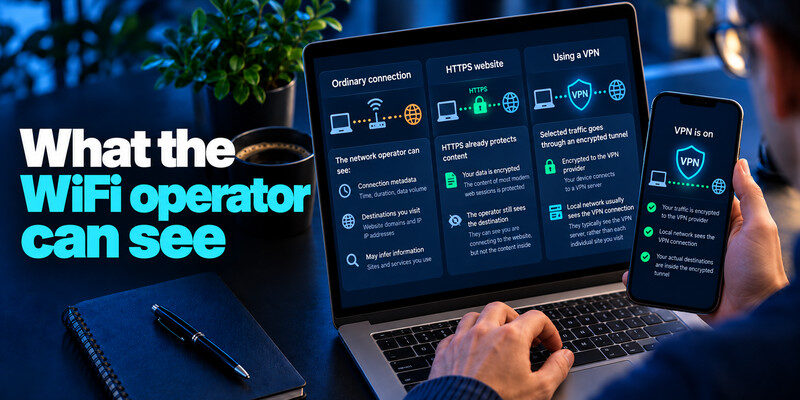
A virtual private network creates an encrypted tunnel from your device to a VPN server. The server then forwards protected traffic onward. That routing helps explain why you need a vpn on public wifi when local visibility concerns you.
What happens when you connect?
- You join a verified WiFi network and open your VPN app.
- Your device establishes an authenticated, encrypted tunnel to a VPN server.
- Covered traffic travels through that tunnel, limiting what the local hotspot can inspect.
- The VPN server forwards requests to websites; replies return through the tunnel.
- Websites generally see the VPN server’s public IP address rather than your original address.
VPN encryption normally ends at the VPN server. Website HTTPS encryption remains a separate layer that protects browser-to-website content. Understanding this boundary is essential to understanding why you need a vpn on public wifi.
What can the hotspot still see?
A hotspot operator can still see your connection, traffic volume, timing, and VPN endpoint. A VPN does not erase everything the network learns about you.
Is VPN encryption strong enough?
Established protocols such as WireGuard and properly configured OpenVPN use modern cryptography. The Electronic Frontier Foundation’s VPN guidance, reviewed in July 2026, recommends assessing protocols and provider trust instead of relying on marketing promises.
For enterprise access, administrators may combine an OpenVPN-based gateway with account verification. A related guide on Google Authenticator and OpenVPN explains a linked authentication topic, although a consumer VPN does not automatically require that setup.
Tunnel security depends on implementation, not an app label. This is another reason why you need a vpn on public wifi should be considered alongside provider reputation.
3. VPN vs HTTPS: Do You Really Need Both?
A technically accurate explanation of why you need a vpn on public wifi must acknowledge a major change: most popular websites already use HTTPS. HTTPS encrypts traffic between a browser and a website, including login details and page content in transit.
The FTC explains that public WiFi is usually safe for ordinary browsing because modern sites use encryption. The EFF likewise says a VPN is not essential for most common public-network threats when HTTPS works.
HTTPS and VPNs protect different paths
| Protection | HTTPS | Typical full-device VPN |
|---|---|---|
| Protects data between | Browser/app and website | Device and VPN server |
| Hides page contents from local WiFi observers | Yes, for properly encrypted connections | Yes, for traffic routed through the tunnel |
| Conceals destination metadata from local network | Not necessarily | Often reduces visibility |
| Changes public IP seen by websites | No | Usually yes |
| Stops phishing or unsafe downloads | No | No |
Use HTTPS regardless of whether a VPN is active. The VPN is an additional layer, not a replacement for a secure website.
A useful 2026 browser statistic
On October 21, 2026, Google announced that Chrome had expanded warnings before insecure HTTP connections to all users by default. Its early rollout figures showed nearly 95% of Chrome desktop users saw no HTTP warnings in a typical week, while fewer than 1% saw three or more. This measures warning exposure, not the exact percentage of all web traffic using HTTPS.
If you mainly use updated apps and HTTPS, a VPN may add less security than advertisements imply. On an unknown hotspot, extra privacy may still be valuable. This is why you need a vpn on public wifi only when your circumstances justify it. That is the nuanced answer to why you need a vpn on public wifi in 2026.
4. When Using a VPN on Public WiFi Matters Most

The strongest case for a VPN is an untrusted network plus a concrete privacy or work requirement.
Airports, hotels, and busy transportation hubs
Venues may operate networks with similar names. If you cannot identify the operator, a reputable VPN is reasonable. That uncertainty is why you need a vpn on public wifi when traveling.
Verify the hotspot before connecting. A VPN cannot make a fake portal trustworthy.
Remote work and confidential services
When handling company data, use an employer-approved VPN or zero-trust access tool if your organization requires it. A personal consumer VPN is not automatically an approved replacement for corporate remote access. Follow company rules about device health, authentication, and permitted networks.
For remote workers, why you need a vpn on public wifi is often more about meeting a specific business security policy than an assumption that all HTTPS apps are exposed.
Sensitive accounts and financial activity
Banking apps generally encrypt connections, so using them on public WiFi is not inherently unsafe. For suspicious networks, prefer your cellular hotspot.
Use multifactor authentication on important accounts, and be wary of unexpected sign-in screens. A VPN will not stop you from entering credentials into a phishing page.
When you may not need a VPN
For reading news, checking directions, or browsing reputable HTTPS sites on a verified network, a VPN is optional rather than universally necessary. Keep your browser updated and heed certificate or insecure-connection warnings.
This distinction answers why you need a vpn on public wifi honestly: you might benefit from extra confidentiality, but the underlying threat and your activity determine whether it is worth enabling.
5. How to Choose a Trustworthy Public WiFi VPN
Selecting a vpn for public wifi security should start with accountability, not advertised “military-grade” slogans. You must trust the VPN provider.
Examine privacy practices
Read the provider’s logging policy. Look for clear explanations of retained connection information, DNS handling, account data, and government requests. Audits help, but do not guarantee future behavior.
The EFF’s VPN guidance cautions that a commercial VPN can itself record information about connections. Avoid unknown free apps that are unclear about how they fund their service.
Check practical security features
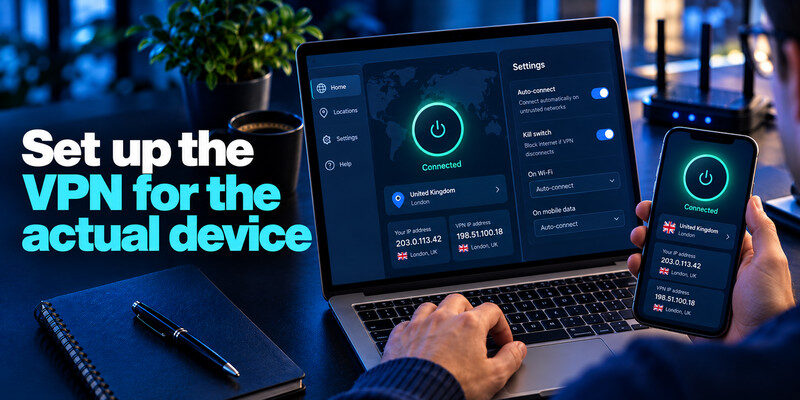
Look for a modern protocol, a reliable kill switch, DNS leak protection, and support for your operating system. Auto-connect on unfamiliar networks can reduce mistakes.
Test these functions. Split tunneling can leave apps unprotected, another reason why you need a vpn on public wifi involves correct setup.
Consider cost without assuming paid means safer
A reputable free tier may be sufficient for occasional browsing; paid plans often improve server availability, performance, and simultaneous-device allowances. Payment alone does not prove that the company handles information responsibly.
If someone asks why you need a vpn on public wifi, choosing a trustworthy provider is part of the answer: sending traffic through an unreliable VPN can create a new risk rather than solving the original one.
6. How to Stay Safe on Public WiFi: A Practical Checklist
You can improve security even without installing a VPN. Use these steps before, during, and after joining a public network.
Before connecting
Confirm the official network name with venue staff or a reliable posted source. Disable automatic joining of unfamiliar hotspots, keep the device updated, and turn off file sharing or network discovery when you do not need them.
Prefer a personal hotspot when handling especially sensitive work or when you cannot verify the public network. Cellular service avoids joining an unknown shared WiFi hotspot.
After connecting
Open the VPN if your risk assessment or workplace policy calls for it. Verify that it shows a successful connection and that your intended apps are covered. Leave browser HTTPS protections active and never click through unexpected certificate warnings.
If a captive portal requires an initial network sign-in, connect through the official portal first and then establish the VPN. Never submit unrelated passwords to a hotspot login.
While browsing
Use unique passwords and MFA. For account protection, read what an authenticator app is and SMS vs authenticator app.
A VPN protects a network path, whereas authentication helps defend accounts. Learning how to generate a strong password adds another layer that remains useful at home or while traveling.
When disconnecting
Forget networks you do not plan to revisit, especially ones with generic names. Stop local sharing services and remove unexpected network profiles if you accidentally installed them.
The checklist makes why you need a vpn on public wifi part of a broader safety habit rather than a single checkbox. The strongest setup is layered: verified network, HTTPS, updates, account protection, and a VPN when useful.
7. What a VPN Cannot Protect You From
A VPN can help keep routed traffic private from a local network, but it cannot make a compromised website trustworthy or an infected device clean. Knowing these limits is central to understanding why you need a vpn on public wifi.
Phishing and deceptive portals
Attackers can operate HTTPS websites, too. A certificate confirms encryption to a domain; it does not prove that the business behind the domain is honest. If a fake cafe page asks for your banking password, the VPN cannot tell you that the request is fraudulent.
Malware and malicious downloads
Files downloaded over an encrypted tunnel may still contain malware. Use reputable download sources, keep your operating system patched, and avoid unexpected browser-extension or certificate-installation prompts.
Account tracking and location signals
Websites can identify signed-in users despite their VPN IP address. Cookies, browser fingerprinting, app permissions, and GPS can reveal additional information. A VPN does not prevent all tracking.
Incomplete routing and connection failures
Split tunneling, a disabled kill switch, DNS leaks, and VPN disconnects can expose information outside the intended path. A network may also block VPN connections. Test how the application behaves rather than trusting a connected badge alone.
Think of why you need a vpn on public wifi as one component of a security plan. The VPN may reduce local exposure; updates and MFA address different risks.
8. Public WiFi VPN FAQs and Final Verdict
Is it safe to use public WiFi without a VPN?
Often, yes, for ordinary browsing on secure HTTPS websites. The FTC says modern website encryption has significantly improved hotspot safety. Use extra caution on unknown networks, heed browser warnings, and consider a VPN when you want additional network privacy.
Can someone steal my passwords on public WiFi?
Attackers may steal passwords through phishing, compromised devices, or truly unencrypted connections. Proper HTTPS prevents a local observer from simply reading passwords transmitted inside its encrypted session. A VPN does not prevent phishing or password reuse.
Does a VPN protect me from a fake WiFi hotspot?
It can protect the traffic successfully routed inside the encrypted tunnel after connection, but it cannot authenticate a venue’s network name or stop a user from submitting information directly to a fake login form. Verify the hotspot before joining.
Is a free VPN enough for public WiFi?
A credible free VPN can provide useful encryption. Check its privacy policy, security protocol, data allowance, and kill switch. An unknown free VPN may create more privacy concerns than it resolves.
How to protect your online privacy 2026: What else matters?
Readers searching how to protect your online privacy 2026 should start with HTTPS, updated software, unique passwords, phishing-resistant MFA where available, and careful WiFi selection. A VPN adds optional network-level privacy but cannot replace these measures.
Should I always keep my VPN on while traveling?
It can be convenient, particularly when changing between unfamiliar networks, but it is not mandatory for everyone. Verify whether banking apps, corporate services, and local devices work as expected. Automatic protection on untrusted networks is often a practical compromise.
Does a VPN hide everything I do online?
No. Local operators may still see that you connect to a VPN, and the VPN provider becomes a party you must trust. Websites can recognize you after login. A VPN reduces some network visibility; it does not eliminate all records or metadata.
Final Verdict: Why You Need a VPN on Public WiFi
The best reason to use a VPN on public WiFi is to add privacy when the network operator is unknown or untrusted. It encrypts the route to the VPN server and can reduce what the local hotspot learns about traffic inside that tunnel. Yet HTTPS already protects most modern web content, so a VPN is an optional extra for many ordinary browsing situations.
Ultimately, why you need a vpn on public wifi depends on your activity, the information you protect, and whom you trust. Verify the hotspot, keep HTTPS enabled, update your software, use multifactor authentication, and select a reputable VPN if that additional protection fits your needs.
