
Where to Find Steam Mobile Authenticator Code (Steam Guard Steps)
Published August 17, 2026 · Updated October 5, 2026

Where to find Steam Mobile Authenticator code? According to Steam Support, you open the Steam Mobile App, go to the Steam Guard page and select Show Steam Guard code. A 5-character code appears and refreshes every 30 seconds. Seeing no code, using a new phone, or have no phone at all? The fixes are below, in order.
Quick answer: where to find Steam Mobile Authenticator code
- Open the Steam Mobile App and sign in.
- Tap the Steam Guard shield at the bottom of the screen.
- Have several accounts? Pick the right one from the drop-down.
- Tap Show Steam Guard code.
- Type the 5-character code on the login screen before it refreshes.
1. Where Can You Find the Steam Mobile Authenticator Code?
Where to find Steam Mobile Authenticator code comes down to one screen: the Steam Guard page inside the official Steam Mobile App. The code lives only on the phone where the authenticator was activated.
How to Find Steam Mobile Authenticator Code When Signing In
- Enter your account name and password on the Steam login screen (PC, browser or another phone).
- When Steam asks for a Steam Guard code, open Steam Mobile on your phone.
- Go to Steam Guard > Show Steam Guard code.
- Type the code before it refreshes. If it changes while you type, use the new one.
You can also scan the QR code Steam shows at sign-in, or approve the request on your phone, instead of typing.
Where to Find Code From Steam Mobile App With Several Accounts?
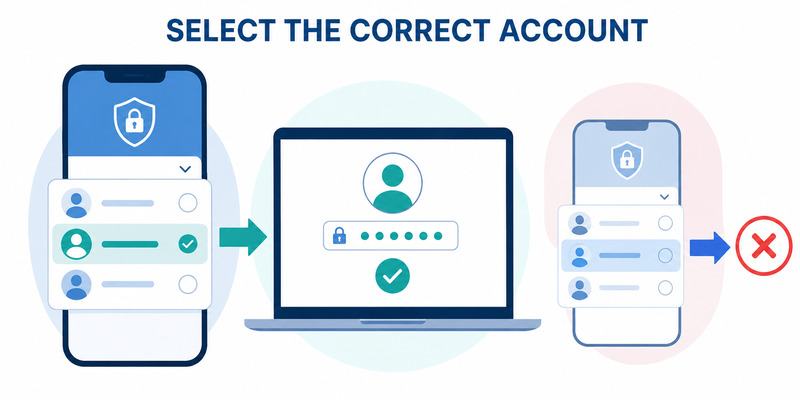
One Steam Mobile App can hold several accounts. On the Steam Guard tab, use the drop-down at the top to choose the account you are signing in to. A valid code from account A will not log you in to account B.
What Does the Steam Mobile Authenticator Code Look Like?
It is 5 letters and numbers, valid for about 30 seconds and usable once. It is not your password, an SMS code, an email code, or your recovery code (the recovery code starts with the letter R).
Juggling 2FA codes for more than Steam? Steam Guard codes stay in the Steam app, but your email, Epic and other logins need codes too. Keep them in one place with Authenticator App by Begamob: free, no sign-up, biometric lock and encrypted backup.
Secure your accounts with fast, reliable two-factor authentication. Download now and protect your login in seconds.Download Authenticator App
How to Get Steam Mobile Authenticator Set Up
Where to find Steam Mobile Authenticator code has no answer until the authenticator is active. If the Steam Guard tab shows Add authenticator, here is how to get Steam Mobile Authenticator running:
- Install the official Steam Mobile App and sign in. You land on the Steam Guard tab.
- Tap Add authenticator.
- Enter the confirmation code Steam texts to your phone number. No number? Steam says you can still add the authenticator.
- Write down the recovery code Steam shows and store it offline. It lets you recover the account yourself if you lose the phone. (Steam Support setup guide)
Once active, the code is generated on the phone, so you can usually view it without mobile data. The device you sign in on still needs internet.
Set up in seconds, tap the banner:

💡 Discover Helpful Guides: Steam App Authenticator Not Working: Complete Fixes
Why Can’t I Find My Steam Guard Code in the Steam Mobile App?
If you still can’t see where to find code from Steam Mobile App, one of these usually explains it:
- Authenticator not enabled: the app is installed but Add authenticator was never completed.
- Wrong account selected: switch accounts in the drop-down.
- Moved to another phone: the old phone is no longer the active authenticator. Check the new one.
- Authenticator removed: set it up again or follow Steam’s recovery process.
Code shows but Steam rejects it? Wait for the next code, confirm it is the same account, set the phone’s date, time and time zone to automatic, then restart and update the Steam app. More fixes: Steam App Authenticator Not Working.
How to Get Steam Authenticator Code Without Phone?
Steam generates the code only inside the Steam Mobile App, so you cannot read a live code without the phone that holds the authenticator. Here is how to get Steam authenticator code access back without it:
- Old phone still works: install Steam on the new phone, sign in and choose Move Authenticator.
- Old phone lost, number still yours: on the code prompt choose “Please help, I no longer have access to my Mobile Authenticator codes” and confirm with the SMS Steam sends.
- You saved the recovery code: use it in Steam’s recovery flow to remove the authenticator, then set it up again.
- None of the above: Steam says you will need Steam Support. Open a request at help.steampowered.com and be ready to prove account ownership.
Details: Steam Authenticator Recovery Code guide.
How to Keep Your Steam Authenticator Code Safe
Knowing where to find Steam Mobile Authenticator code also means knowing who must never get it.
- Steam Support and Valve staff never ask for your password or authenticator code. Never share an SMS recovery or removal code either.
- Check the domain before you sign in. Use the official Steam client or a saved Steam link.
- Skip “desktop authenticator” tools and anyone offering to retrieve a code for money.
Want more step-by-step 2FA guides? Begamob’s Authenticator App blog covers setup, backup and recovery for Steam, Google, Microsoft and more. Explore Begamob Authenticator →
Steam Mobile Authenticator Code FAQs
What if I lost my Steam Mobile authenticator?
You can’t read the code without it. If you still own the phone number or saved the recovery code, use “Please help, I no longer have access to my Mobile Authenticator codes”. Otherwise contact Steam Support.
How do I get a 7-digit Steam backup code?
Steam doesn’t label any Steam Guard code a “7-digit backup code”. What Steam does provide: a recovery code (starts with R, shown once at setup), an SMS code sent to your registered number to move or remove the authenticator, and an email code when no mobile authenticator is active. Only trust codes from the official Steam app or site.
I can’t access my Steam Mobile Authenticator. What should I do?
Try Move Authenticator if the old phone works, the SMS option if you still have the number, the recovery code if you saved it, and Steam Support if you have none of them.
How do I get my Steam authenticator code without a phone?
You can’t view the live code without the phone, but you can restore access with Move Authenticator, the SMS option, your recovery code or Steam Support. See how to get Steam authenticator code without phone.
Why isn’t my Steam authenticator code showing?
The authenticator may not be enabled, you may be on the wrong account, or it may have been moved or removed.
Why is my Steam Guard code not working?
It may have expired, belong to another account, or your phone’s clock may be off.
Can I find my Steam Guard code on PC?
No. The code is generated in the Steam Mobile App. On PC, sign in, then read the code from your phone.
Is my recovery code the same as my Steam Guard code?
No. The recovery code is a one-time rescue code. The Steam Guard code is the 5-character code that changes every 30 seconds.
In short: where to find Steam Mobile Authenticator code is Steam Mobile App > Steam Guard > Show Steam Guard code. No code, new phone or no phone? Use the steps above, and keep your recovery code safe.
Download Authenticator App
Secure your accounts with fast, reliable two-factor authentication. Download now and protect your login in seconds.
