
TikTok Two Factor Authentication: How to Turn It On, Turn It Off and Fix Verification Codes
Published September 9, 2026 · Updated October 5, 2026
Yes, TikTok has two factor authentication, and the app calls it 2-step verification. To turn on TikTok two factor authentication, open Profile → Menu → Settings and privacy → Security and permissions → 2-step verification, choose at least two verification methods (SMS, email or an authenticator app), then tap Turn on.
This guide covers two factor authentication for TikTok from start to finish: how to set it up, how to turn it off, why TikTok keeps sending verification codes, and what to do when a code stops working.
Quick answers
- Does TikTok have two factor authentication? Yes, under the name “2-step verification”.
- Does TikTok have 2 step verification? Yes. It is the same feature as 2FA.
- Best setup: authenticator app + email.
- How to turn off 2 step verification on TikTok: Settings and privacy → Security → 2-step verification → Turn off → enter your password.
- Why do I keep getting TikTok verification codes? TikTok sees a new or unfamiliar login, or someone is trying to sign in.
1. Does TikTok Have Two Factor Authentication?
Yes. TikTok two factor authentication is built into the app, but TikTok labels it 2-step verification. When you sign in from a new or unfamiliar device, TikTok asks for a second proof of identity, so a stolen password alone is not enough to get into your account.
Does TikTok Have 2 Step Verification, or Is It Different From 2FA?
For everyday use, they are the same. People search for “TikTok two factor authentication”, “2FA” or “2SV”, but the menu only says 2-step verification. If you cannot find a button called “two-factor authentication”, look for that name instead.
Why turn on TikTok two factor authentication?
- Passwords leak through phishing, reused logins and data breaches.
- A hijacked account can expose your DMs, drafts, audience, Shop or ad access.
- With 2-step verification on, an attacker also needs one of your verification methods to log in from a new device.
2. How to Turn On Two Factor Authentication for TikTok
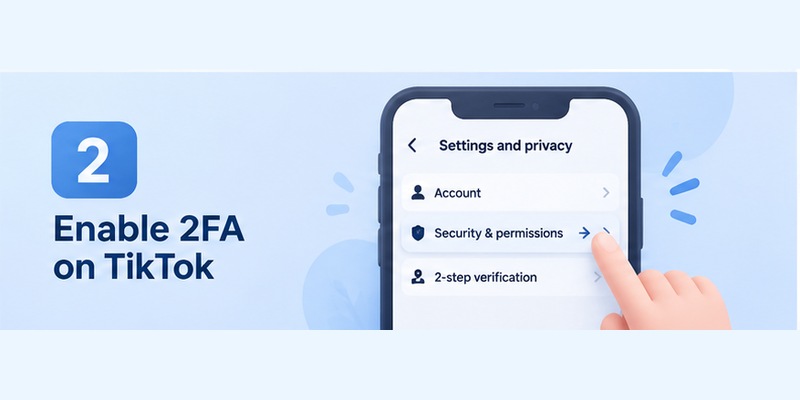
You can set up two factor authentication for TikTok only in the mobile app, not in a desktop browser. It takes about two minutes:
- Open TikTok and tap Profile.
- Tap the menu icon (three lines) at the top right.
- Tap Settings and privacy.
- Tap Security and permissions. On some app versions this is just Security.
- Tap 2-step verification.
- Select at least two methods, then tap Turn on and enter the code TikTok sends you for each method.
When both methods are verified, TikTok two factor authentication is active. Go back to the 2-step verification page to confirm.
Which TikTok 2-step verification methods should you choose?
- Authenticator app (recommended): codes are generated on your phone, so there is no SMS to intercept.
- Email: a good second method, as long as your email account is also protected by 2FA.
- Phone (SMS): convenient, but it depends on your carrier and SIM. Pair it with another method.
- Password: shown as an option on some accounts and app versions.
The simplest strong combination is authenticator + email. Available options can vary by account and app version, so use what your 2-step verification screen shows.
Using TikTok Shop or TikTok Ads Manager? Business accounts have their own page: User settings → Account Security, with SMS, email or Google Authenticator as methods.
Skip the SMS wait. Generate your TikTok codes offline with Begamob Authenticator: free, no sign-up, ready in under a minute. Download the app →
Secure your accounts with fast, reliable two-factor authentication. Download now and protect your login in seconds.Download Authenticator App
3. How to Set Up an Authenticator App for TikTok Two Factor Authentication
An authenticator is the most reliable way to run TikTok two factor authentication, because codes keep working without signal. You can use Google Authenticator, Microsoft Authenticator or any other two factor authentication app.
- Install an authenticator app from the official app store.
- In TikTok, go to Settings and privacy → Security and permissions → 2-step verification and select Authenticator.
- TikTok shows a QR code or setup key. Scan it with your authenticator, or enter the key manually.
- Your app now shows a 6-digit TikTok code that refreshes every 30 seconds. Type the current code into TikTok.
- Verify your second method (for example email) and tap Turn on.
Protect the setup key. The QR code and key work like a password for your TikTok two factor authentication. Never send them to anyone or leave screenshots in a shared folder. Need a step-by-step for a specific app? See our TikTok authenticator guide.
Download Begamob Authenticator: get a fresh TikTok code every 30 seconds
4. How to Turn Off 2 Step Verification on TikTok
If you really need to switch off TikTok two factor authentication:
- Go to Profile → Menu → Settings and privacy → Security.
- Tap 2-step verification.
- Tap Turn off, then confirm in the pop-up.
- Enter your password and tap Next.
TikTok then shows that 2-step verification is turned off. You can turn it back on at any time.
Before you turn it off: if you are only doing this because codes are not arriving or not working, fix the method instead (see the troubleshooting section below). Leaving your account with a password only makes it much easier to hijack.
5. Why Do I Keep Getting TikTok Verification Codes?
A TikTok verification code is sent whenever TikTok wants to confirm that a login is really you. With TikTok two factor authentication on, the most common reasons are:
- You signed in on a new phone, tablet or browser.
- You reinstalled TikTok, cleared app data or logged out.
- You logged in from a new location or through a VPN.
- You removed a device from your trusted devices.
- Someone else is trying to log in with your password.
If you did none of these, treat it as a warning: do not share the code, change your password, open Settings and privacy → Security and permissions → Manage devices, and remove any device you do not recognize.
Where does a TikTok verification code come from?
It depends on the methods you picked for TikTok two factor authentication: an SMS to your phone number, an email to your linked address (check spam and promotions), or your authenticator app, which shows a new 6-digit code every 30 seconds.
6. TikTok Two Factor Authentication Not Working? Common Fixes
Find which method is failing before you change any settings.
- Authenticator code rejected: wait for the next code and enter it right away. Make sure you chose the right TikTok entry, and set your phone’s date and time to automatic, since mismatched clocks make codes invalid.
- SMS never arrives: check the number, your signal and SMS filters, restart the phone, and avoid requesting codes repeatedly. Try your other method.
- Email code missing: check spam, junk and promotions, and make sure you are looking at the same address linked to TikTok.
- Authenticator vanished after changing phones: log in with your email or SMS method, then add TikTok to the authenticator on the new phone. Before switching phones, use your authenticator’s backup or transfer feature, and test it before wiping the old device.
- Looking for TikTok backup codes: personal TikTok accounts do not appear to offer a standard downloadable backup-code list. Rely on two working methods plus account recovery instead.
7. TikTok Two Factor Authentication FAQ
How to recover a TikTok account without 2-step verification?
First try every method still linked to the account (email, phone or authenticator). If none works, use TikTok’s account recovery options from the login screen, including friend verification where it is offered, or contact TikTok Support. Do not keep guessing codes, because repeated attempts can lock you out.
I have a 2-step verification problem on TikTok. What should I do?
Identify the failing method: authenticator, SMS or email. Wait for a fresh code, check your phone’s time settings, check spam folders, then switch to another linked method. If you suspect someone changed your settings, change your password and review Manage devices.
What if I lost my two-step verification code?
Request a new one: a TikTok code from SMS or email is valid only for a short time, and authenticator codes refresh every 30 seconds. If you lost the phone with your authenticator, sign in with your email or SMS method, then reconnect the authenticator on the new device.
Where can I find the 6-digit verification code for TikTok?
Check where you set up TikTok two factor authentication: your SMS inbox, your email (including spam), or the authenticator app, where the 6-digit TikTok code refreshes every 30 seconds.
Can I use TikTok two factor authentication without a phone number?
Usually yes. TikTok requires at least two methods, and email plus an authenticator app is a common pair. Options can vary by account, so check your 2-step verification screen.
Can someone still hack my TikTok account with 2FA on?
It is much harder, but not impossible. Phishing pages that capture your password and code, a compromised email, or an unlocked phone can still lead to a takeover. Use a unique password, secure your email and never share a verification code.
Final Thoughts: Is TikTok Two Factor Authentication Worth Turning On?
Yes. Does TikTok have two factor authentication? It does, and it takes about two minutes to turn on. Choose an authenticator plus email, keep your recovery details current, review Manage devices from time to time, and never hand a code to anyone.
For most users, combining an authenticator with another reliable method provides a practical balance of security and recovery. TikTok’s current account-security system also gives you tools for reviewing devices, checking security activity, adding a passkey, and recovering access when normal login methods are unavailable.
A password protects your account only while that password remains secret. TikTok two factor authentication adds another barrier when the password alone is no longer enough.
Download Authenticator App
Secure your accounts with fast, reliable two-factor authentication. Download now and protect your login in seconds.
